www.vivotek.com
T: 886-2-82455282
F: 886-2-82455532
Send Snapshots When Motion is Detected
If no external sensor is available, the Administrator can use the built-in motion
detection to monitor any movement and send snapshots via emails for security
check.
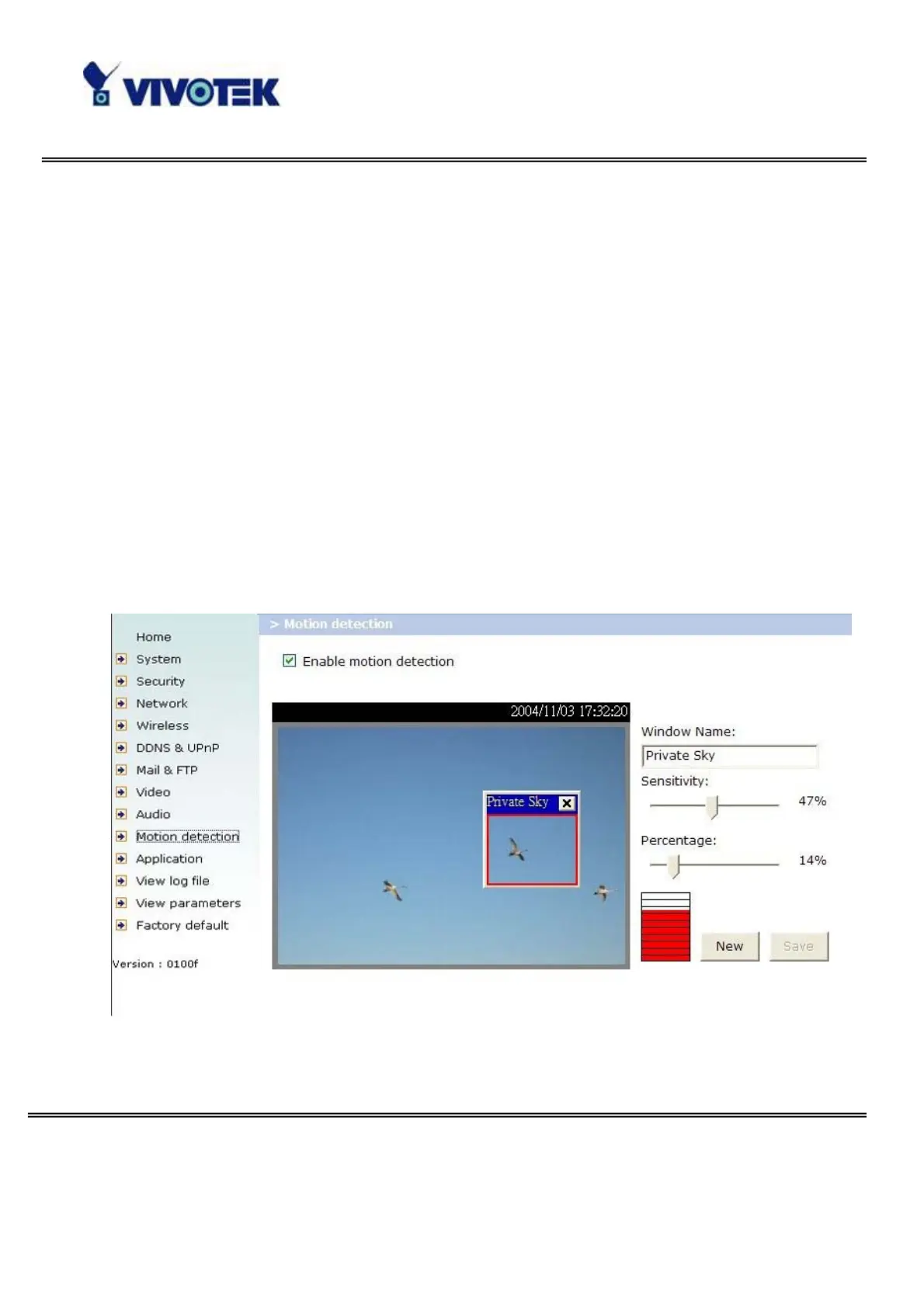
6. Click on “Motion detection” in the left column,
7. Check “Enable motion detection”,
8. Click on “New” to have a new window to monitor video,
9. Type in a name to identify the new window,
10. Use the mouse to click, hold, and drag the window corner to resize or the title bar
to move,
11. Fine-tune using the “Sensitivity” and “Percentage” fields to best suit the camera’s
environment. Higher ”Sensitivity” detects the slighter motion. Higher “Percentage”
discriminates smaller objects,
12. Clicking on “Save” enables the activity display. Green means the motion in the
window is under the watermark set by the Administrator and red means it is over the
watermark,
13. Click on “Application” in the left column,
14. Check on the window name set in step 9,



 To Next Page