www.vivotek.com
T: 886-2-82455282
F: 886-2-82455532
Appendix
A. Troubleshooting
Status LED
After powering up, the Network Camera performs a self-diagnostic to detect any
hardware defects. The following table lists the LED patterns in general. In case of any
fatal error, the LED will blink in a pattern other than those below.
Condition LED color
During self-diagnostic after power on blink between red and green
No network Red is ON
Getting IP Green is flash every 0.5 sec
Talk only / mute Green is flash every 1 sec
Listen only / Full duplex / half duplex Green is flash every 0.5 sec
Reset and Restore
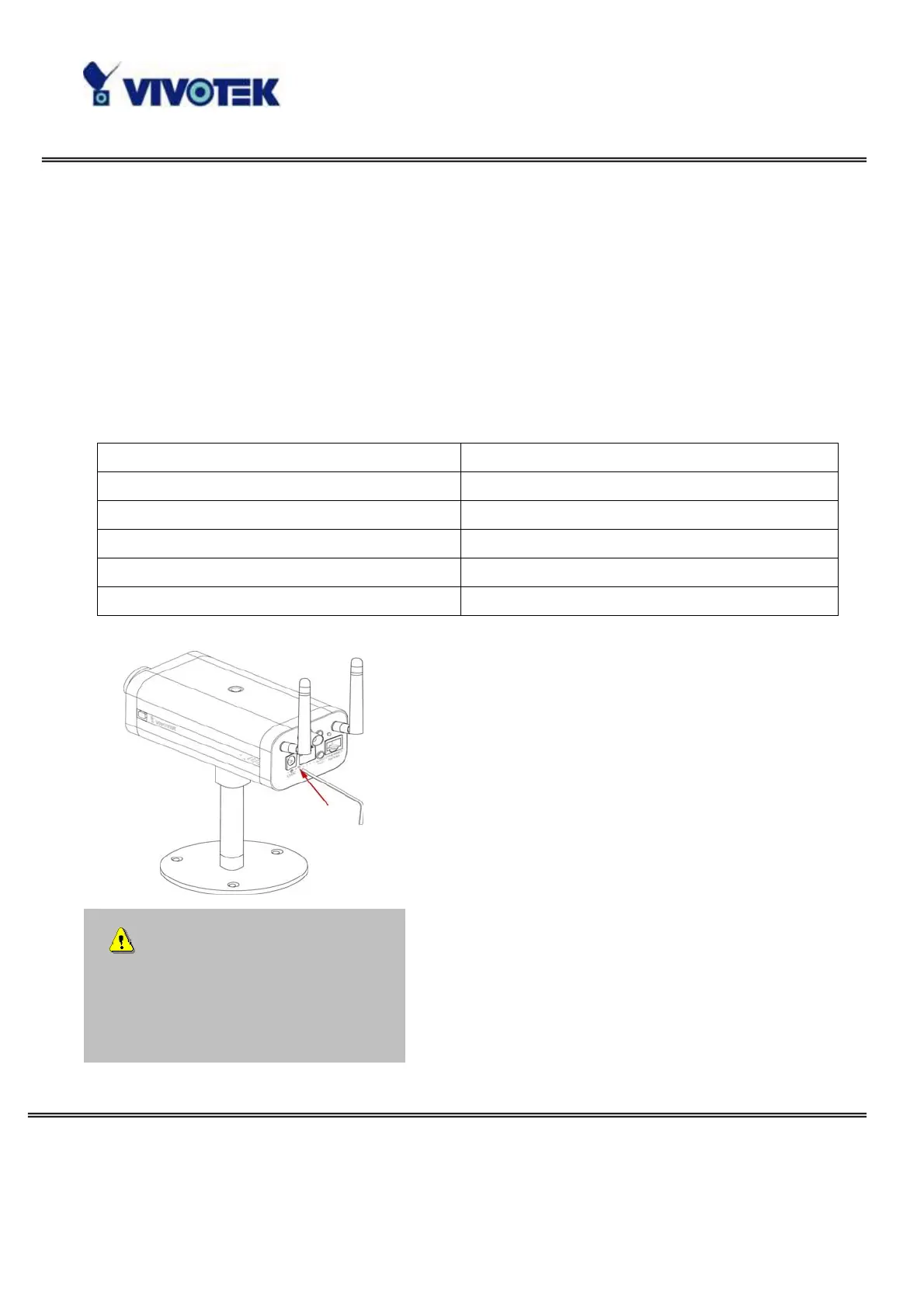
At the left side of the camera there is a button
hidden in the pinhole as shown in the picture. It is
used to reset the system or restore the factory
default settings. Sometimes resetting the system
sets the system back to normal state. If the system
problems remain after reset, restore the factory
settings and install again.
RESET: Poke the wrench to click on the button.
RESTORE: 1. Poke the wrench to press on the
button continuously.
2. Wait for self-diagnostic until the LED turns
orange.
3. Withdraw the wrench.
Restoring the factory defaults
will erase any previous settings.
Reset or restore the system after
power on.



 To Next Page