Software Installation
Installation Wizard 2 (IW2), free-bundled software included on the product CD, helps you set up
your Network Camera on the LAN�
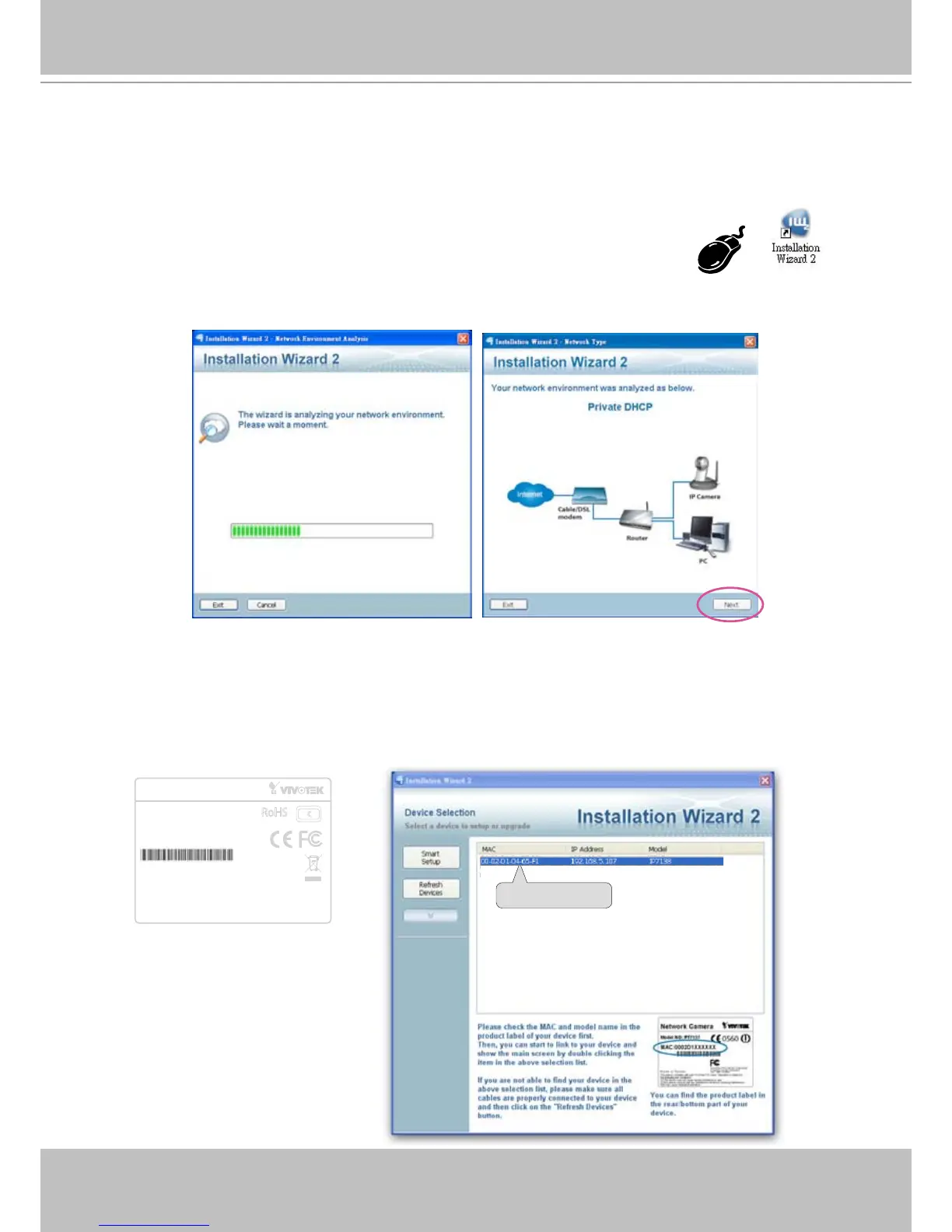
1� Install IW2 under the Software Utility directory from the software CD�
Double click the IW2 shortcut on your desktop to launch the program�
2� The program will conduct an analysis of your network environment�
After your network environment is analyzed, please click Next to continue the program�
3� The program will search for all VIVOTEK network devices on the same LAN�
4� After searching, the main installer window will pop up� Click on the MAC and model name
which matches the product label on your device to connect to the Network Camera via
Internet Explorer�
Network Camera
Model No: IP7138
Made in Taiwan
This device complies with part 15 of the FCC rules. Operation is subject to
the following two conditions:
(1)This device may not cause harmful interference, and
(2) this device must accept any interference received, including interference
that may cause undesired operation.
Pat. 6,930,709
RoHS
V I
MAC:0002D10465F1



 To Next Page