4
2
E190VA / E220VA / E260VA
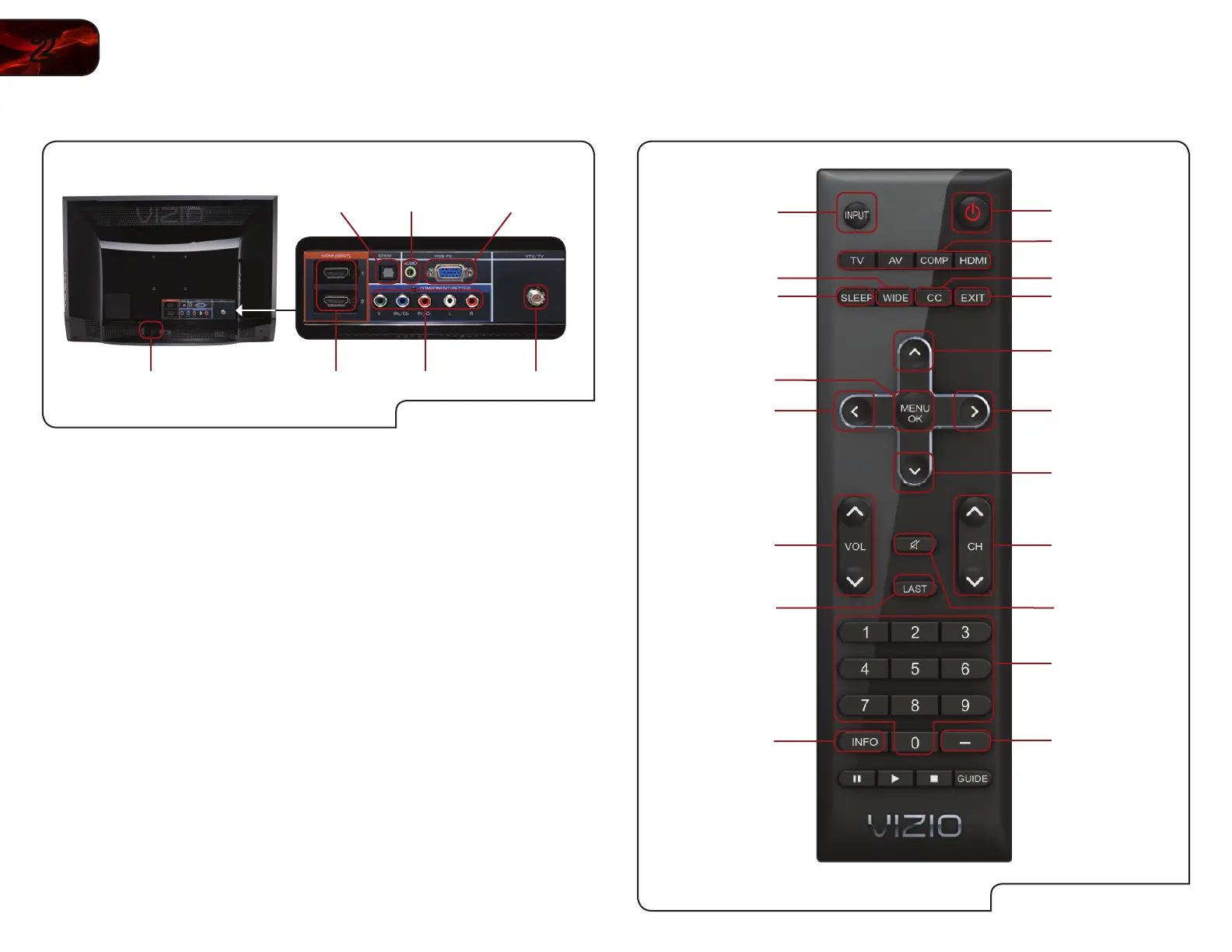
Rear Panel
Rear Panel
AC IN HDMI (1,2) Component Cable/Antenna
RGBAudioOptical
Optical: Connect to audio device (VIZIO sound bar, home theater
system).
Audio: Connect 1/8” mini stereo connector from computer.
RGB: Connect RGB cable from computer.
AC IN: Connect the included Power Cable here. Connect the other
end of the cable to an electrical outlet.
HDMI (1,2): Connect external device (Blu-Ray/DVD player, game con-
sole, etc).
Component: Connect component video/audio devices.
Cable/Antenna: Connect coaxial cable for external antenna or cable TV.
Remote Control
VR10 Remote Control
Power/Standby
Input (Specific)
Closed Caption (CC)
Exit
Arrow Up
Arrow Right
Arrow Down
Channel
Up/Down
Mute
Number Pad
Info
Last
Volume Up/Down
Arrow Left
Menu/OK
Sleep
Wide
Input
Dash


 To Next Page