VIZIO M470NV/M550NV User Manual
18
www.VIZIO.com
Chapter 4 Getting Started
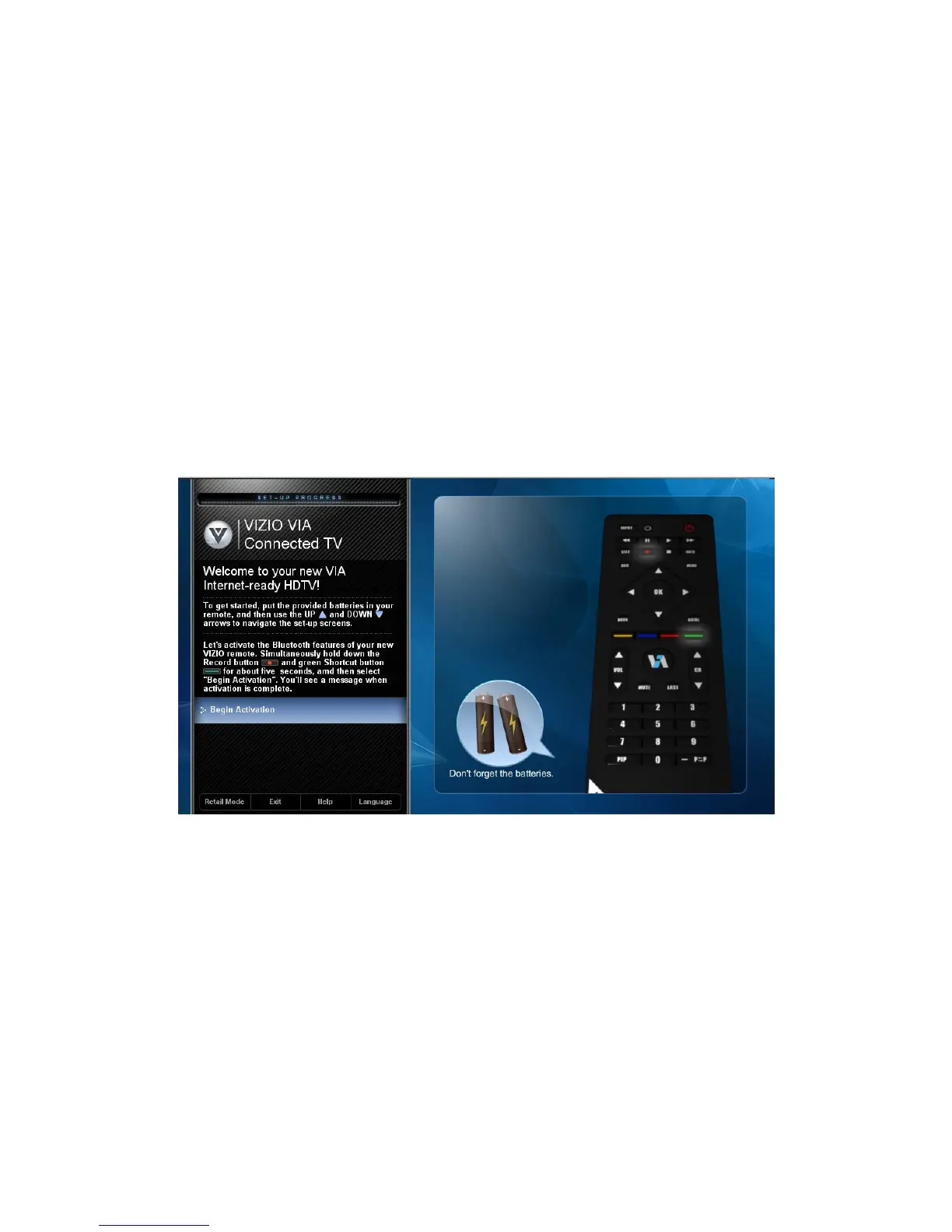
Your VIA-enabled HDTV has a built-in Setup App that plays when you turn on your TV for the first time.
Follow the on-screen directions to easily setup your new HDTV.
1. Insert batteries into the remote control.
2. Connect the power cord to the power cord connector on your HDTV, and then plug the power
cord into an AC wall socket.
3. Gather the devices your want to connect to your HDTV. Don’t connect them yet. We will help you
do that in the Setup App.
4. Turn on your TV. The Setup App will automatically play and guide your thru the initial setup of
your HDTV. Use the arrow and OK buttons to navigate through the Setup App. During the setup
process you will:
Activate your new remote control for Bluetooth
Connect to the Internet
Add your TV channels (unless you have a cable/satellite set-top box)
Connect your devices and set up your remote to control them


 To Next Page
 Loading...