3
CONNECT EQUIPMENT(CONTINUED)
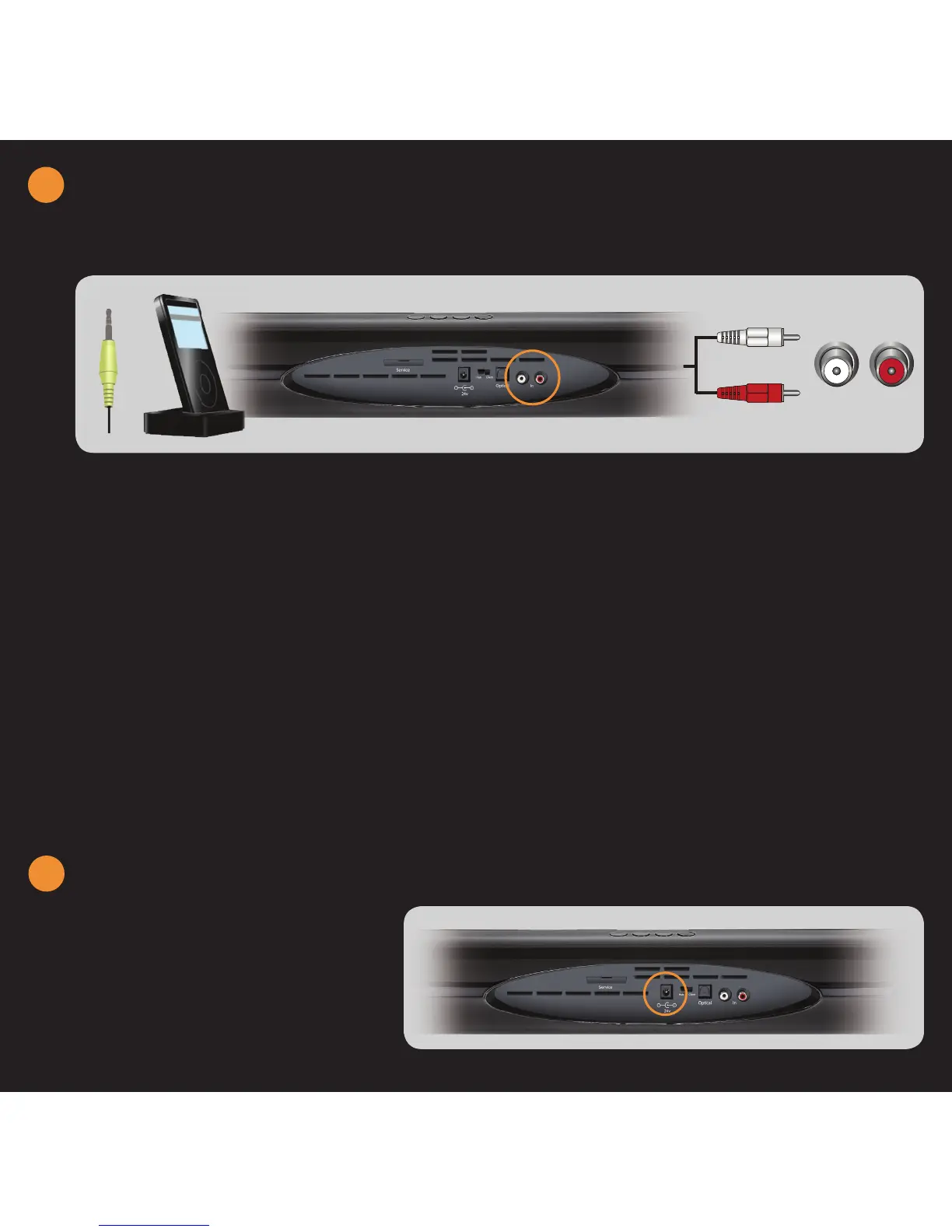
CONNECTING AN IPOD DOCK (NOT INCLUDED)
1. Turn off power to the Sound Bar and the MP3 Player.
2. Connect one end of the audio cable to the analog
audio output on the MP3 player docking unit.
3. Connect the other end of the audio cable (white and
red connectors) to the IN jacks on the Sound Bar.
1. Connect one end of the AC adapter
into the 24V DC jack on the back of
the Sound Bar.
2. Plug the other end into a wall outlet.
4. Turn on the power to the Sound Bar and MP3 Player.
5. Select the associated input by pressing INPUT on the
top of the Sound Bar or pressing IN on the remote
control.
NOTES:
• Most MP3 players commonly use a 1/8” Stereo Mini-Jack. In
this case, use a 1/8” stereo mini-jack-to- RCA (AV) cable (sold
separately).
• Refer to your MP3 Player user manual for more information
about the audio output settings and connections of the product.
CAUTION: Do not connect the MP3 Player headphone output directly
to the Sound Bar. This can result in damage to the devices.
L R
4
CONNECT POWER - SOUNDBAR
3


 To Next Page