2
3
CONNECT EQUIPMENT
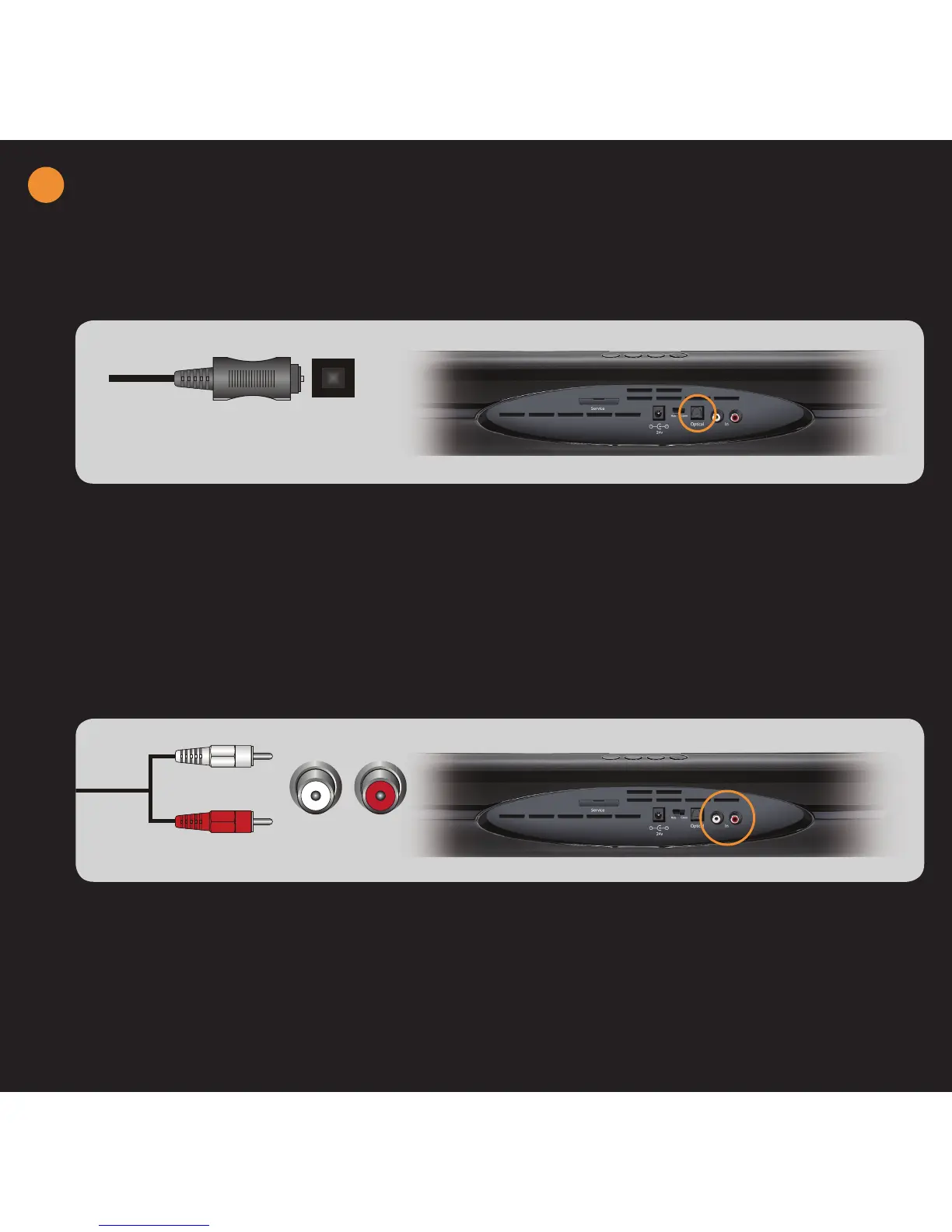
DIGITAL CONNECTION - BEST QUALITY
ANALOG CONNECTION - GOOD QUALITY
For best performance, use the OPTICAL jack on your Sound Bar if your TV, Set-top Box, DVD Player,
Home Theater System, etc. has an Optical digital audio output.
OPTICAL (S/PDIF)
1. Turn off power to the Sound Bar and the device.
2. Connect one end of the Optical (S/PDIF) cable (sold
separately) to the digital audio output on the device.
3. Connect the other end of the Optical (S/PDIF) cable to
the OPTICAL jack on the Sound Bar.
4. Turn on power to the Sound Bar and the device.
5. Select the optical input by pressing INPUT on the top
of the Sound Bar or pressing OPTICAL on the remote
control.
PLEASE NOTE: If there is no sound, check the audio/sound output on
the device. If the device is outputting in DTS, please change to PCM.
1. Turn off power to the Sound Bar and the device.
2. Connect one end of the audio cable (white and red
connectors) to the analog audio output on the device.
3. Connect the other end of the audio cable (white and
red connectors) to the IN jacks on the Sound Bar.
4. Turn on power to the Sound Bar and the device.
5. Select the associated input by pressing INPUT on the
top of the Sound Bar or pressing IN on the remote
control.
L R


 To Next Page