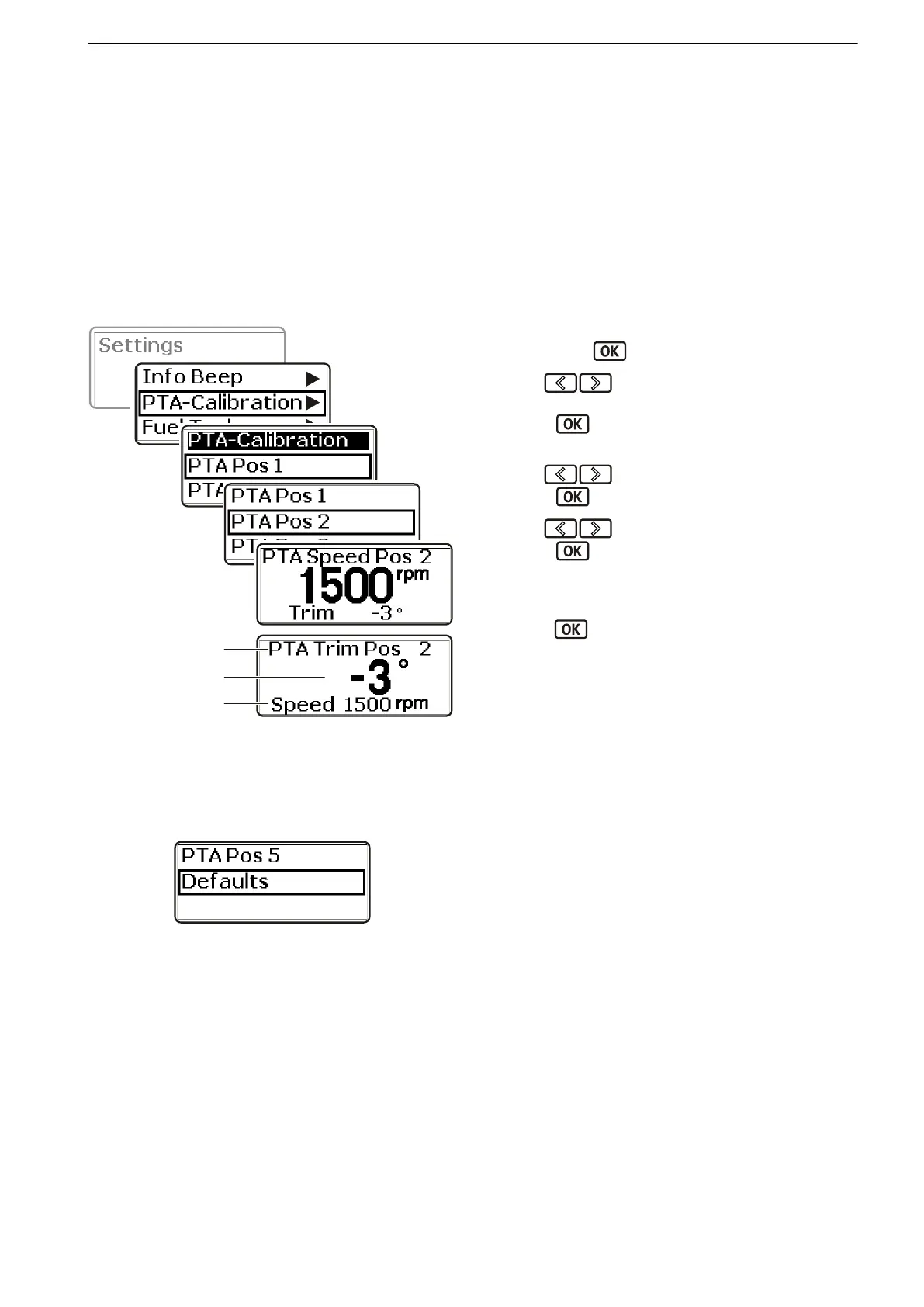
PTA Calibration
PTA (Power Trim Assistant) automatically adjusts the
trim angle
to boat speed. The system has a basic set-
ting, but it is possible to set five different angles for five
different speeds.
On boats with more than one station and with several
displays it is enough to do the calibration on one dis-
play for it to be shown at all stations and on all displays.
For installations with several engines the calibration
needs to be made for each engine
1 Navigate from the settings menu to PTA Calibra-
tion. Press
to get to the submenu.
2
Use to set the trim angle for idle, PTA
Pos 1.
Press
to confirm the setting.
3 Proceed to PTA Pos 2
.
Use
to set the rpm.
Press to confirm the setting.
4
Use to set the trim angle.
Press
to confirm the setting.
5 Repeat steps 4 to 5 for Pos 3, Pos 4 and Pos 5.
6
To return to basic settings, select Defaults and
press
to confirm return to basic settings.
A Trim position being set
B Engine rpm
C
Trim angle
Defaults
Calibration and Settings
47702599 12-2011 119
47702599 - Downloaded from www.volvopenta.com 23/11/2015 22:01:35








 To Next Page