Wheelchair lift
Deploy platform
To deploy the lift, open the lift
compartment door and hatch.
• Insert the plug of the hand held
control into the socket located next to
the lift.
• Release the emergency stop switch
on the handheld control by turning it
in the direction of the arrows.
Assist passenger boarding the bus
• Depress the Up button on the hand
held control to fully extend the
platform outside the door.
• Depress the Up button until the
platform is raised at least 10 cm
above the level of the compartment.
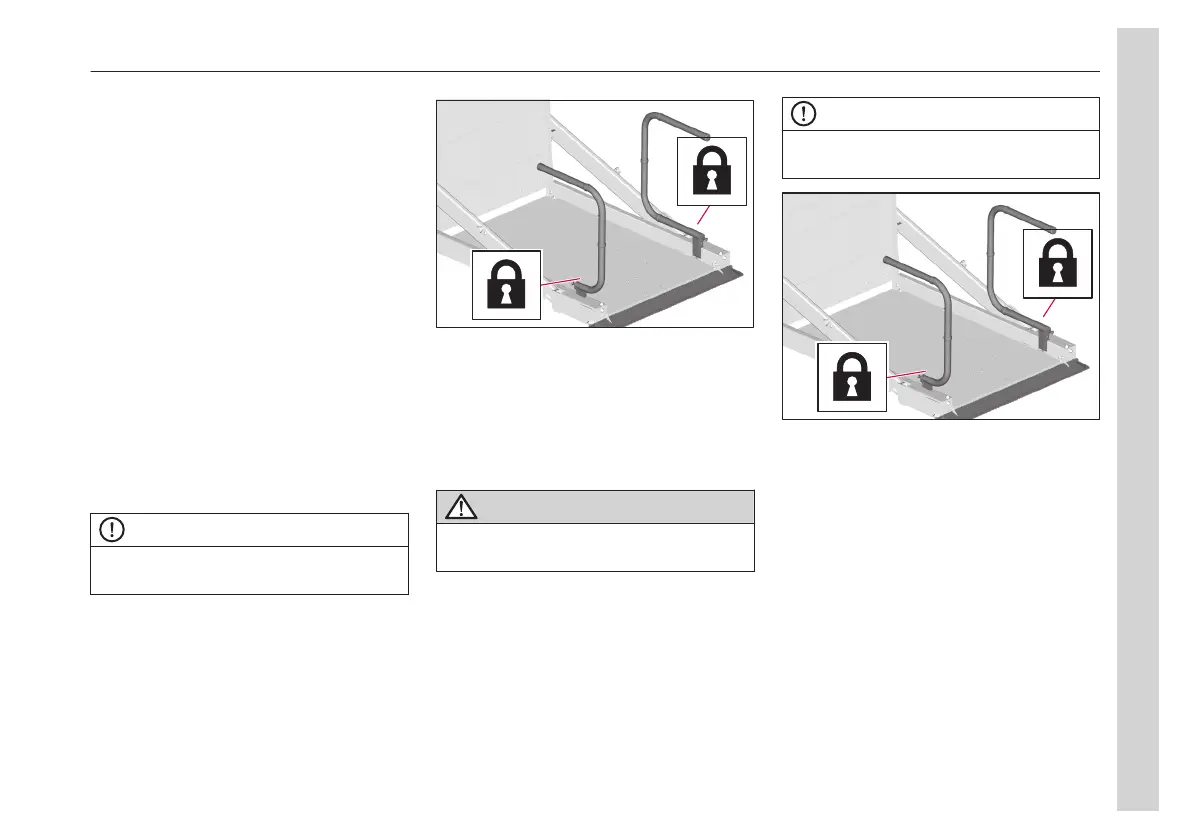
• Lift the rails to the upright position.
NOTE
Ensure that the rails are secured against
self-folding.
• To lower the platform to the ground,
press and hold the Down button.
• The safety flap opens automatically
when the lift touches the ground.
• Place the wheelchair in the proper
position on the platform.
CAUTION
Make sure that the passenger has
activated the wheelchair lift locking device.
• To raise the platform, press and hold
the Up button.
• Position the wheelchair in a suitable
location in the bus.
Assist passenger leaving the bus
Deploy the platform as described.
NOTE
Ensure that the rails are secured against
self-folding.
• To raise the platform, press and hold
the Up button.
• Carefully place the wheelchair in the
centre of the platform.
• To lower the platform to the ground,
press and hold the Down button.
Stow platform
When the passenger is safely on the
ground, the lift can be stowed in its
compartment.
• Raise the platform at least 10 cm
above the compartment.
• Fold the hand rails by pulling the
blocking handles and then folding the
railing on the platform.
05
Equipment
73



 To Next Page