Display
Display
Vehicle messages, symbols and
information about the bus are shown in
the driver information display. Some
functions in the bus can be controlled via
the menus and submenus in the display.
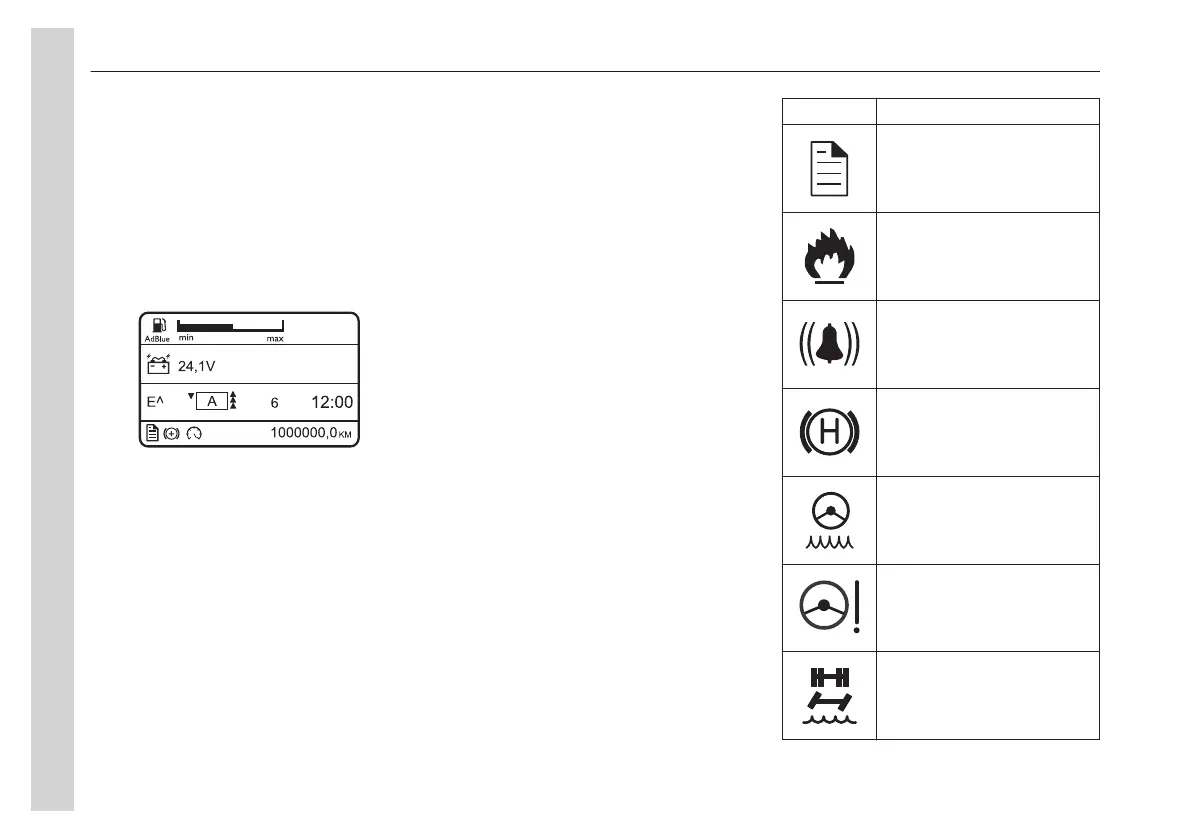
Display fields
The display is divided into four fields.
1 First favourite display
2 Second favourite display
3 Third favourite display
4 Status bar
The display is divided into four fields: two
and a half favourite rows and one and a
half status rows. The two and half
favourite rows are configurable and it is
possible to choose what information to
be shown.
Symbols
Symbols and messages in the
display
Symbols and messages are displayed in
combination with stop or warning lamps.
• Several messages can be active
simultaneously. The highest priority
is displayed first.
• Messages have a yellow or red lamp
depending on level, pressure and
temperature.
• Some messages are displayed
without a symbol.
Symbol
Meaning
Message active
Fire alarm, see In case of fire
page 85
Alarm clock activated
Door brake activated, see
page 26
Steering fluid, low level
Steering servo, failure
Steering servo bogie, low
pressure
04
Instruments and controls
34


 To Next Page