5) HVAC auto-mode select button
This button is used to select the auto-mode for
temperature setting. Required temperature can be
changed on the setup menu.
6) Arrow left button
This button is used to scroll between items and
adjust each segment on the screen.
Press this button in order to decrease the
temperature.
7) Arrow down button
This button is used to scroll between items and
adjust each segment on the screen.
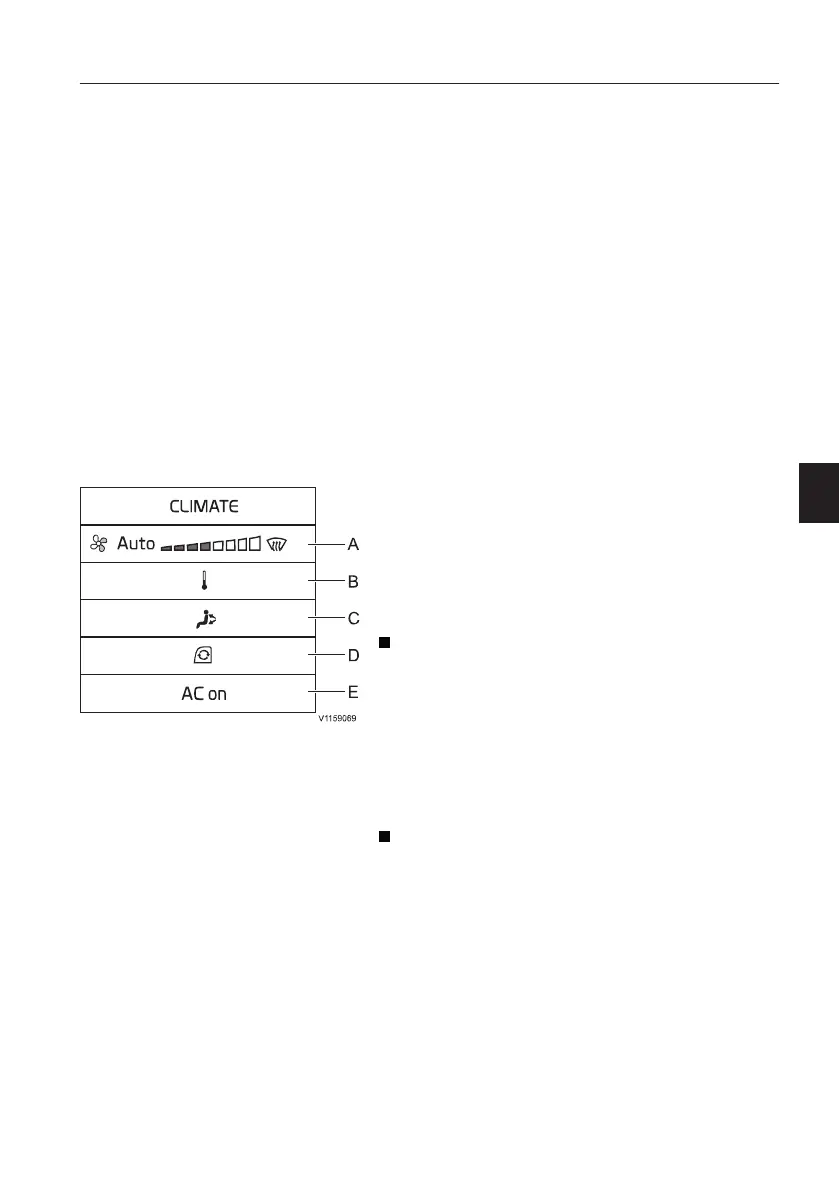
HVAC setup
Press and hold in the HVAC control button (1) to
setup the HVAC system.
A) Climate mode selection
This is for selecting climate mode. (auto, manual, or
defrost)
Mode selection and fan speed in manual mode are
controlled with the arrow left or arrow right button.
B) Temperature control
Auto mode: Temperature can be adjusted with
the arrow left or arrow right button.
Default setting value is 22°C (71.6°F) and the
setting range is 16°C ~ 32°C (60.8°F ~ 89.6°F). If
the temperature sensor in cab fails, auto mode
shall turn off.
See page
45
for details on how to change the
temperature unit from degrees Centigrade to
Fahrenheit.
Manual mode: Temperature is divided into 8
steps and it can be adjusted with the arrow left or
arrow right button. According to the selected step,
the temperature will be changed automatically.
Other controls
Operator comfort
119


 To Next Page