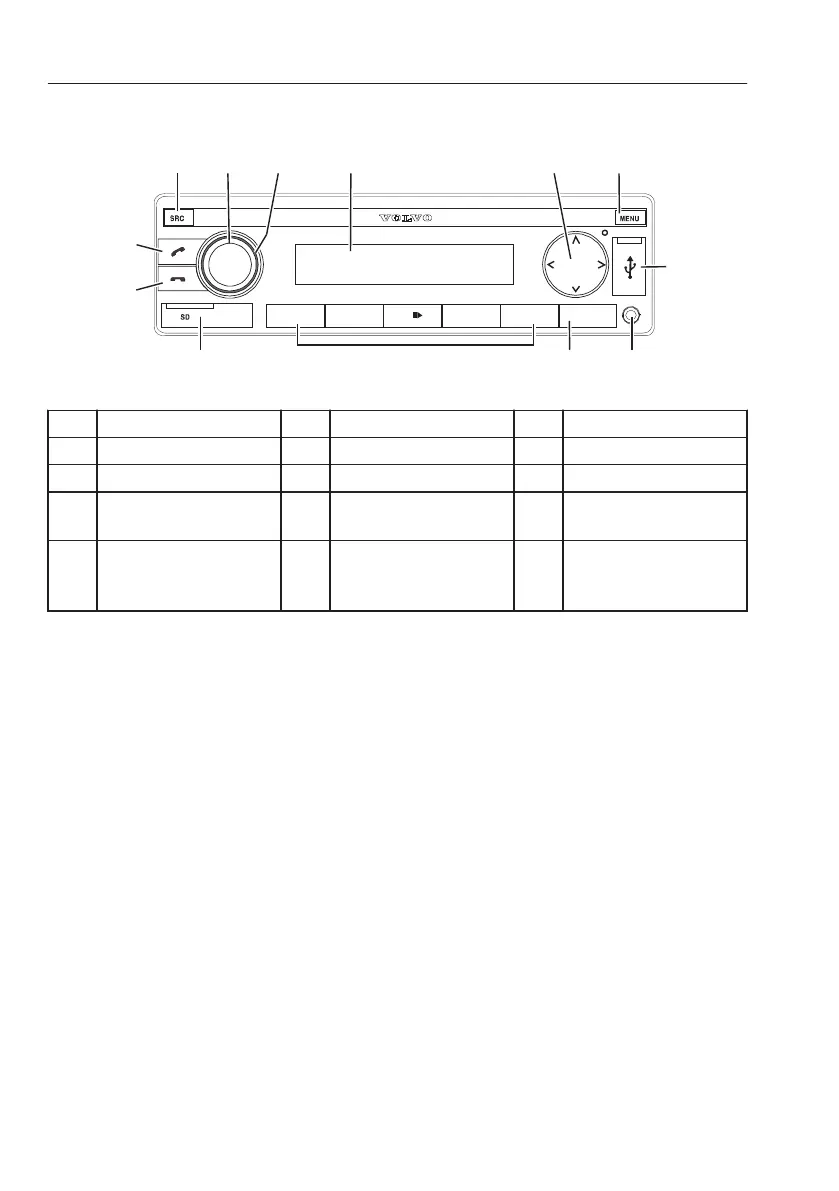
Audio system
1 L I S T 2 3 4 R PT 5 M I X DI S P
1 2 3 4 5 6
7
910 8
V1158627
11
12
13
1 SRC button 2 On/Off button 3 Volume control
4 Display 5 Select button 6 MENU button
7 USB socket 8 AUX 9 DISP button
10 Preset button 1–5 11 SD card slot 12 Phone button-ending/
rejecting a phone call
13 Phone button-
answering
a call/voice
dialing
1 SRC button
Select memory bank or audio source.
- Short press: Switch among radio¹, USB, AUX
source.
- Long press: Activate Travel-Store function in
radio mode. (Setting kept in FMT or AMT²
memory bank)
NOTE!
Radio¹ is switched on as FM1, FM2, FMT, MW,
LW, AM or AMT, MW, LW, AM or AMT are only
available in respective tuner regions.
NOTE!
AMT² in tuner regions INTERNAL, N-AMERICA
and JAPAN.
126
Other controls
Operator comfort



 To Next Page