||
INTRODUCTION
8
•
Search - Search function for finding an arti-
cle.
•
Categories - All articles sorted into catego-
ries.
•
Favourites - Quick access to favourite-
bookmarked articles.
•
Quick Guide - A selection of articles for
common functions.
Select the information symbol in the lower right-
hand corner in order to obtain information about
the digital owner's manual.
NOTE
The digital owner's manual is not available
while driving.
Search
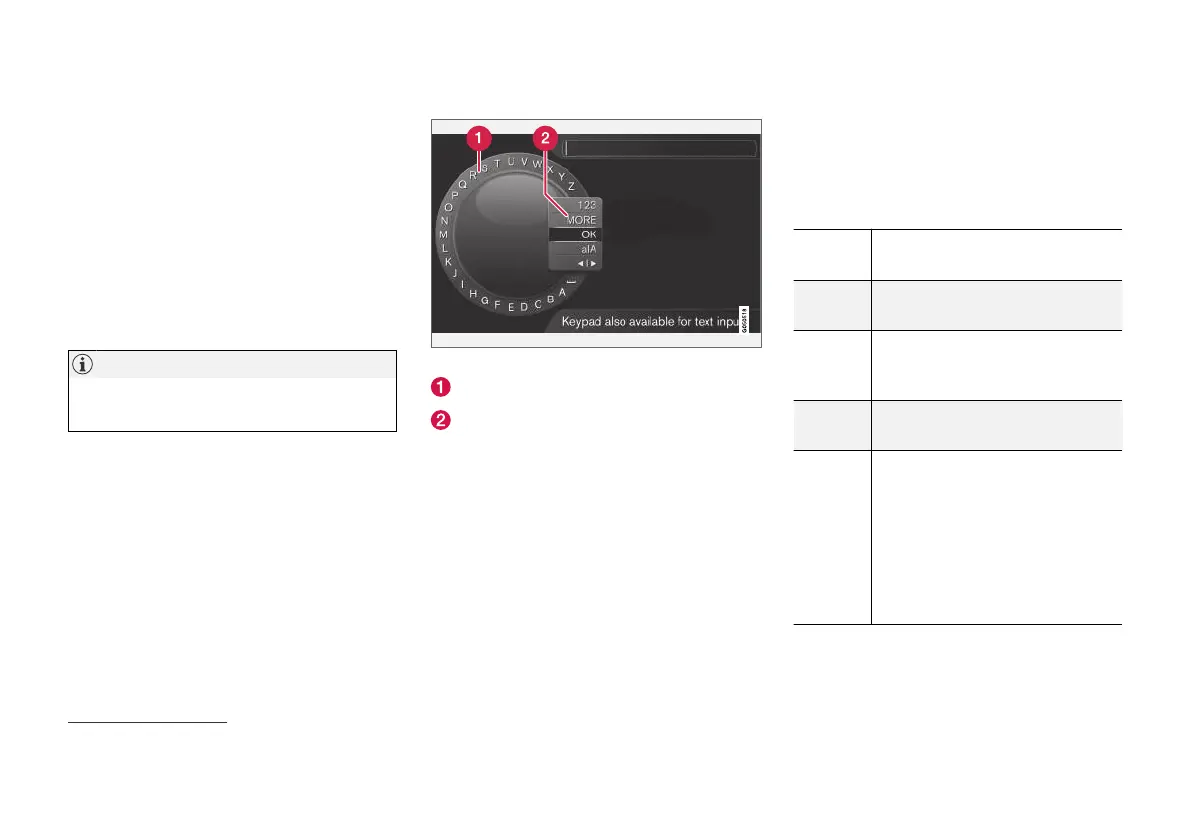
Searching using the character wheel.
Character list.
Changing the input mode (see following
table).
Use the character wheel to enter a search term,
e.g. "seatbelt".
1.
Turn TUNE to the desired letter, press OK/
MENU to confirm. The number and letter
buttons on the control panel in the centre
console can also be used.
2. Continue with the next letter and so on.
3. To change the input mode to numbers or
special characters, or to perform a search,
turn TUNE to one of the options (see explan-
ation in the following table) in the list for
changing the input mode (2), press OK/
MENU.
123/AB
C
Change between letters and num-
bers with OK/MENU.
MORE
Change to special characters with
OK/MENU.
OK
Perform the search. Turn TUNE to
select a search result article, press
OK/MENU to go to the article.
a|A
Changes between lowercase and
uppercase letters with OK/MENU.
| | }
Changes from the character wheel
to the search field. Move the cur-
sor with TUNE. Delete any mis-
spelling with EXIT. To return to the
character wheel, press OK/MENU.
Note that the digit and letter but-
tons on the control panel can be
used for editing in the search field.
3
Applies to certain car models.



 To Next Page