INTRODUCTION
}}
9
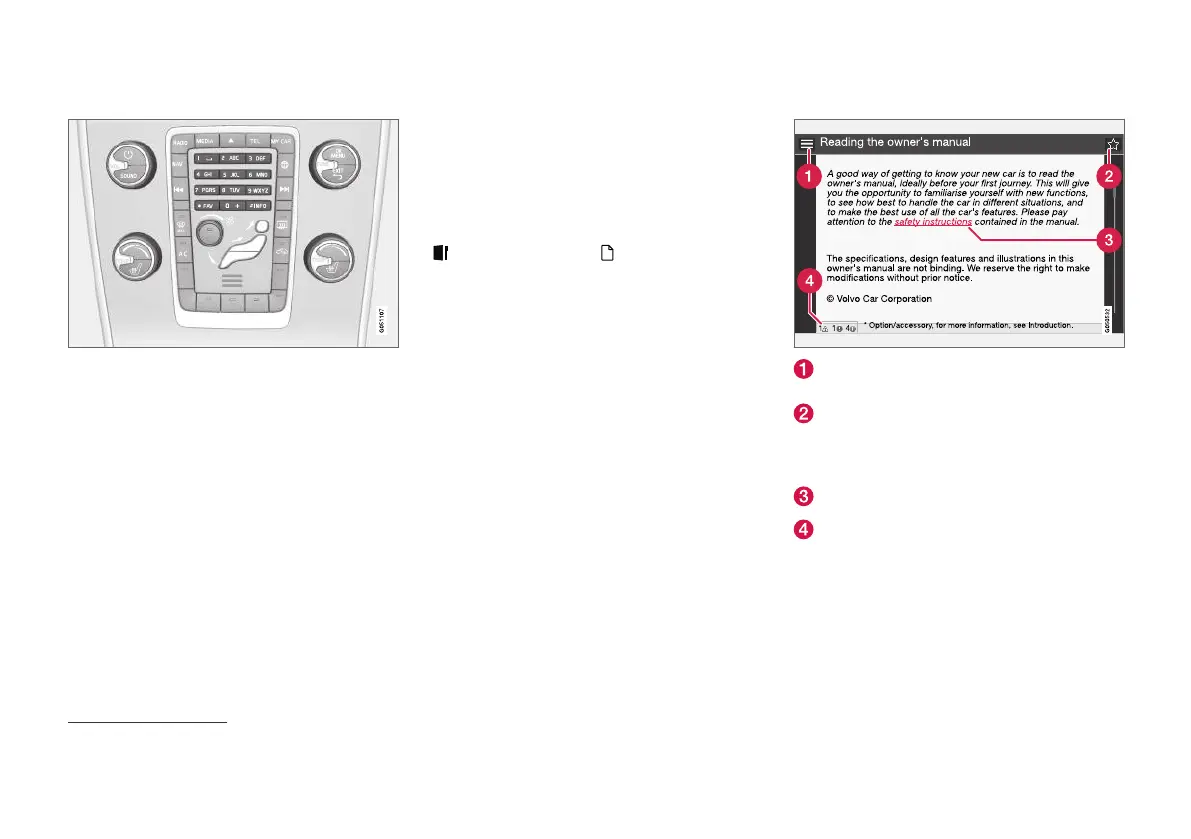
Enter with the numerical keyboard
Numerical keyboard.
Another way of entering characters is to use the
centre console's buttons 0-9, * and #.
When e.g. 9 is pressed, a bar appears with all
characters
4
under the button, e.g.
W, x, y, z and
9. Quick presses on the button move the cursor
through these characters.
•
Stop with the cursor on the desired character
in order to select it - the character is shown
on the enter line.
•
Delete/undo using EXIT.
To enter a number, hold in the corresponding
number key.
Categories
The articles in the owner's manual are structured
into main categories and subcategories. The
same article can be in several appropriate cate-
gories in order to be found more easily.
Turn TUNE to navigate in the category tree and
press OK/MENU to open a category - selected
- or article - selected . Press EXIT to go
back to the previous view.
Favourites
Located here are the articles that are saved as
favourites. To select an article as a favourite, see
the heading "Navigating in an article" below.
Turn TUNE to navigate in the favourite list and
press OK/MENU to open an article. Press EXIT
to go back to the previous view.
Quick Guide
Located here is a selection of articles for getting
to know the car's most common functions. The
articles can also be accessed via categories, but
are collected here for quick access.
Turn TUNE to navigate in the Quick Guide and
press OK/MENU to open an article. Press EXIT
to go back to the previous view.
Navigating in an article
Home - leads to the start page for the
owner's manual.
Favourite - adds/removes an article as a
favourite. You can also press the FAV button
in the centre console to add/remove an arti-
cle as a favourite.
Highlighted link - leads to linked article.
Special texts - if the article contains warn-
ings, important or note texts then an associ-
ated symbol is shown here as well as the
number of such texts in the article.
Turn TUNE to navigate between the links or
scroll in an article. When the screen has scrolled
to the start/end of an article the home and
favourite options are accessed by scrolling a fur-
ther step up/down. Press OK/MENU to activate
4
The character for each button may vary depending on market/country/language.



 To Next Page