DISPLAYS AND VOICE CONTROL
}}
* Option/accessory.
111
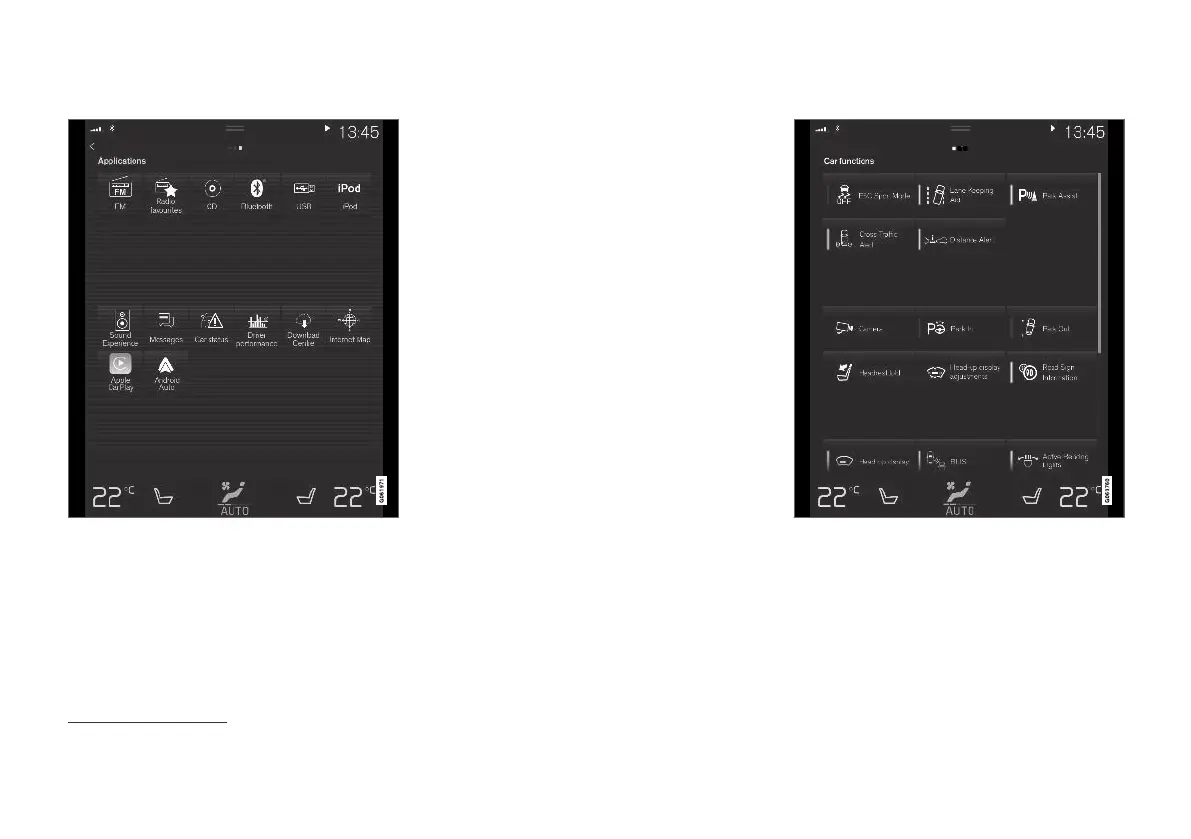
Application view
Application view with the car's apps.
Swipe from right to left
7
across the screen in
order to access the application view (app view)
from the home view. Apps that have been down-
loaded (third-party apps) and apps for embedded
functions, such as
FM radio, are found here. Cer-
tain apps show brief information directly in the
app view, such as the number of unread text
messages for
Messages.
Tap on an app to open it. It then opens in the
subview to which it belongs, such as
Media.
You can scroll down in the app view, depending
on the number of apps. Do this by swiping/drag-
ging from the bottom and up.
Go back to the home view again by swiping from
left to right
7
across the screen, or by pressing the
home button.
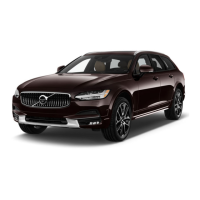
Function view
The function view with buttons for different car func-
tions.
Swipe from left to right
7
across the screen in
order to access the function view from the home
view. From here you can activate or deactivate
different car functions, e.g.
BLIS*, Lane Keeping
Aid
* and Park Assist*.
7
Applies to left-hand drive cars. For right-hand drive cars - swipe in the opposite direction.


 To Next Page