DISPLAYS AND VOICE CONTROL
86
Show trip data in the driver display
The trip computer's recorded and calculated val-
ues can be shown in the driver display.
The values are saved in a trip computer app. Via
the app menu, you can choose which information
is shown on the driver display.
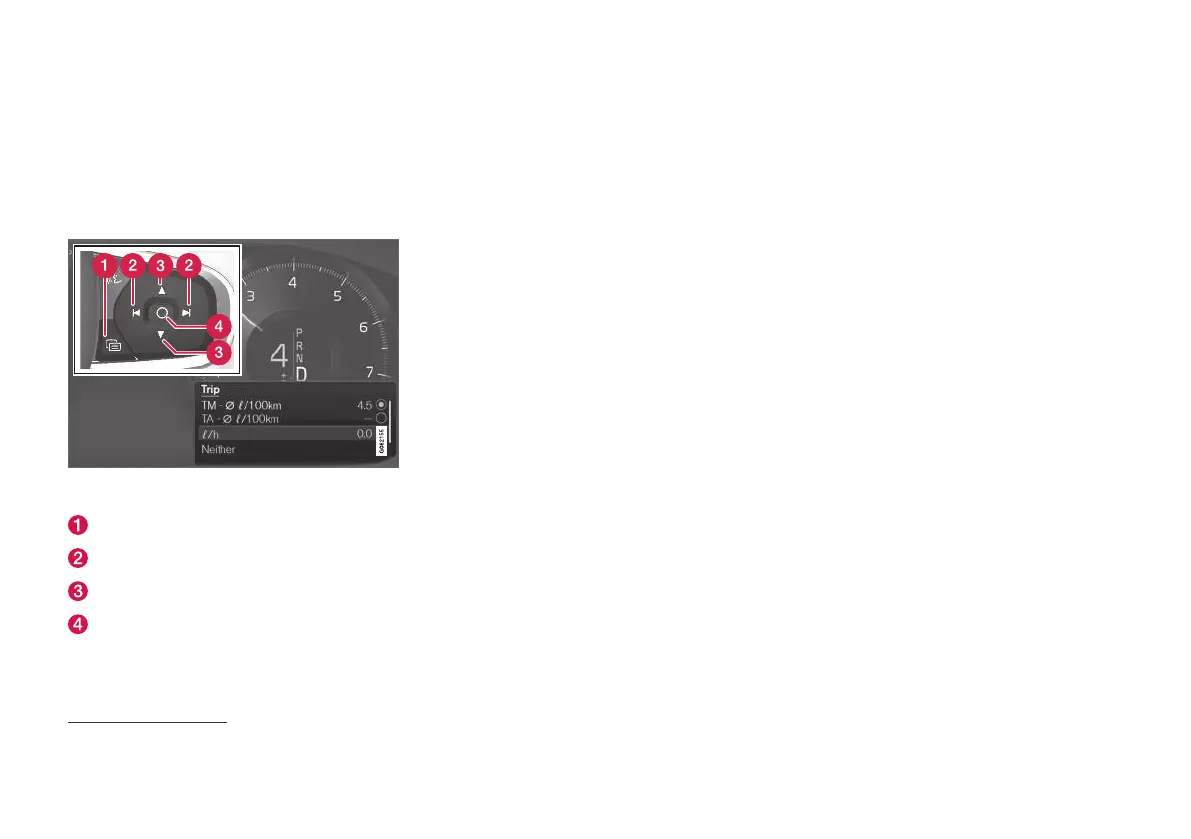
Open and navigate in the app menu
2
using the right-
hand steering wheel keypad.
App menu
Left/right
Up/down
Confirm
1. Open the app menu in the driver display by
pressing (1).
(It is not possible to open the app menu
while there is an unacknowledged message
in the driver display. The message must first
be acknowledged before the app menu can
be opened.)
2. Navigate to the trip computer app to left or
right with (2).
> The top four menu rows show measured
values for trip meter TM. The next four
menu rows show measured values for trip
meter TA. Scroll up or down in the list with
(3).
3. Scroll down to the option buttons to select
which information to show in the driver dis-
play:
•
Distance to empty tank
•
Odometer
•
Mileage for trip meter TM, TA, or no dis-
play of mileage
•
Instantaneous fuel consumption, average
consumption for TM or TA, alternatively,
no display of fuel consumption
•
Tourist (alternative speedometer).
•
Distance to empty battery
Select or deselect an option with the O but-
ton (4). The change is made immediately.
Related information
•
Trip computer (p. 84)
•
Resetting the trip meter (p. 87)
2
The figure is schematic - parts may vary depending on car model.



 To Next Page