DRIVER SUPPORT
291
•
The speed set after the last button press is
stored in the memory.
Related information
•
Speed Limiter (p. 289)
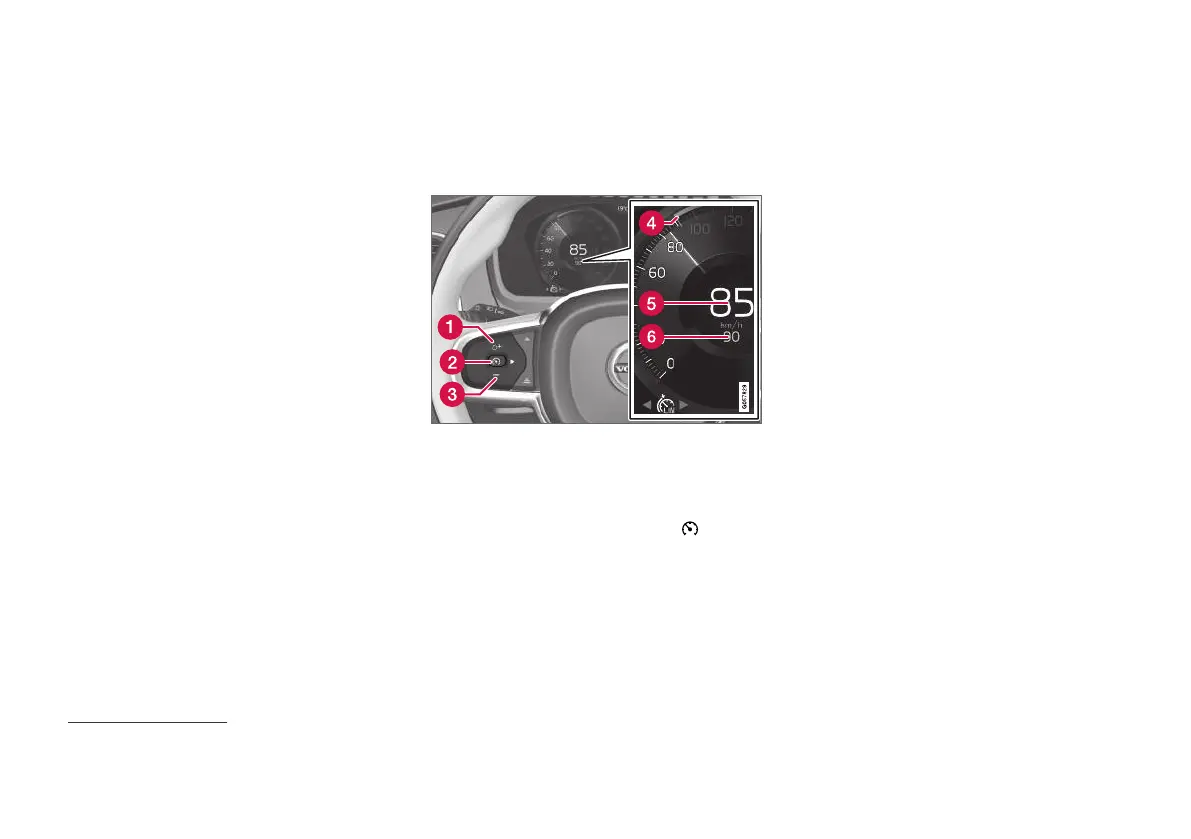
Deactivate the speed limiter and set
it in standby mode
The speed limiter (SL
14
) can be temporarily
deactivated and set in standby mode.
NOTE: The illustration is schematic - details may vary
depending on car model.
To deactivate the Speed Limiter and set it in
standby mode:
–
Press the steering wheel button (2).
> The speed limit markings and symbols in
the driver display change colour from
WHITE to GREY - the speed limiter is now
temporarily deactivated and the driver can
exceed the maximum speed setting.
Temporary deactivation with the
accelerator pedal
The speed limiter can also be temporarily deacti-
vated and overridden with the accelerator pedal
without the speed limiter first having to be set in
standby mode - e.g. to be able to quickly acceler-
ate the car out of a situation.
In which case, proceed as follows:
1. Fully depress the accelerator pedal and
release it to interrupt acceleration when the
desired speed has been reached.
> In this mode, the speed limiter is still acti-
vated and the driver display's symbol is
therefore WHITE.
2. Fully release the accelerator pedal when the
temporary acceleration is finished.
> The car is then engine-braked automati-
cally to below the last stored maximum
speed.
Related information
•
Speed Limiter (p. 289)
14
Speed Limiter



 To Next Page