||
DRIVER SUPPORT
* Option/accessory.
302
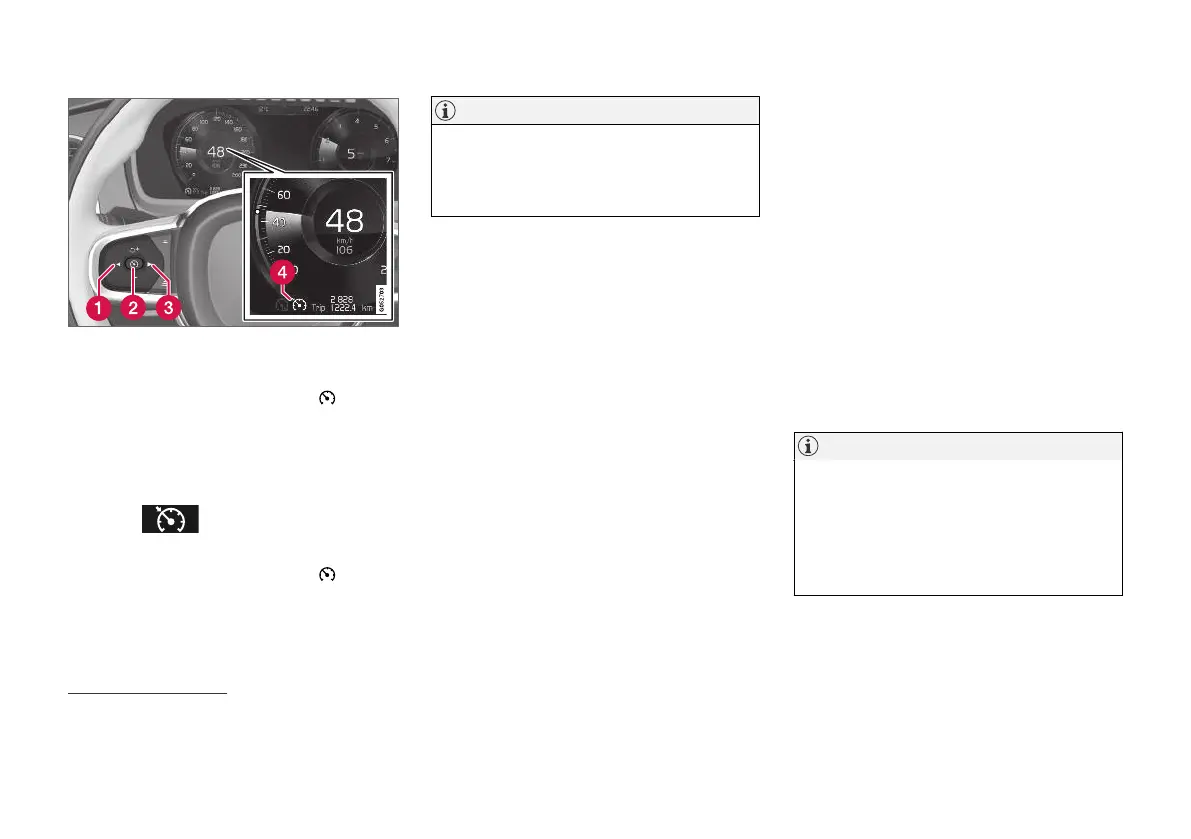
Buttons and symbols for functions
28
.
To deactivate cruise control:
1.
Press the steering wheel button
(2).
> Cruise control is set in standby mode.
2.
Press the steering wheel button ◀ (1) or ▶
(3) to change to another function.
> The driver display's symbol for cruise con-
trol
(4) is extinguished - which
deletes the set/stored speed.
3.
Press the steering wheel button
(2)
again.
> Another function is activated.
NOTE
In cars equipped with Adaptive Cruise Con-
trol*, it is possible to switch between cruise
control and Adaptive Cruise Control – see the
heading "Switch between CC and ACC".
Related information
•
Cruise control (p. 297)
•
Change between Cruise control and adaptive
cruise control (p. 319)
Distance Warning*
29
The Distance Warning
30
function can assist the
driver to notice that the time interval to the vehi-
cle ahead may be too short.
However, the requirement is that the car is
equipped with a Head-up display to be able to
show Distance Warning, which is then displayed
with a symbol on the windscreen as long as the
time interval to the vehicle ahead is shorter than
the preselected value.
Distance warning is active at speeds
above 30 km/h (20 mph) and only reacts to the
vehicle ahead travelling in the same direction. No
distance information is provided for oncoming,
slow or stationary vehicles.
NOTE
•
Distance Alert is only available on cars
that can display information on the wind-
screen with a Head-up Display.
•
Distance warning is deactivated during
the time the adaptive cruise control or
Pilot Assist is active.
28
NOTE: The illustration is schematic - details may vary depending on car model.
29
The Distance Warning function is only available in cars that can show information on the windscreen with a so-called Head-up display.
30
Distance Alert


 To Next Page