EasyManua.ls Logo

VQ RETRO MINI - LCD Display Icons and Elements; Battery Use and Removal

VQ RETRO MINI
36 pages
Print Icon
To Next Page IconTo Next Page
To Previous Page IconTo Previous Page
Loading...
GB
Retro Mini Operation Guide
16
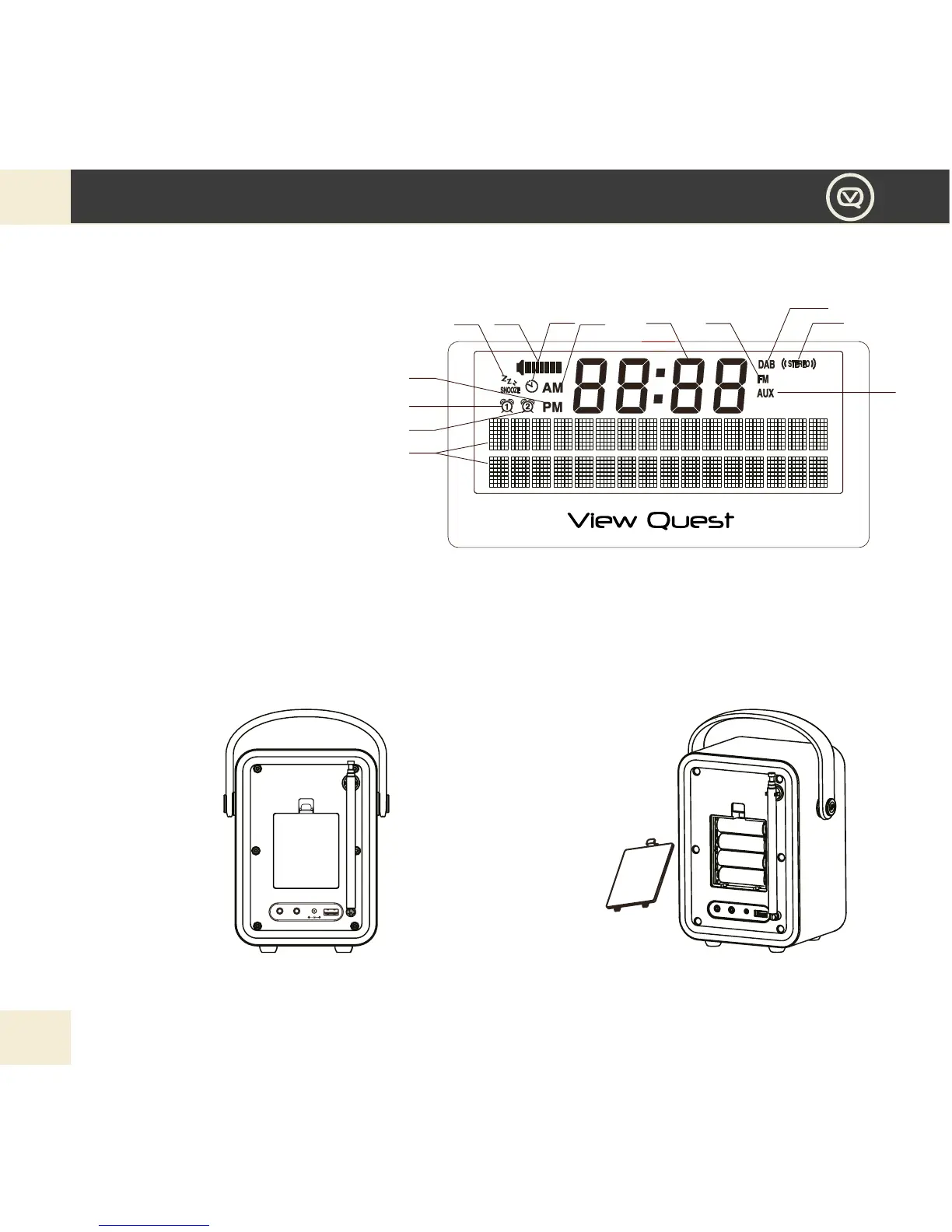
LCD DISPLAY
19. 2x16 dot matrix
20. Alarm 2 icon
21. Alarm 1 icon
22. PM icon
23. Snooze icon
24. Volume bar
Battery Use
Your Retro Mini can be powered by 4 x Type ‘AA ’ batteries.
Battery Removal
1. Use the thumb or
nger to pull clip down
and outward in order
to release battery
cover.
NOTE: If you’re not powering your Retro Mini with batteries we recommend you remove them.
25. Sleep icon
26. AM icon
27. Clock icon
28. FM mode icon
29. DAB mode icon
30. STEREO icon
31. AUX in mode icon
2. Be sure to insert
batteries of the correct
type and ensure correct
polarity (+/-). And then
secure the battery cover.
19
20
21
22
23 24 26 27 28
29
30
31
25
AUX IN HEADPHONE
DC : 5V/2000mA
USB CHARGING
5V/1000mA

Related product manuals