EasyManua.ls Logo

VTech 6032 - User Manual

VTech 6032
62 pages
Print Icon
To Next Page IconTo Next Page
Loading...
www.vtechphones.com
i
The ENERGY STAR
®
program (www.energystar.gov) recognizes and encourages
the use of products that save energy and help protect our environment. We are
proud to mark this product with the ENERGY STAR
®
label indicating it meets the
latest energy efficiency guidelines.
This manual has all the feature operations and troubleshooting necessary to install
and operate your new VTech telephone. Please review this manual thoroughly to
ensure proper installation and operation of this innovative and feature rich VTech
product. For support, shopping, and everything new at VTech, visit our website at
www.vtechphones.com. In Canada, please visit www.vtechcanada.com.
Congratulations
on purchasing your new VTech product.
Before using this telephone, please read the
Important safety instructions
on page 38 of this manual.

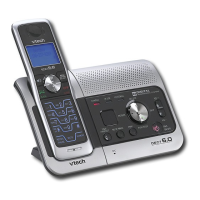
Table of Contents

Other manuals for VTech 6032

Questions and Answers

  • B
    Brian AndersonSep 10, 2025
    How to make announcement message clear on VTech Cordless Telephone?
    • S
      Stephanie GardnerSep 10, 2025
      To ensure a clear announcement message on your VTech Cordless Telephone, speak in a normal tone of voice about nine inches from the telephone base when recording. Also, make sure there is no background noise during recording.
  • T
    Tara MonroeSep 12, 2025
    Why does VTech Cordless Telephone answering system not answer after correct number of rings?
    • D
      douglas41Sep 12, 2025
      If the answering system on your VTech Cordless Telephone doesn't answer after the correct number of rings, make sure the answering system is turned on. If toll saver is activated, the number of rings changes to two when there are new messages. If the memory is full or the system is off, it will answer after ten rings. In some cases, the ringing system used by the local telephone company can affect the answering system.
  • P
    pperezSep 13, 2025
    Why are caller ID features not working properly on my VTech Cordless Telephone?
    • J
      Julie WaltonSep 13, 2025
      If you are experiencing problems with caller ID features on your VTech Cordless Telephone, confirm that you have subscribed to caller ID service with your local telephone company. The caller may not be calling from an area that supports caller ID, or the equipment used by both you and the caller's telephone companies may not be compatible with caller ID service. If you have DSL service, install a DSL filter to the telephone line between the telephone base and the telephone line jack.
  • J
    Joann PearsonSep 15, 2025
    Why doesn't my VTech Cordless Telephone system receive or display caller ID during call waiting?
    • B
      Brandon GarciaSep 15, 2025
      If the system does not receive caller ID or display it during call waiting on your VTech Cordless Telephone, make sure you subscribe to caller ID with call waiting features from your local telephone company. The caller may not be calling from an area which supports caller ID. Both you and the caller’s telephone companies must use equipment which are compatible with caller ID service. If you subscribe to DSL service, install a DSL filter to the telephone line between the telephone base and the telephone line jack.
  • A
    Alexander DeanSep 18, 2025
    How to fix if messages on VTech 6032 Cordless Telephone system are difficult to hear?
    • C
      Crystal EsparzaSep 18, 2025
      If messages on the answering system of your VTech Cordless Telephone are very difficult to hear, press / /VOLUME on the telephone base to increase the speaker volume.
  • C
    Christine LopezNov 21, 2025
    Why is there noise during telephone conversation on my VTech Cordless Telephone?
    • M
      marcusjacksonNov 21, 2025
      If there is noise or interference during a conversation on your VTech Cordless Telephone, or if calls cut in and out, try the following: * Move the handset closer to the telephone base. * Move appliances or other cordless phones plugged into the same circuit as the base to another outlet. * Install the phone away from electronic devices like wireless routers, radios, cellular phones, and kitchen appliances. * Avoid installing the phone near a microwave oven. * If plugged in with a modem or surge protector, try a different location or surge protector. * Move the telephone base to a higher location for better reception. * Test with a corded phone to rule out wiring or local service issues; contact the local telephone company if necessary. * If you have DSL service, install a...

Summary

Installation

Install handset battery

Provides instructions for inserting and charging the handset battery.

Telephone base installation

Guides on connecting the telephone base and power adapter to a wall jack.

Basic operation

Make, answer and end calls

Instructions on how to initiate, receive, and terminate phone calls.

Answering system operation

Personal identification number (PIN)

How to set or change the security code for remote access.

Important safety instructions

Troubleshooting

General Troubleshooting

Solutions for common issues like no dial tone, battery, or connection problems.

Call and Connection Problems

Troubleshooting for ringing, interference, dialing, and call quality issues.

VTech 6032 Specifications

General IconGeneral
BrandVTech
Model6032
TypeCordless Telephone
Number of Lines1
Caller IDYes
Standby TimeUp to 5 days
DECT 6.0 TechnologyYes
Frequency1.9 GHz
Call WaitingYes
Handset SpeakerphoneYes
IntercomYes
Number of Handsets1
Battery TypeNiMH

Related product manuals