EN - 13
English
Handset battery charging
The battery must be fully charged before
using the cordless handset for the first time.
The CHARGE LED turns on when the cordless
handset is charging on the handset charger.
The battery is fully charged after 16 hours of
continuous charging. For best performance,
keep the cordless handset in the handset
charger when not in use.
Replacing a Cordless Handset
Battery
The cordless handset battery is preinstalled.
To replace the cordless handset battery,
follow the steps below.
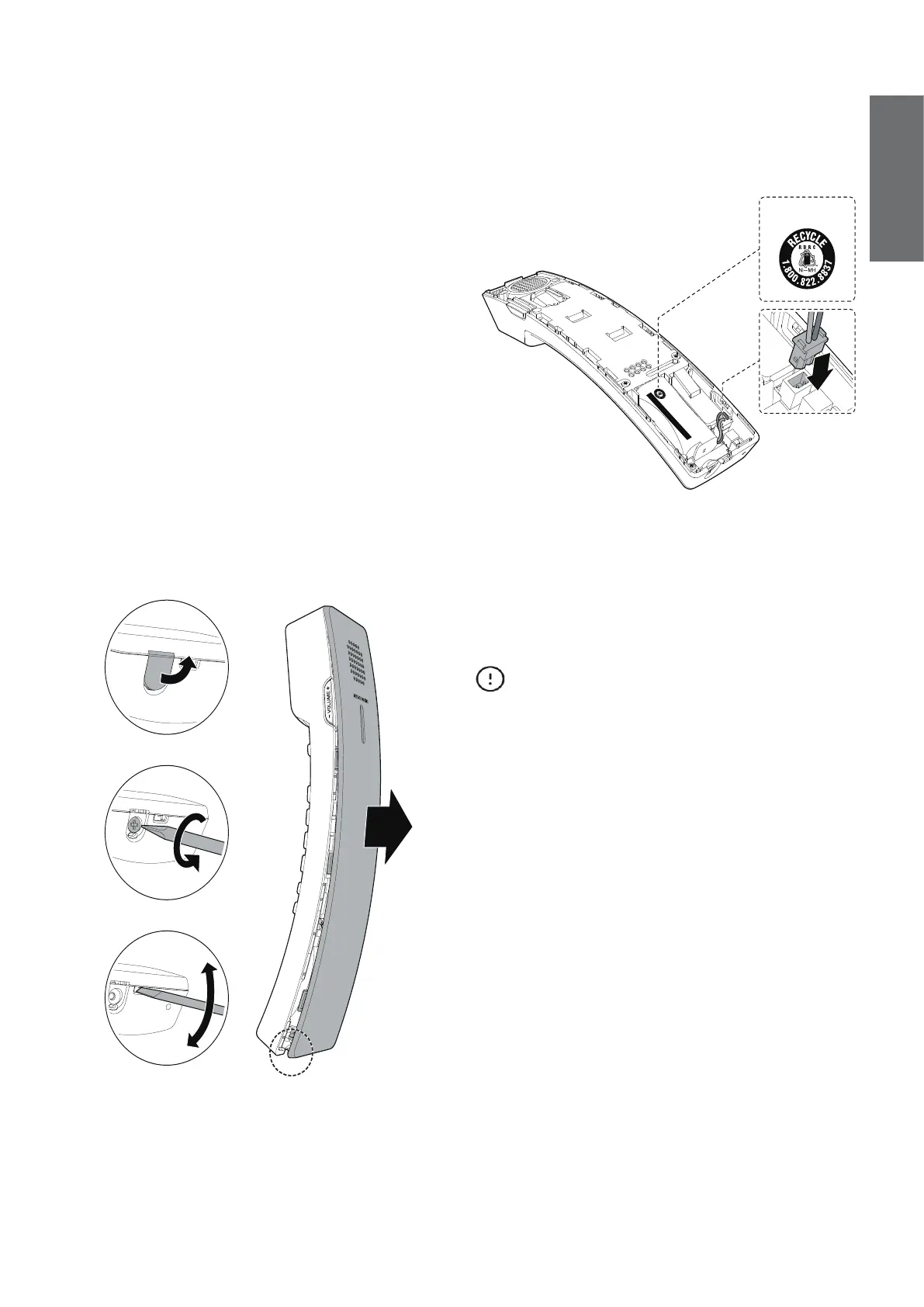
1. Use a narrow object to pry open the
screw cover and remove the screw with
cross head screwdriver. Then, insert a 5
mm standard flat head screwdriver in the
provided slot and gently open the handset
cover.
2. Unplug the battery connector from the
socket and then remove the battery from
the handset battery compartment.
3. Plug the battery connector securely into
the socket inside the handset battery
compartment. Place the battery with the
label THIS SIDE UP facing up and the
wires inside the battery compartment.
THIS SIDE UP / CE CÔTÉ VERS LE HAUT
Battery Pack / Bloc-piles :
BT183342/BT283342 (2.4V 400mAh Ni-MH)
WARNING / AVERTISSEMENT :
DO NOT BURN OR PUNCTURE BATTERIES.
NE PAS INCINÉRER OU PERCER LES PILES.
Made in China / Fabriqué en chine CR1535
THIS SIDE UP
4. To replace the handset cover, align all
the tabs on the handset cover against the
corresponding grooves on the handset,
then firmly push downward until all the
tabs lock in the grooves. Then install the
screw.
CAUTIONS
There may be a risk of explosion if a wrong
type of handset battery is used. Use only the
supplied rechargeable battery (BT164392/
BT264392) or replacement battery (BT264392).
To order a replacement,
call +44 (0)1706 694 070 or
email ukca@trustdistribution.com.
Dispose of used batteries according to the
instructions.



 To Next Page