EN - 8
Base Station
WALL MOUNT SLOT
S211X BASE Artwork
RESET
WALL MOUNT SLOT
S211X BASE Artwork
RESET
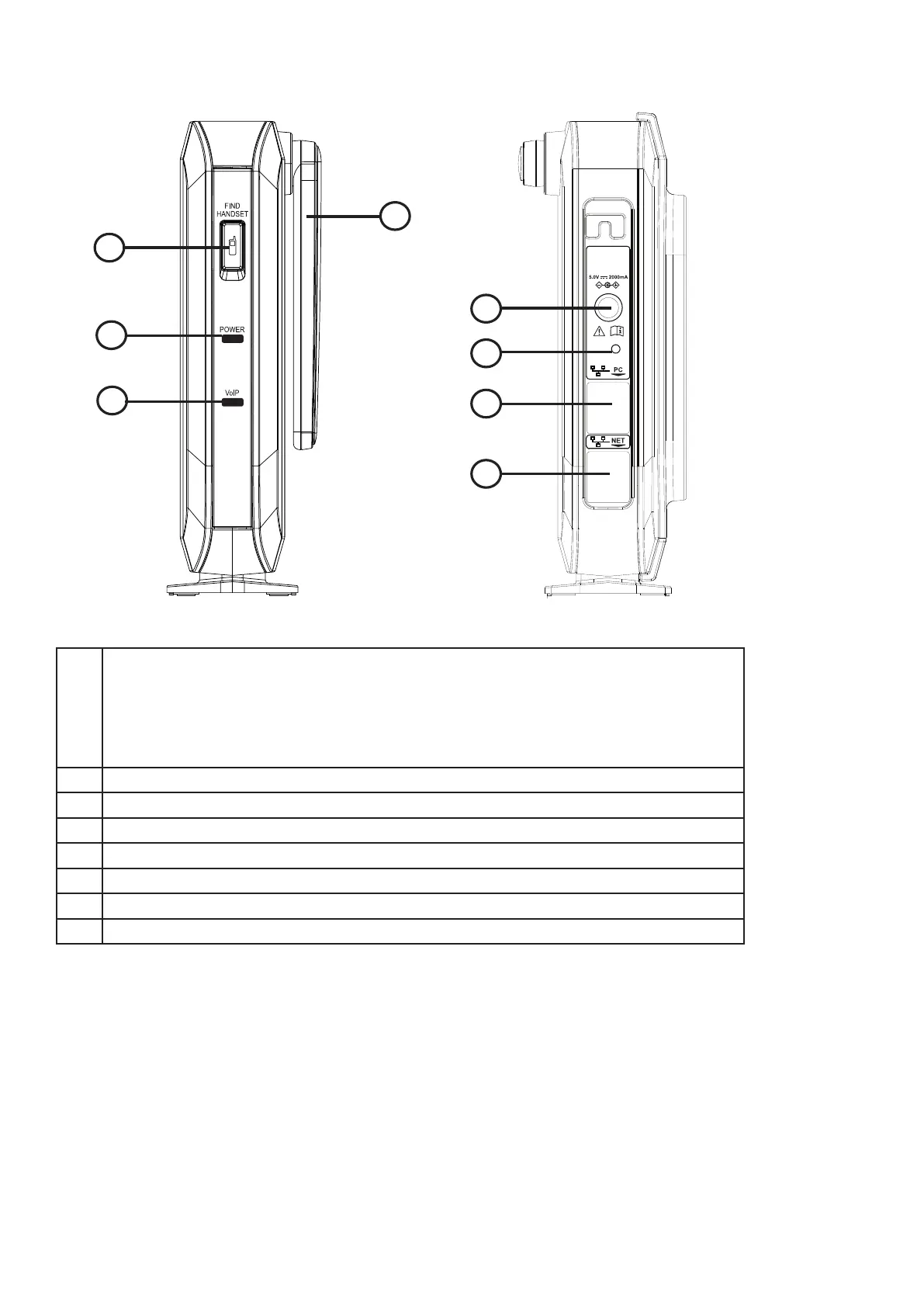
1 FIND HANDSET button.
2 POWER LED
3 VoIP LED
4 Antenna
5 AC adapter input
6 Reset button. Press for 15 seconds to restore factory defaults.
If the reset is successful, the VoIP LED will flash slowly.
7 PC port
8 Ethernet port
1
2
3
4
5
6
7
8
1
FIND HANDSET button.
• Short press (for less than 2 seconds) to find the handset by making it ring.
Short press again to stop handset ringing.
• Short press (for less than 2 seconds) ten times, then long press (between 5 and 10
seconds) to restore the phone’s factory defaults.
2
POWER LED
3
VoIP LED
4
Antenna
5
AC adapter input
6
Reset button. Short press (for less than 2 seconds) to reboot the phone.
7
PC port
8
Ethernet port



 To Next Page