www.vtechphones.com
8
Installation
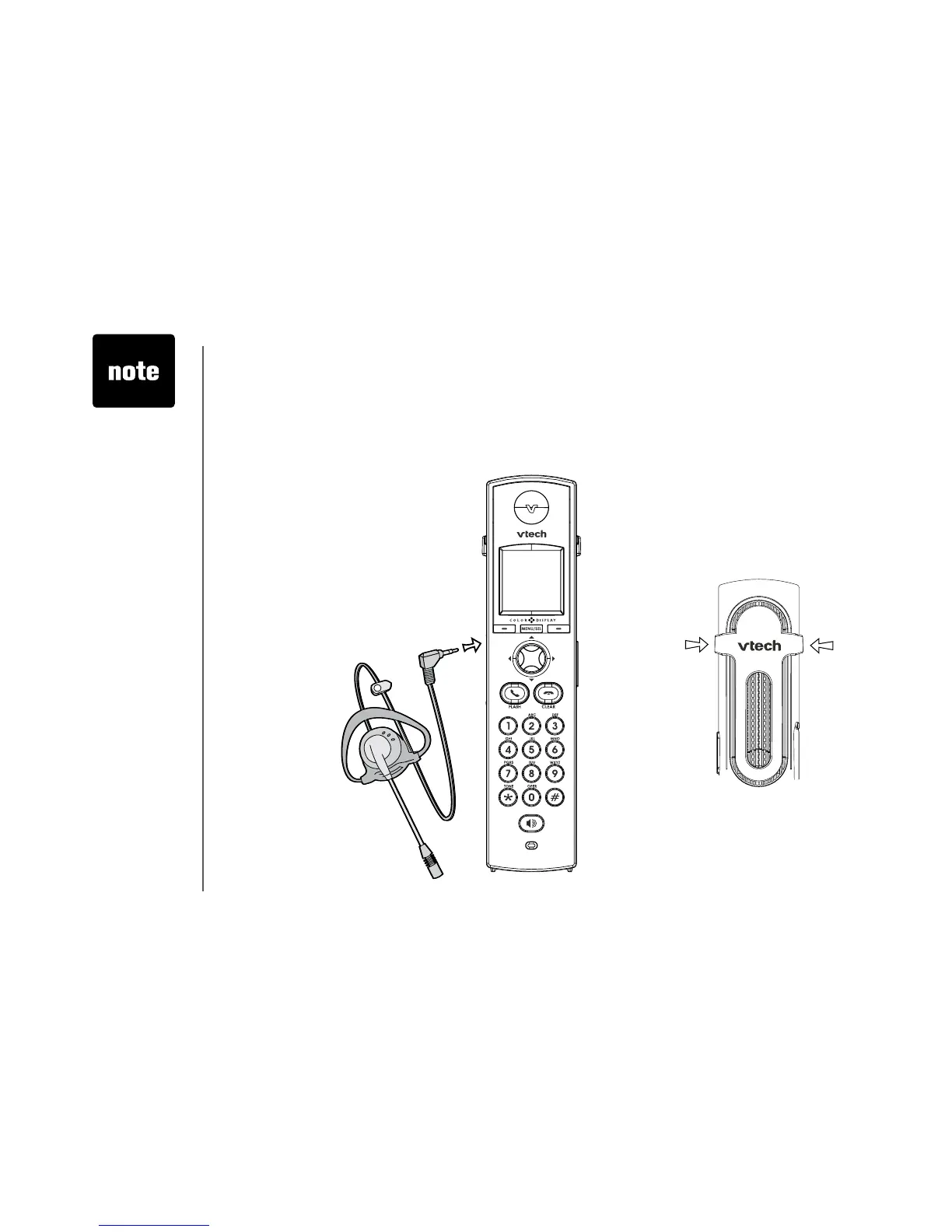
Install belt clip and headset as shown below if desired.
For hands-free telephone conversations, use any industry standard 2.5 mm headset (purchased
separately). For best result, use a VTech 2.5 mm headset.
Belt clip & headset (optional)
• To purchase
a headset,
visit us on the
web at www.
vtechphones.
com or call
VTech Customer
Service at 1
(800) 595-9511.
In Canada, call 1
(800) 267-7377.
• Whenever a
compatible
headset is
connected to the
cordless handset,
the microphone
on the handset
will be muted.
This is done to
limit the effect
of background
noise.
Belt clip
Align the pins on the inside edge of the clip
with the notches on the sides of the handset.
Plug the 2.5 mm headset into the
jack on the side of the handset (be
-
neath the small rubber cap).


 To Next Page