EasyManua.ls Logo

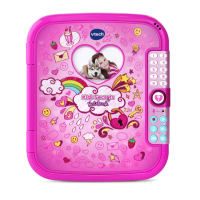
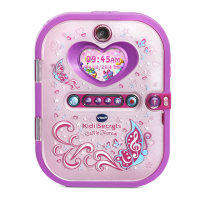
VTech Kidi Secrets Selfie Journal Series - User Manual

VTech Kidi Secrets Selfie Journal Series
29 pages
Print Icon
To Next Page IconTo Next Page
Loading...
Parents Guide
91-003512-001
US

Questions and Answers

  • S
    shawn81Jul 27, 2025
    What to do if my VTech Kidi Secrets Selfie Journal Diary stops working?
    • D
      Debra FoxJul 27, 2025
      If your diary stops working, try the following: First, remove the batteries and let the diary sit for a few minutes, then replace them. If that doesn't work, turn the diary ON. If it still doesn't work, repeat the process with a brand new set of batteries.
  • M
    millerbrittanyAug 1, 2025
    What to do if memory card can’t be detected in VTech Kidi Secrets Selfie Journal Toy?
    • V
      Victor GillAug 1, 2025
      If the memory card can't be detected, make sure it's correctly inserted. Also, verify that the memory card is a supported type (microSD or microSDHC). The file system should be FAT or FAT32, as the Kidi Secrets Selfie Journal[TM] doesn't support NTFS or exFAT. Back up your data and format the card if needed.
  • C
    Charles FreemanAug 6, 2025
    Why can’t I view transferred music, video, or photo files on my VTech Kidi Secrets Selfie Journal?
    • E
      evanstroyAug 7, 2025
      Check that the transferred files are in the correct directory on the Kidi Secrets Selfie Journal[TM]. Photos should be in the DOWNLOAD/PHOTO folder, videos in the DOWNLOAD/VIDEO folder, and songs in the MUSIC folder when connected to a computer. Also, ensure that your files are in the supported formats: Standard Baseline JPEG (8000 x 8000) for photos, AVI (640 x 480 Motion JPEG) for videos, and MP3 for songs.
  • S
    Steven WardAug 11, 2025
    Why photo taken with VTech Kidi Secrets Selfie Journal Toy is not clear?
    • B
      Bryan ThorntonAug 11, 2025
      If the photos you're taking aren't clear, ensure you are holding the diary steadily. Good lighting conditions are also important for shooting environment. Finally, check that the camera lens protection window is clean.
  • M
    Mark JohnsonAug 16, 2025
    What to do if VTech Kidi Secrets Selfie Journal cannot save files?
    • M
      Michael LiAug 16, 2025
      If you cannot save files, check if the memory card is full. Also, check to see if a memory card is inserted.
  • R
    Robert AvilaAug 22, 2025
    How to fix if the screen displays incorrectly on VTech Kidi Secrets Selfie Journal?
    • K
      Kevin WoodwardAug 22, 2025
      Turn off the diary and let it sit for a few minutes without batteries. Then, replace the batteries to see if the issue is resolved.

Summary

Getting Started and Initial Setup

Battery Installation Guide

Instructions for inserting 4 AA batteries into the device.

Initial Device Operation

Leaving Try Me Mode

Procedure to activate normal play mode from sample mode.

Creating a Diary Entry

Step-by-step guide to writing and saving diary entries.

Taking Photos and Videos

Instructions for capturing photos and videos with the device.

Important Notices and Installation

Battery Notice

Important guidelines for using and handling batteries safely.

Memory Card Installation

Instructions for inserting a microSD card for memory expansion.

Unlock Button Functionality

Using the Face Unlock feature and setting up security.

Button Functions and Controls

Reset Button Functionality

Procedure to reset facial recognition and numeric password.

Input and Navigation Controls

Device Components and Connectivity

USB Port and Memory Card Slot

Connecting to computer and expanding memory capacity.

Connecting to a Computer

Data Management and File Transfer

System Requirements and Play Activation

Security Features Setup and Operation

Configuring Facial Recognition

Steps for setting up the Face Unlock feature.

Setting Your Numeric Password

Guide to setting a 4-digit numeric password.

Face Unlock Best Practices

Resetting the Password

How to reset both facial recognition and numeric password.

Device Activities

Camera Usage

Using the camera to take photos and videos.

My Diary Functionality

Creating a New Diary Entry

Step-by-step process for writing a new diary entry.

Reviewing Diary Entries

How to view, edit, or delete saved diary entries.

My Games Overview

My Tools and Settings

Care and Maintenance

Troubleshooting Common Issues

Diary Unresponsive Solutions

Steps to resolve issues when the diary becomes unresponsive.

Computer Connection Problems

Troubleshooting connection issues with a computer.

Memory Card Detection Issues

Resolving issues with memory card recognition.

File Saving Errors

Solutions for problems encountered when saving files.

Further Troubleshooting and Support

VTech Kidi Secrets Selfie Journal Series Specifications

General IconGeneral
Product TypeElectronic Diary
Recommended Age6+ years
Featuresgames
DisplayLCD screen
Power SourceBattery powered
ConnectivityUSB for photo transfer
Batteries RequiredYes
Batteries IncludedYes
MemoryBuilt-in memory for photos and entries

Related product manuals