10
11
Dial mode
The dial mode is preset to touch-tone
dialing. If you have pulse (rotary) service,
you need to change the dial mode to
pulse dialing before using the telephone.
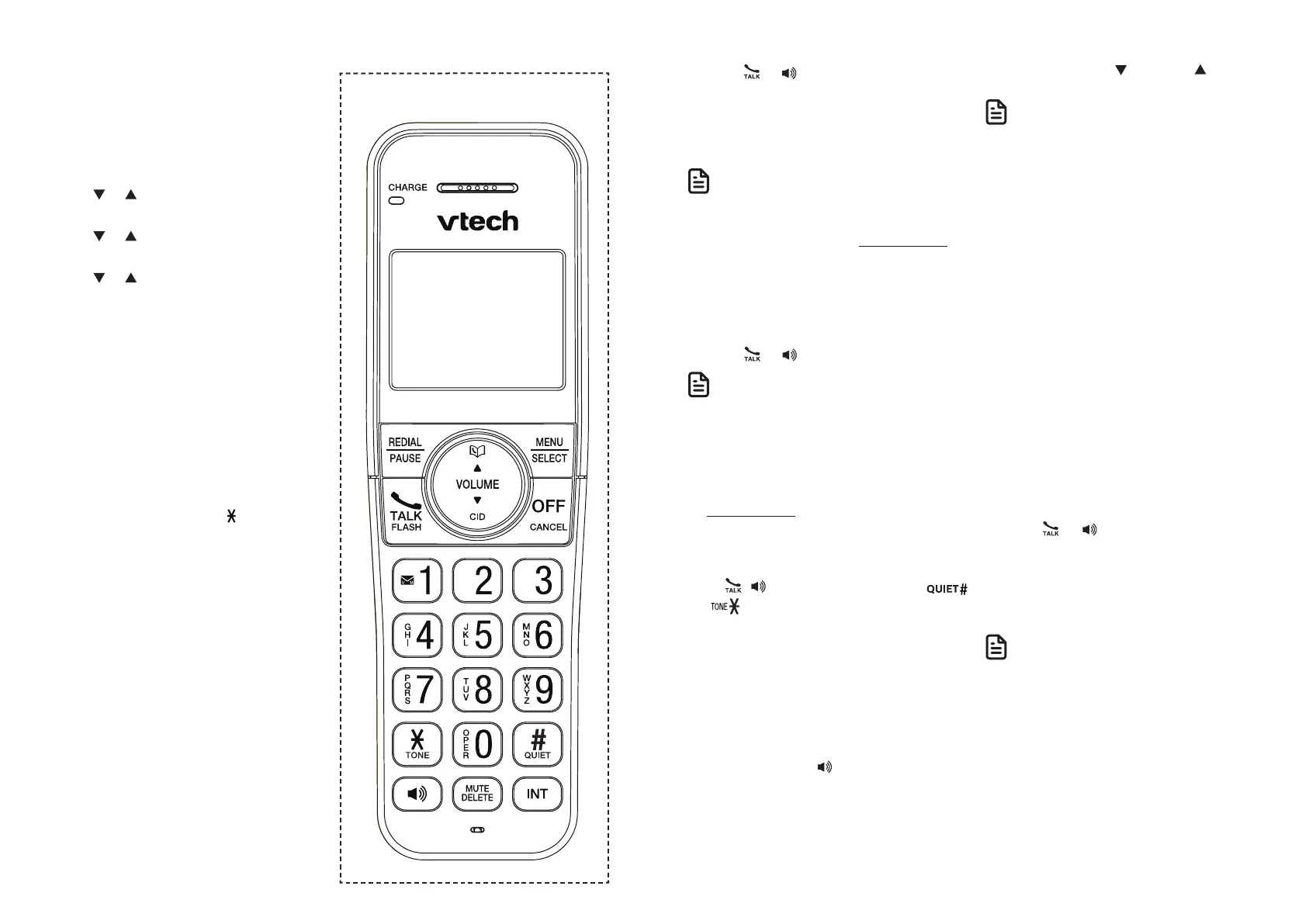
1. Press MENU when the handset is not
in use.
2. Press or to choose Settings, and
then press SELECT.
3. Press or to choose Dial mode, and
then press SELECT.
4. Press or to choose Touch-tone
or Pulse, and then press SELECT to
confirm your selection. You hear a
confirmation tone.
Temporary tone dialing
If you have pulse (rotary) service only,
you can switch from pulse to touch-tone
dialing temporarily during a call. This is
useful if you need to send touch-tone
signals to access your telephone banking
or long distance services.
1. During a call, press TONE .
2. Use the dialing keys to enter the
number. The telephone sends touch-
tone signals. It automatically returns to
pulse dialing mode after you end the
call.
Telephone Operations
Make a call
1. Press or on the handset.
2. When you hear a dial tone, dial the
number.
• The handset displays Unable to call
if the telephone line is in use.
• The handset shows the elapsed time as you
talk (in hours, minutes and seconds).
• While entering numbers, press and hold
PAUSE to insert a dialing pause
(a p appears).
Predial a call
1. Enter the telephone number.
2. Press or to dial.
• The handset displays Unable to call if the
telephone line is in use.
• The handset shows the elapsed time as you
talk (in hours, minutes and seconds).
• While entering numbers, press DELETE or
CANCEL to make corrections;
press and hold PAUSE to insert a dialing
pause (a p appears).
Answer a call
Press , , or any dialing key (0-9,
,
or ) to answer.
End a call
Press OFF on the handset, or place the
handset in the telephone base or
handset charger.
Speakerphone
During a call, press to switch between
the speakerphone
and the handset earpiece. When the
speakerphone is active, the handset
displays Speaker.
Volume
During a call, press /VOLUME/ to
adjust the listening volume.
• The handset and speakerphone volume
settings are independent.
• When the volume reaches the minimum or
maximum setting, you hear two beeps.
Mute
The mute function allows you to hear the
other party but the other party cannot
hear you.
• During a call, press MUTE. The handset
displays Muted until the mute function
is turned off.
• Press MUTE again to resume the
conversation. The handset briefly
displays Microphone on.
Join a call in progress
You can use up to two system handsets at
a time on an outside call.
• When a handset is already on a call,
press or on another handset to
join the call.
• Press OFF or place the handset in the
telephone base or handset charger to
exit the call. The call continues until all
handsets hang up.
• If you have paired a DECT 6.0 cordless
headset and speakerphone to the
telephone base, you can also join a call in
progress using the paired device. Refer
to the user’s manuals of the respective
product for more information.
Handset control key panel:


 To Next Page