98
Press right key,the image position be altered from up to down
Press left key,the image position be altered from left to right.
MENU
ENTER
or
Under convert negative and photo mode, must push the button
to the corresponding mode: such as push left “FILM” entering
negative scan mode; push right “PHOTO”entering picture scan
mode.
b.Choice of picture mode, under the picture scan mode main
menu,press until ,then press ENTER into
the choice of colour 、B&W.
(5).Method of playing scanned picture
Under the negative film and picture main menu mode,press ,
until ,then press ENTER into autoplay scanned picture mode,
press ENTER again to suspend automatic play,then enter preview
and choose picture mode, you can choose by pressing ;
press ENTER again into edit image mode,then you can delete、
exit、return to the main menu.
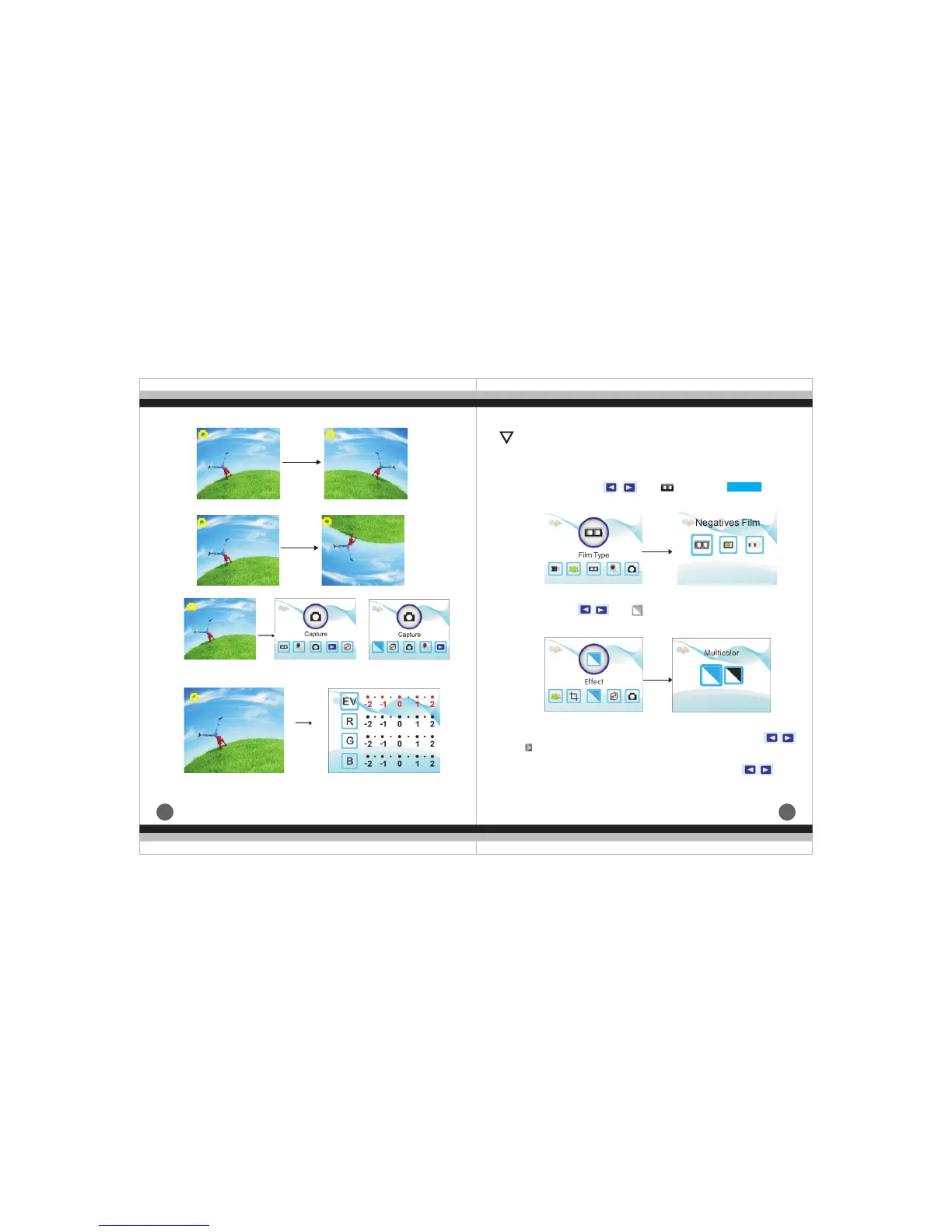
Mirror
Flip
EV 0.0 EV 0.0
EV 0.0
EV 0.0
c.Press MENU back to the main menu.
!
(4).Operation Guide
a.In main menu, press ,unti ENTER you
can chose negative、slide、B&W
,then press
Enter
Enter
d.press ENTER to set exposure compensation
EV 0.0
EV 0.0
b.Scanning mirror film or print mode and turning function.


 To Next Page