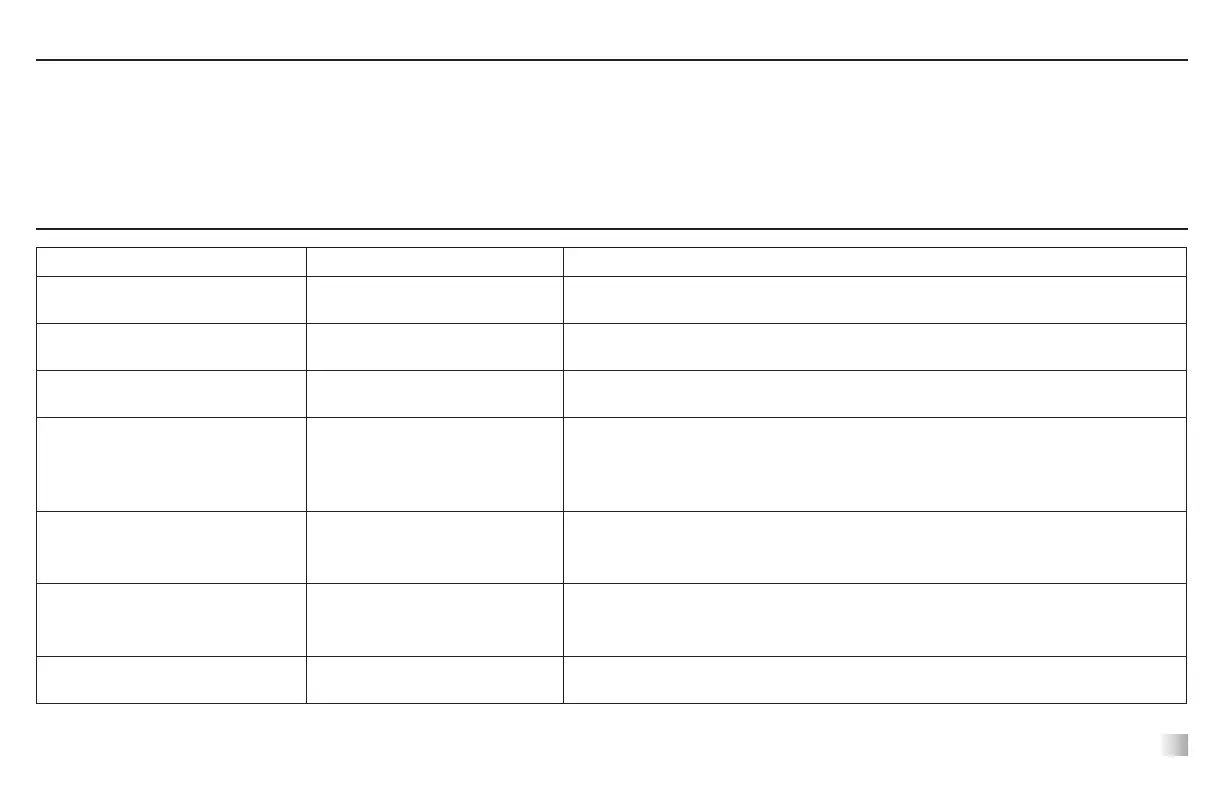
Problem Cause Solution
Unit will not run
Mechanical obstruction
Motor obstruction
Add or replace fuse as necessary.
If problem persists, please contact your VWR representative for repair.
Unit is excessively noisy
Sensor fan misaligned
Motor misaligned
Ensure that tray is secured tightly.
If problem persists, please contact your VWR representative for repair.
Unit not shaking at proper speed -
Perform speed calibration test on page 11
If problem persists, please contact your VWR representative for repair.
E3
Mechanical obstruction
Drive system failure
Ceased bearing
Drive belt broken
Remove mechanical obstruction.
If problem persists, the reason may be the drive system and should not be addressed by the
end user. Contact your VWR representative for repair.
E4
Improper positioning of load
Maximum load exceeded
Ensure the load is evenly distributed and does not exceed the maximum load capacity for
the unit. See “Load Sensing Function” on page 10.
If problem persists, please contact your VWR representative for repair.
E7 Unable to reach set speed
Reduce the speed setting or weight. This function can be disabled by following the instruc-
tions listed under “Additional Load Sensing Feature” on page 11. (NOTE: This function is
only available on models 3750 and up and is not available on Model 3500 shakers.)
E8 Electronics error
This error cannot be xed by the end user.
Please contact your VWR representative for repair.
TeChnICal servICe
For more information or technical assistance contact your local VWR representative or visit www.vwr.com.
Web resources: Visit VWR’s website at www.vwr.com for:
• Complete technical service contact information
• Access to VWR’s Online Catalogue, and information about accessories and related products
• Additional product information and special offers
TroUbleshooTIng
12








 To Next Page