9 Appendix II
102
WABCO Maintenance Manual MM-0112 (Revised 07-18)
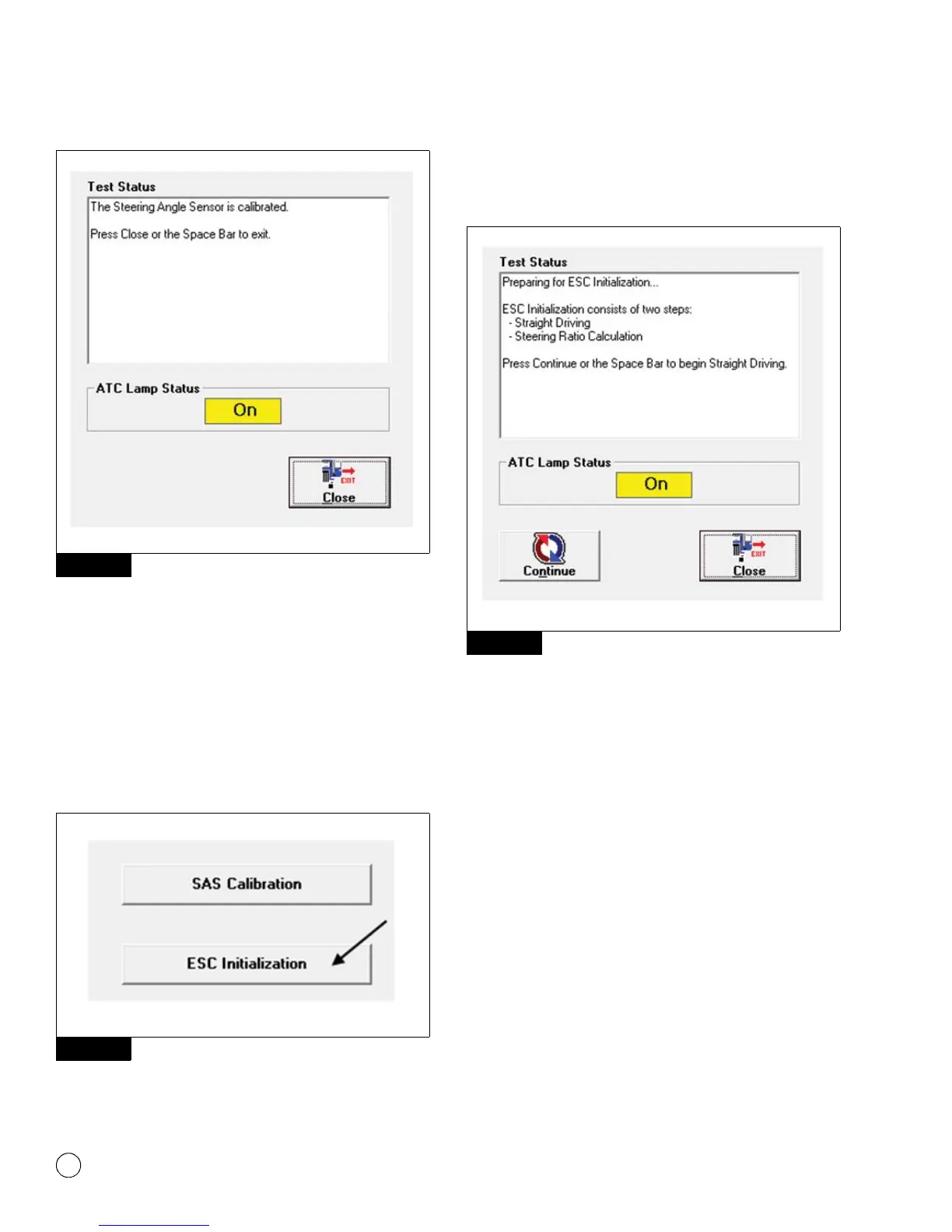
Figure 9.11
The SAS calibration is now completed. The ATC lamp will blink
continuously to inform driver ECU is in learning mode.
If SAS calibration fails; recheck the SAS connection and verify SAS
mounting. Cycle ignition and retry SAS calibration again.
ESC Initialization
Access the ESC EOL menu as in SAS calibration but instead in the
message box that appears, click the “ESC Initialization” button.
Figure 9.12.
Figure 9.12
Check the message box that appears. Press the space bar or click
the “Continue” button when ready to proceed. Figure 9.13. The ATC
lamp will start blinking to inform driver ECU is in learning mode.
Figure 9.13
Tip: Carefully follow the instructions that appear in the
message box. Figure 9.13. Once the ESC initialization is
started, the messages will automatically change as the
requirements are met. DO NOT click the “continue” button
again as this may cause the process to fail. The ESC
Initialization procedure requires the vehicle to be driven.
NOTE: If SAS calibration was completed before ESC initialization, the
ATC lamp will be continuously blinking before ESC initialization
begins. Figure 9.14.
Figure 9.11
Figure 9.12
Figure 9.13
4010681a


 To Next Page