F-001
20
15
A
B
C
Air-Gap
Switch*
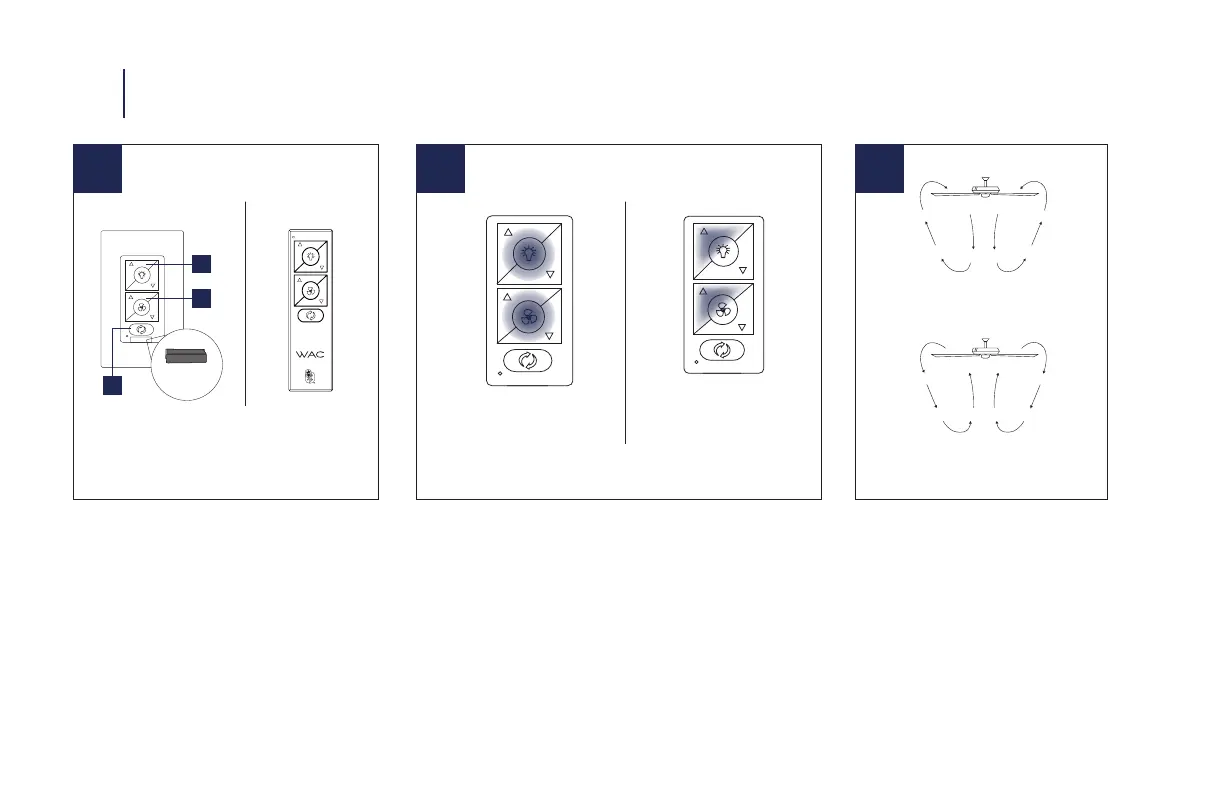
12 CONTROLLING THE FAN
Your fan is pre-paired. If you need to pair your fan refer to
step 14.
A: Light On/O, Bright/Dim +/- B: Fan On/O, Fan Speed +/-
C: Reverse Button (Summer and Winter Modes)
Air-Gap Switch: Pull tab to power o in case of emergency.
Not necessary for normal fan operation (only included with
wall control).
Summer Mode
(Counter-Clockwise)
Winter Mode
(Clockwise)
13 14
Pairing
Press and hold buttons
for 10-15 seconds.
Wall Control
* Air-Gap Switch only included
with wall control
Remote
Control
Unpairing
To purge, press and hold
buttons for 4 seconds.
NOTE: Your fan features 6 speeds. An audible tone will indicate
when the speed is increased or decreased. When the fan has
reached the minimum/maximum speed level the fan will beep twice
NOTE: Pairing must be completed within 3 minutes of turning the
power on to the fan receiver.



 To Next Page