23F-001
17 18 19
WACFan_841812
NOTE: Changes to your Wi-Fi network settings (SSID or Security
Passphrase) will prevent your fan from connecting to the cloud.
You can re-establish connectivity by performing a Wi-Fi Reset and
using the WAC app to recongure the fan to connect to the net-
work with the new settings.
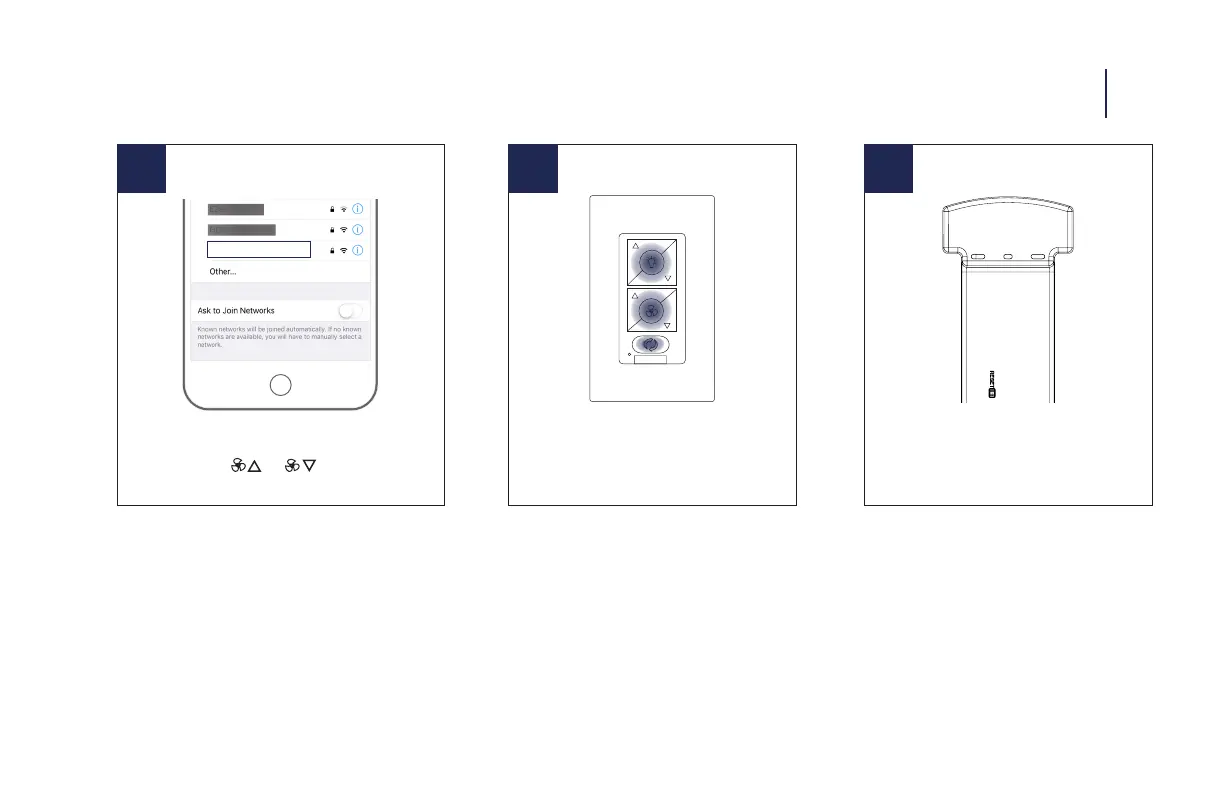
Factory Reset
Press and hold buttons for 10 seconds
Receiver Factory Reset
Press the reset button on the receiver
until the receiver beeps
Fan Wi-Fi Reset
Press and hold the and buttons until the LED
blinks green and the receiver beeps
FACTORY RESET 13
NOTE: Factory reset will remove remote control(s), wall control(s)
and WAC app connections.
NOTE: You may need to factory reset your receiver if you experi-
ence issues with network connectivity. Once you factory reset your
receiver - go back into the app and follow the steps. The factory
reset from the wall control only works if the wall control was suc-
cessfully paired to the fan.



 To Next Page