Contents
Index
Contents
27
Index
27
S
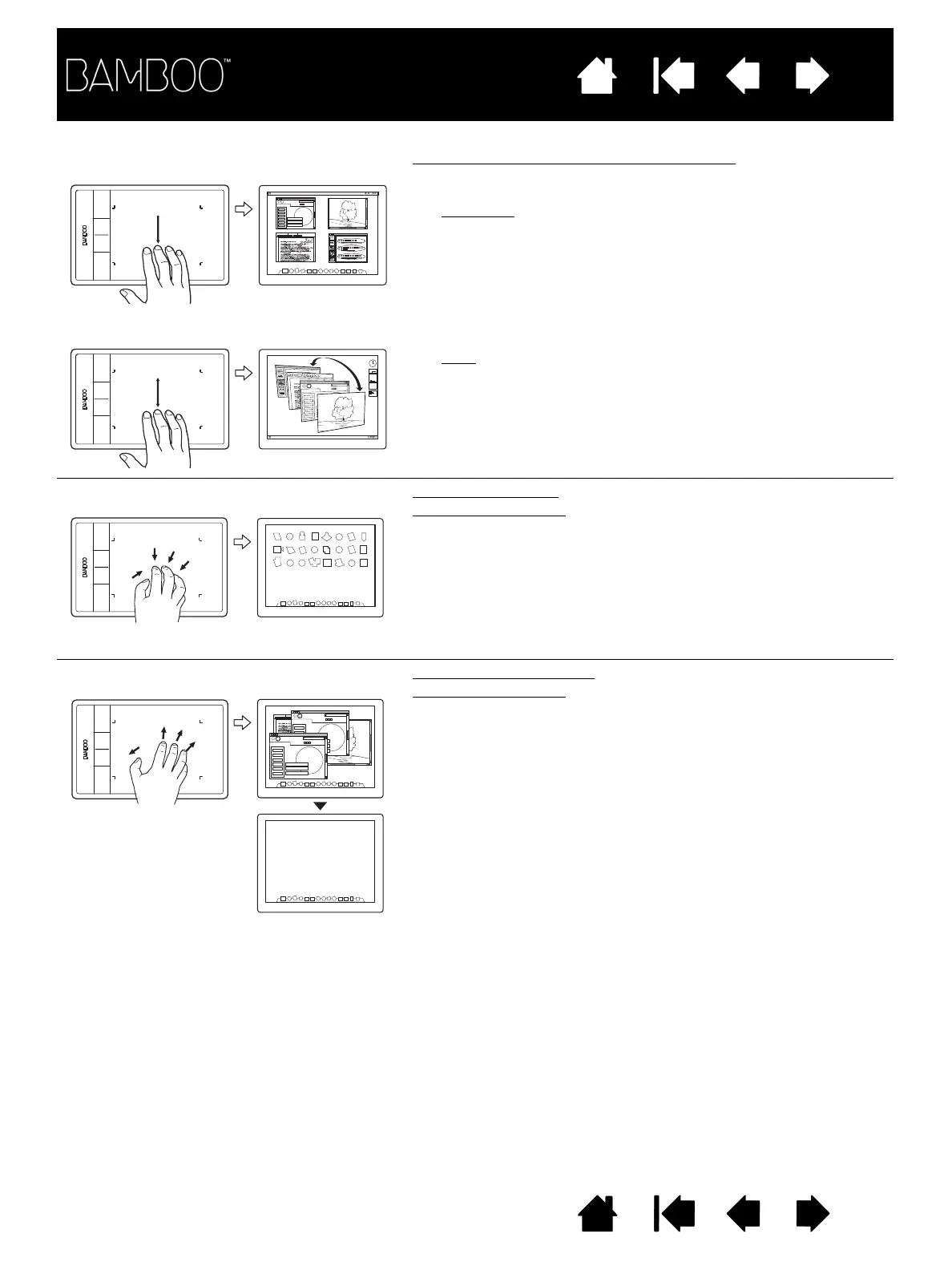
WIPE
DOWN
FOR
F
LIP
3D/
E
XPOSÉ Open Flip 3D (Windows) or Exposé (Mac)
Using four fingers spaced slightly apart, swipe down.
•Windows
: Your first swipe opens Flip 3D. Swipe down
again to close Flip 3D. Not available for Windows XP.
Alternatively, move your fingers down 1 cm (0.4 inch) to
open Flip 3D. Without lifting your fingers, continue
moving downward to select applications to the left, or
move upward to select applications to the right. Lift any
finger to dismiss Flip 3D.
•Mac
: Your first swipe opens Exposé. Swipe down again
to close Exposé.
P
INCH
FOR
L
AUNCHPAD
Launchpad (pinch)
Mac OS 10.7.x only.
Place your thumb and three fingers on the tablet surface,
then pinch them together to fade your open windows and
display all of your apps.
S
PREAD
TO
SHOW
DESKTOP
Show desktop (spread)
Mac OS 10.7.x only.
Place your thumb and three fingers on the tablet surface,
then spread them apart to show the desktop view.












 To Next Page