EasyManua.ls Logo

Walchem WebMaster - Direct Modem Set-Up for Windows Vista 64

Walchem WebMaster
73 pages
Print Icon
To Next Page IconTo Next Page
To Previous Page IconTo Previous Page
Loading...
Quick Start Guide SECTION 5: WINDOWS VISTA (64-bit)
P/N 180273 Rev. N April 2017
56
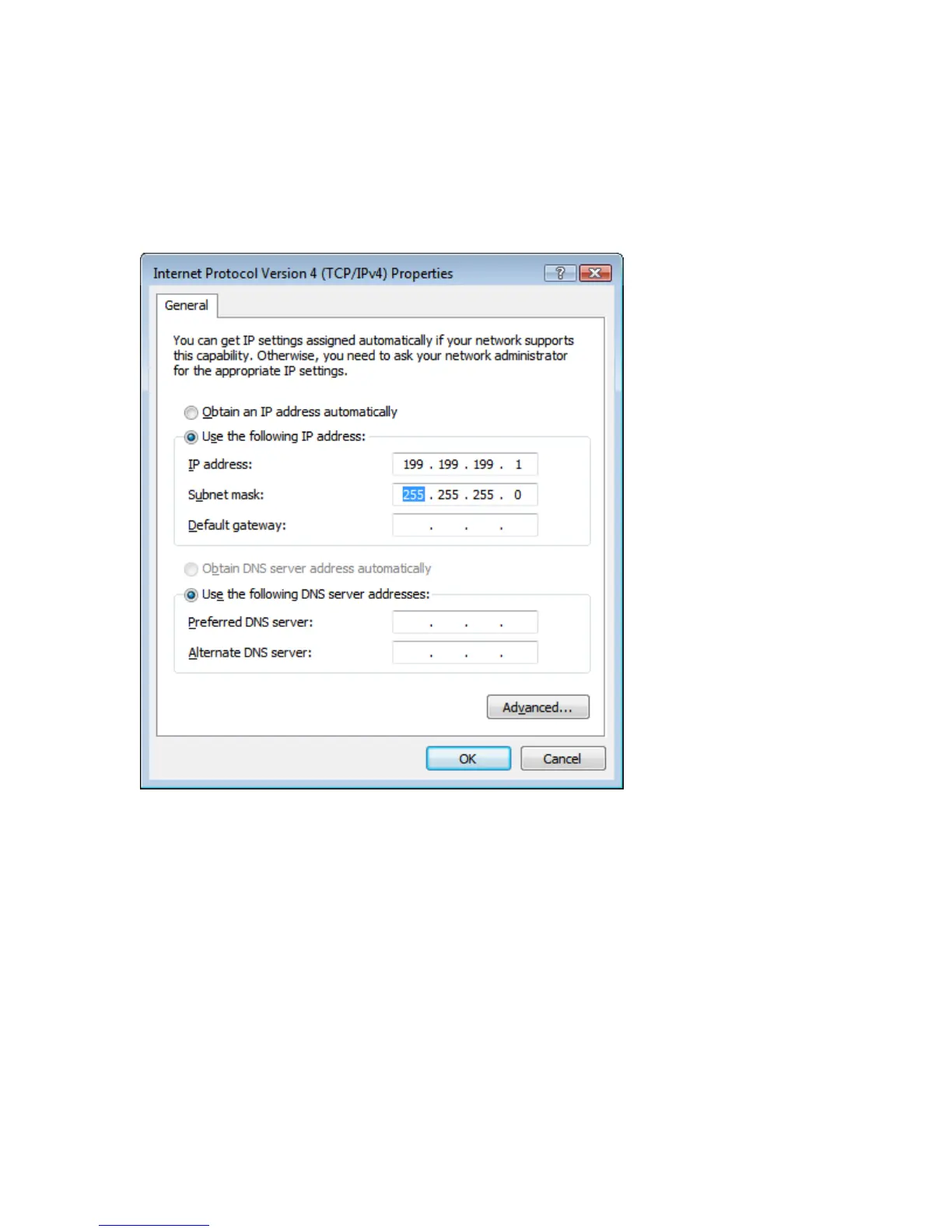
Step 9
► Select ‘Use the following IP address’
► Enter 199.199199.1 for the IP address and 255.255.255.0 for subnet mask
► Click ‘OK’ and you’re done!
Step 10
► Open your browser and type in 199.199.199.2 to access the WebMaster Login screen.
2. DIRECT MODEM SET-UP FOR WINDOWS VISTA 64
See Windows Vista 32 Direct Modem Set-up instructions

Other manuals for Walchem WebMaster

Related product manuals