English - 7 -
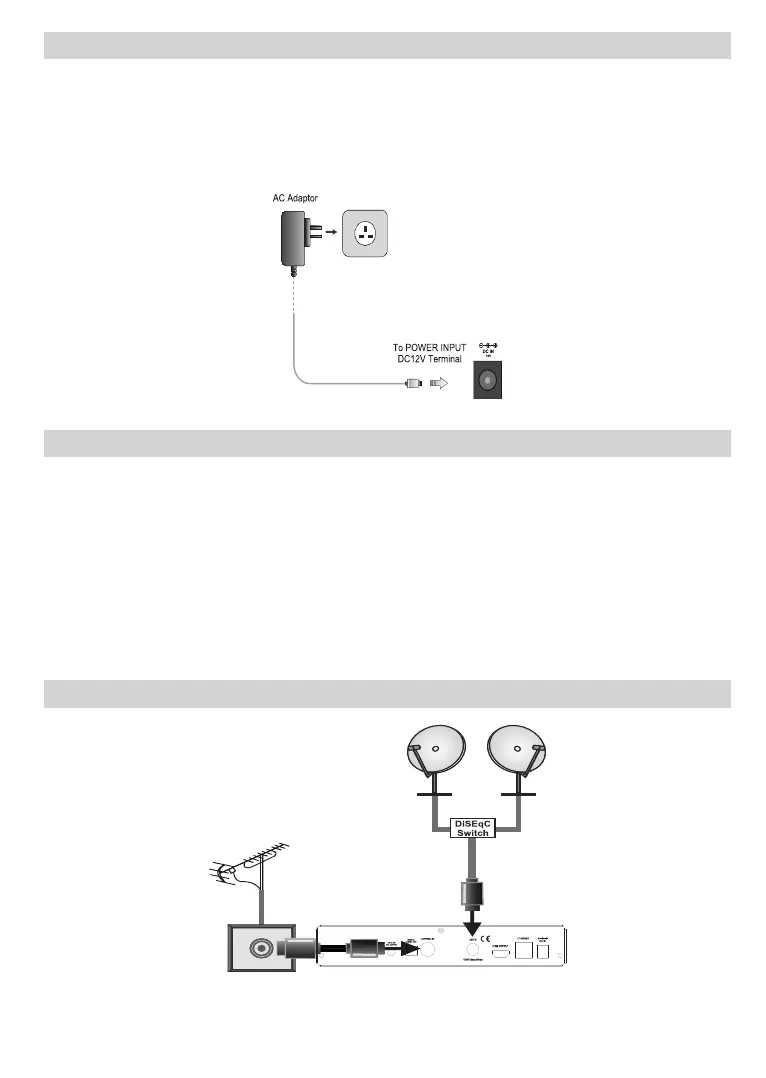
Power Connection
IMPORTANT: This set top box is designed to operate on 12V DC. For this, an adaptor is used which gives
12 V voltage. Connect this adaptor to a system that supplies 220-240 V AC, 50/60Hz.
After unpacking, allow the set-top box to reach the ambient room temperature before you connect the set to
the mains.
Note: If a car cigarette lighter socket power plug adaptor is going to be used, it should be noted that if the output voltage
reduces to lower than 12V, a smartcard error can be caused.
Power On-Off
Be sure that you put through all the cable connections. After plugging in the power adaptor cord of the set-
top-box to the mains supply, a LED on the front panel will illuminate alternately in red and green and stay red
in the end (Standby mode). When the set-top-box is first powered up please wait for a while before activating
the receiver since booting of software will take some time. Then, you can turn on your digital set-top box by
pressing the standby button on the remote control. You will see that the LED on the front panel will illuminate
alternately in green and red and stay green in the end (Power on mode).
Auto Power Down
The Auto Power Down option in Settings>More menu is set to 4 Hours by default. If the box has been left
on and not been operated during the set time, it will switch into standby mode after the set time has expired.
A message will be displayed two minutes before going into standby mode. You can disable this option by
setting as Off or set between 1 to 8 hours.
Antenna Connection
Back side
of the box
Use ANTENNA IN and/or LNB IN sockets in order to connect your box to an antenna and/or satellite system.
Note: If there is a problem with the /1% connection, a warning 26' will be displa\ed on the screen. 3lease check and ¿[
LNB connection.
35040506



 To Next Page