Turn
left
Turn
right
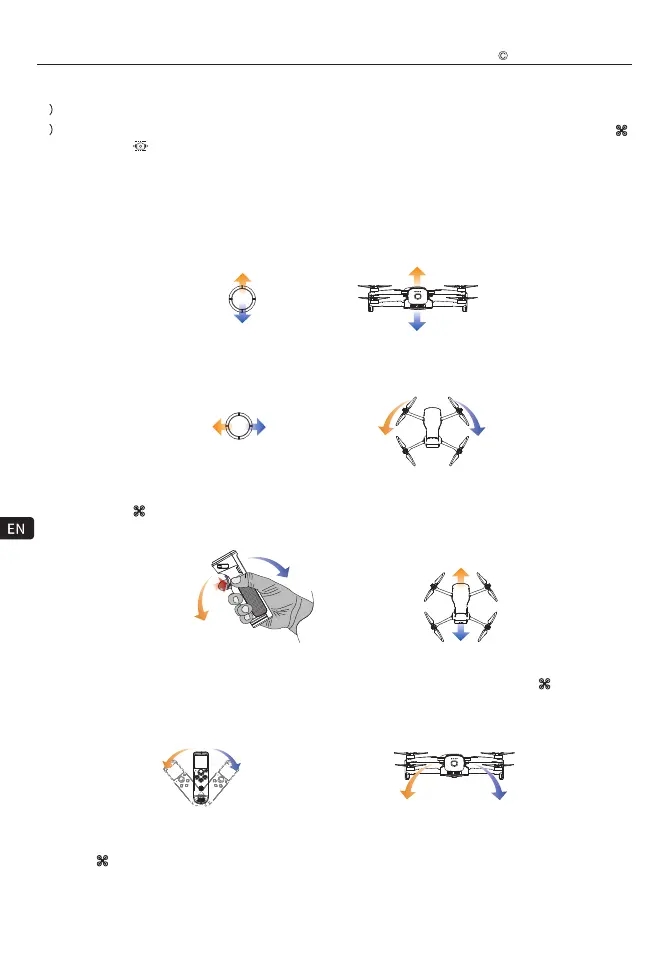
1)Somatosensory Control/Button Control
Turning up
Fly upwards
Fly Downwards
Turning down
Turning
right
Turning
left
Tilt left Tilt Right
Tilt left Tilt Right
A B
C
A
B
C
Fly forward
Fly backward
Tilt forward
Tilt backward
Control up / down
After the aircraft is unlocked and taken off, dial the joystick upwards to control the aircraft to fly upwards, and dial
the joystick downwards to control the aircraft to fly downwards.
Control heading
After the aircraft is unlocked and taken off, dial the joystick to the left to turn the aircraft to the left, and dial the
joystick to the right to turn the aircraft to the right.
Control fly forward/ fly backward
After the aircraft is unlocked and taken off, double-click the somatosensory control switch to switch the somatosensory
control object to " " aircraft, press and hold the somatosensory control switch and tilt the voice handle forward
to control the aircraft to fly forward, press and hold the somatosensory control switch and tilt the voice handle back
to control the aircraft to fly backward.
Control to fly left/fly right
Double-click the somatosensory control switch to switch the somatosensory control object to " " aircraft, (after
the aircraft is unlocked and take off) press and hold the somatosensory control switch while tilting the voice handle
to the left to control the aircraft to tilt left (fly to the left), press and hold the somatosensory control switch and tilt
the voice handle to the right to control the aircraft to tilt right (fly to the right).
6
12) Power button
13
Upgrad/charging port
14
Somatosensory control switch: Double-click to switch the somatosensory control object (switch between “ ”
aircraft and “ ” gimbal); press and hold to turn on the somatosensory control; release to turn off the
somatosensory control;
* Notice:
1) After the WK-V8 controller is powered on for the first time, the somatosensory control object used for the first
time is " " aircraft by default. Please switch the somatosensory control object according to your needs;
2) Please fly in an open environment without shielding and electromagnetic interference.
Walkera All Rights Reserved
T210 MINI(WK-V8)Quick operation guide



 To Next Page