19
6. Preparation for operation
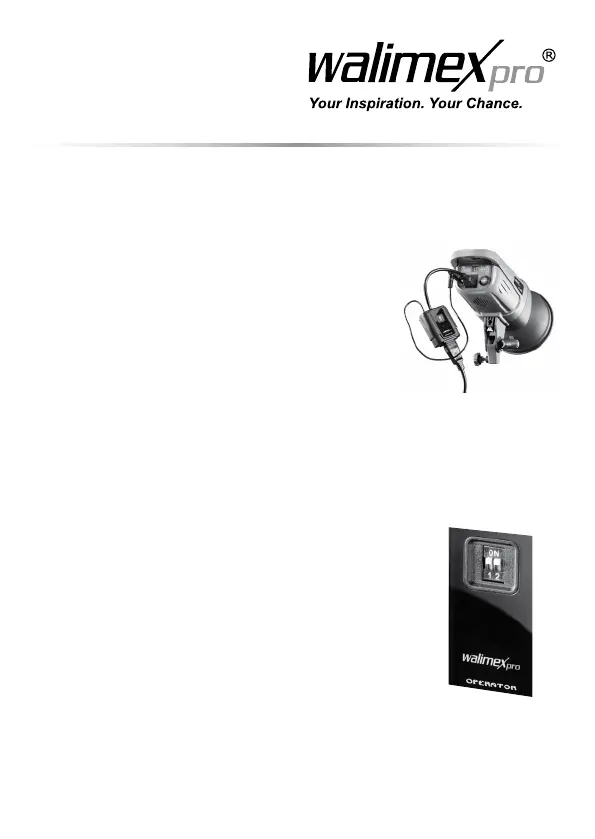
6.1Connectthereceiverwiththestudioashandpowersupply
1. Switchostudioashdevice.
2. Insertthesynccordinthejackofthestudioash.
3. Plug the power cord of the receiver in the jack of
thestudioash.
4. Compare the local power supply with the
connected load of the Remote Trigger.
See Technical Specications.
Ifthevaluesshoulddier,pleasecontact
info@foto-walser.de or tel. +49 8432 9489-0.
5. Connect the power cord with the socket on the
device and with the power socket.
6.2 Adjust frequency
You have the opportunity to operate the Remote
Triggerwith4dierentfrequencies.Itisimportant,that
you make the same adjustments for transmitter and
receiver as in the following example.
1. Adjust the frequency on the backside of the
transmitter. Adjust the levers e.g. on 1 and 2.
2. Adjust the frequency on the backside of the
receiver. Adjust the levers e.g. on 1 and 2.


 To Next Page