EasyManua.ls Logo

Wang 2200 - Opening the Access Door

Wang 2200
35 pages
Print Icon
To Next Page IconTo Next Page
To Previous Page IconTo Previous Page
Loading...
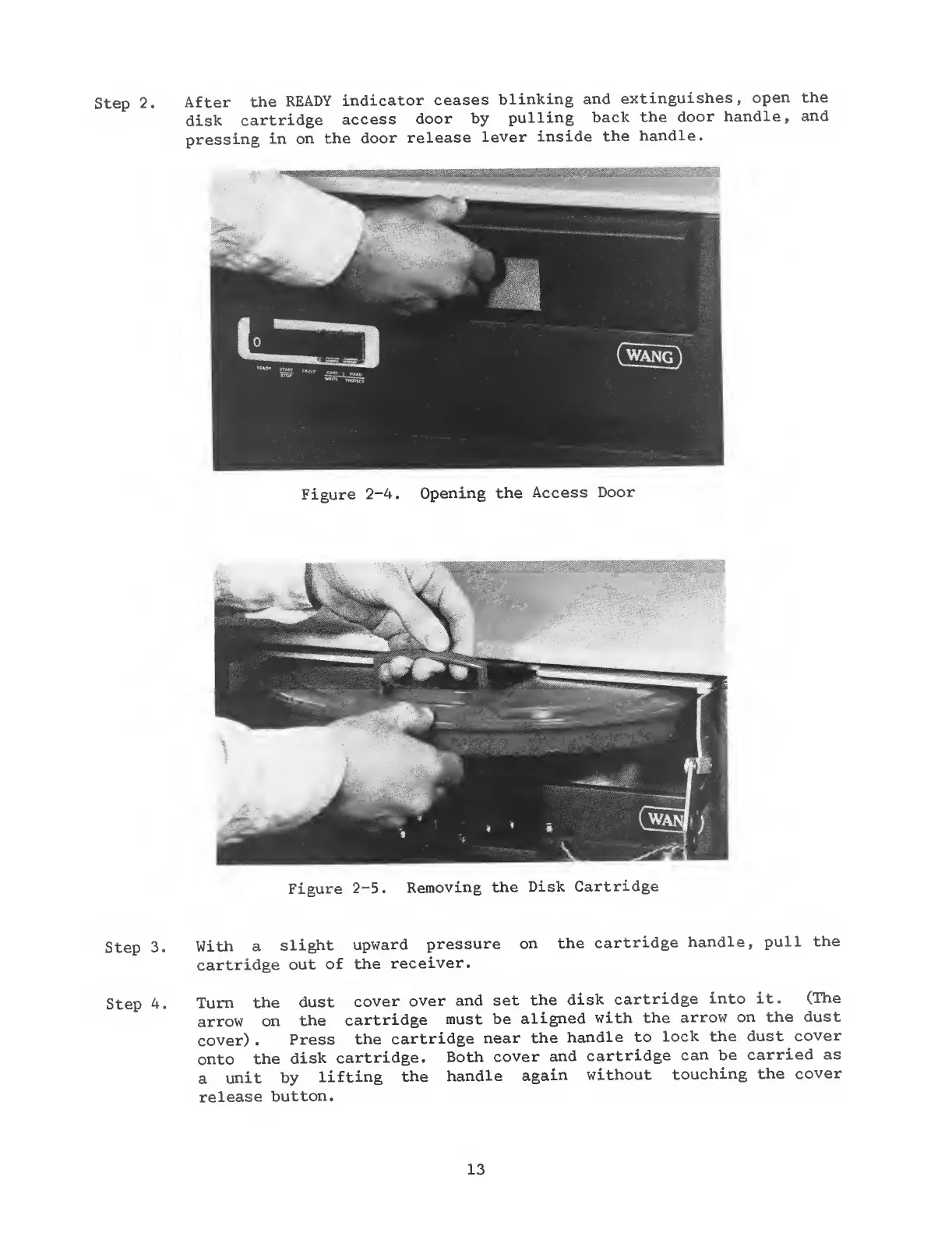
step
2.
After
the
READY
indicator
ceases
blinking
and
extinguishes,
open
the
disk
cartridge
access
door by
pulling
back
the door
handle,
and
pressing
in on
the
door
release
lever
inside
the
handle.
1",
-; -,^*
':T^'^^%''^rf^''&^'
,
Figure
2-4.
Opening
the
Access
Door
Figure
2-5.
Removing
the
Disk
Cartridge
Step
3.
Step
4.
With a
slight
upward
pressure
cartridge
out
of the
receiver.
on
the
cartridge
handle,
pull
the
Turn
the
dust
cover
over and
set
the
disk
cartridge
into it.
(The
arrow
on
the
cartridge
must be
aligned
with
the
arrow on
the dust
cover)
.
Press
the
cartridge
near
the
handle to
lock the dust
cover
onto
the
disk
cartridge.
Both
cover
and
cartridge
can be
carried as
a
unit by
lifting
the
handle
again
without
touching
the
cover
release
button.
13

Related product manuals