Waterlogic 4 Firewall User Manual- Issue 1, January 2011
8
Waterlogic 4 Firewall User Manual- Issue 1, January 2011 9
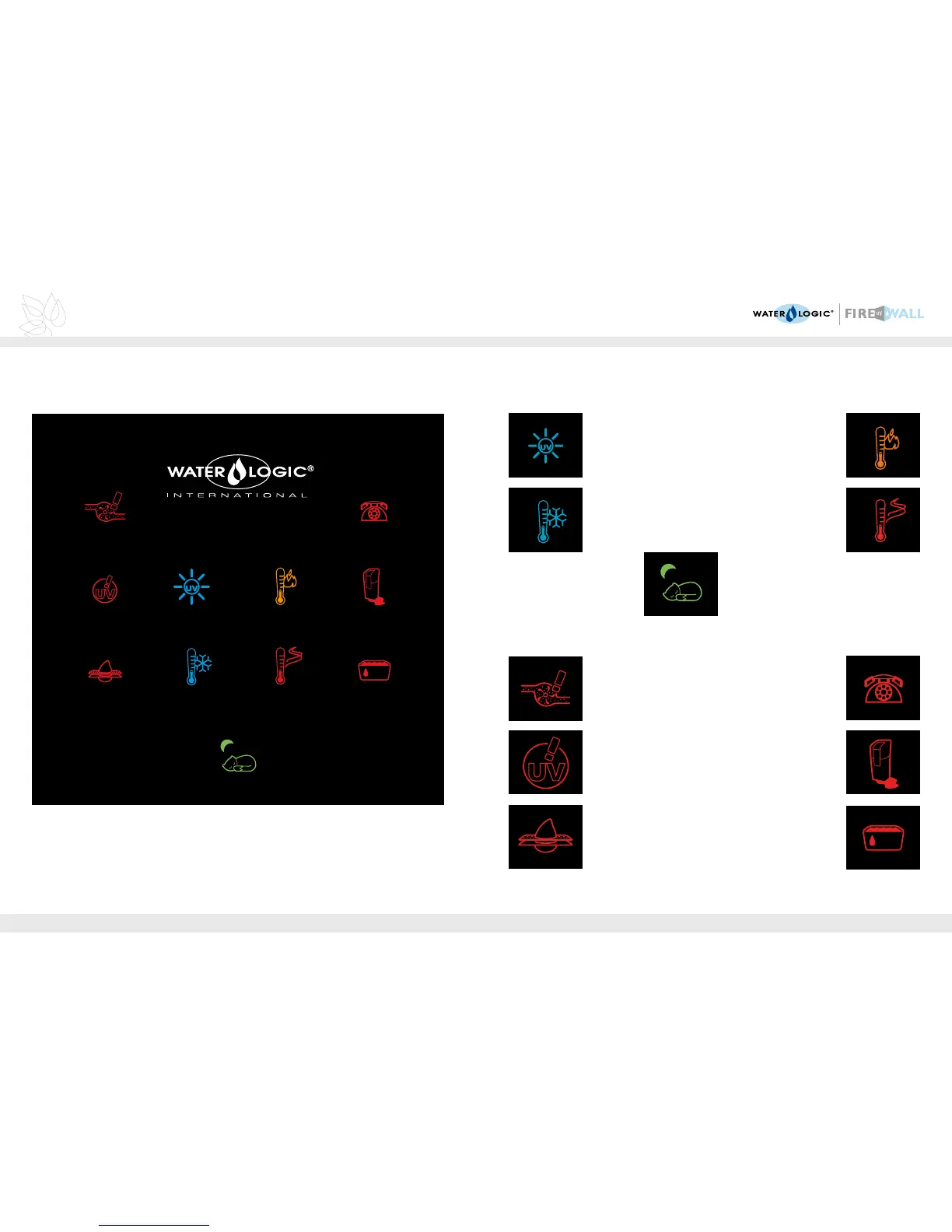
DISPLAY PANEL AND ICONS
The Waterlogic 4 Firewall uses simple icon symbols to advise on the status and functionality
of your water dispenser. Please see over the page for the action to be taken if one of these
icons should be displayed.
ADVISORY ICONS
The UV lamp is
operating
The Waterlogic 4
Firewall is chilling
Sleep Mode -
press any button to
bring machine out
of sleep mode
Extra hot water has
been selected
The Waterlogic 4
Firewall is heating up
No water supply -
check the water supply
is turned on, if fault
persists please call your
authorised service agent
The UV lamp has
failed - please call your
authorised service
agent
Filter needs replacing -
please call your
authorised service agent
Note - If all the icons should flash and an audible alarm sounds, please switch the
machine off immediately and call your authorised service agent.
Please call your
authorised
service agent
A fault has been
detected - please call
your local authorised
service agent
The drip tray is full -
please empty the
drip tray
MALFUNCTION ICONS



 To Next Page