EasyManua.ls Logo

Wavetek 132 - Section 2 Operation - Modes; Function Generator Operation; Voltage Controlled Generator Operation

Default Icon
52 pages
Print Icon
To Next Page IconTo Next Page
To Previous Page IconTo Previous Page
Loading...
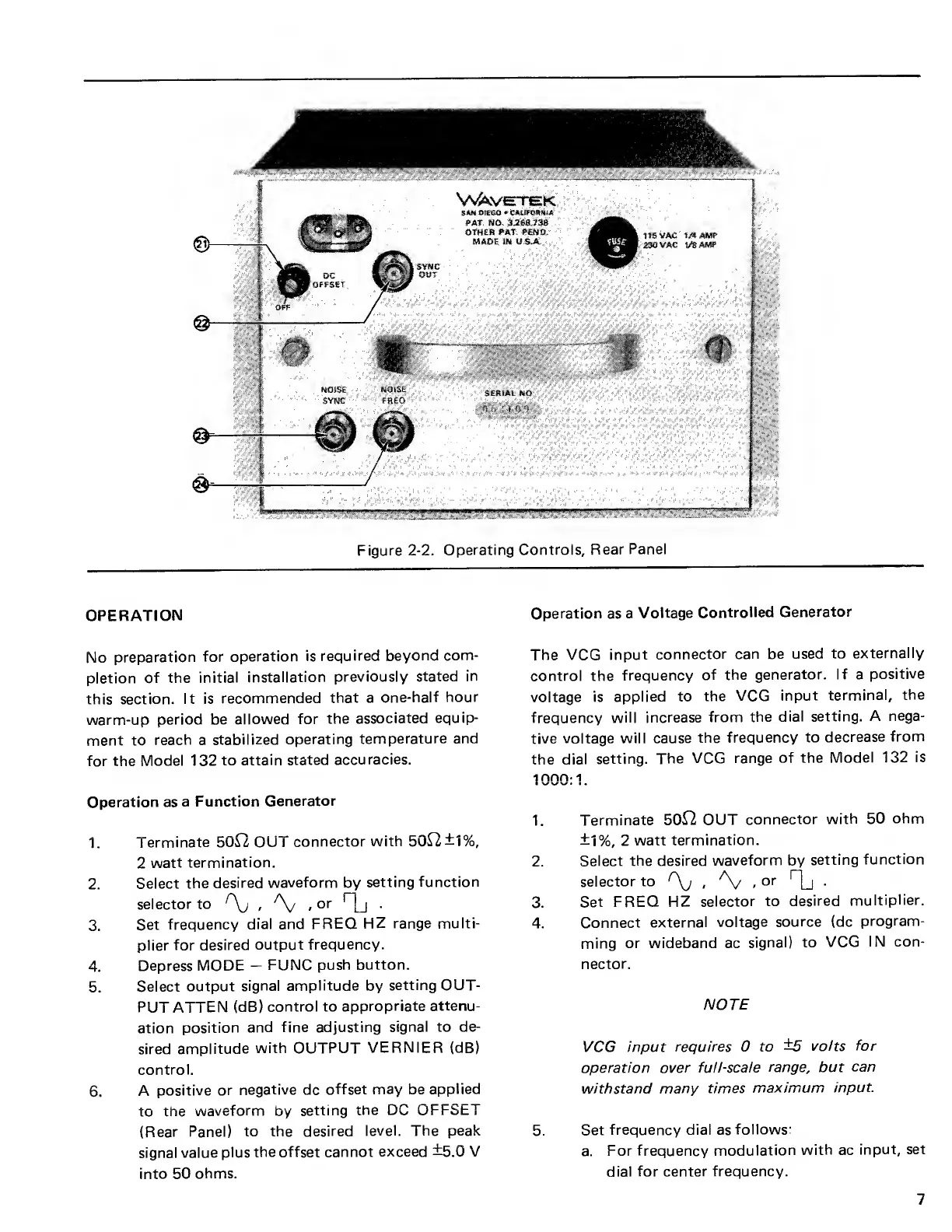
Figure
2-2.
Operating
Controls,
Rear
Panel
OPERATION
No
preparation
for
operation is
required
beyond com-
pletion of
the
initial installation
previously stated
in
this
section. It is
recommended
that a
one-half
hour
warm-up
period be
allowed
for
the associated
equip-
ment to
reach
a
stabilized
operating
temperature
and
for the
Model 132
to
attain stated
accuracies.
Operation
as
a
Function
Generator
1.
Terminate 5012 OUT
connector
with 5012 ±1%,
2
watt
termination.
2.
Select
the
desired
waveform
by
setting
function
selector
to
/
\j
,
.
or
1
|j
.
3.
Set
frequency
dial and FREQ
HZ range multi-
plier
for desired
output
frequency.
4.
Depress MODE
FUNC
push button.
5.
Select
output
signal amplitude
by
setting OUT-
PUT ATTEN
(dB)
control to
appropriate
attenu-
ation
position
and fine adjusting
signal to de-
sired
amplitude
with OUTPUT
VERNIER (dB)
control.
6.
A
positive
or
negative
dc
offset
may
be
applied
to
the
waveform
by
setting
the DC OFFSET
(Rear
Panel)
to the desired
level. The peak
signal
value
plus
the offset cannot
exceed
±5.0
V
into 50
ohms.
Operation as
a
Voltage
Controlled
Generator
The
VCG
input
connector can be
used to
externally
control
the
frequency
of
the
generator.
If
a
positive
voltage
is
applied to
the VCG
input
terminal,
the
frequency
will increase
from
the
dial setting.
A
nega-
tive
voltage
will cause
the
frequency
to decrease
from
the
dial
setting.
The VCG
range of
the Model
132 is
1000:
1
1.
Terminate
5012 OUT
connector
with 50
ohm
±1%,
2
watt
termination.
2.
Select
the desired
waveform
by
setting
function
selector to
^\j
,
,
or
Oj
3.
Set
FREQ HZ
selector
to
desired
multiplier.
4.
Connect
external
voltage
source (dc
program-
ming
or
wideband ac
signal) to
VCG
IN con-
nector.
NOTE
VCG input
requires 0 to
±5 volts
for
operation over
full-scale
range,
but
can
withstand
many times
maximum
input.
5.
Set
frequency dial as
follows:
a.
For frequency
modulation
with
ac
input, set
dial
for center
frequency.
7

Other manuals for Wavetek 132

Related product manuals