EasyManua.ls Logo

Wavetek 132 - Page 8

Default Icon
52 pages
Print Icon
To Next Page IconTo Next Page
To Previous Page IconTo Previous Page
Loading...
X100K
SEQUtMCEVENGTM
iOlSEFREO
hA
OUTPUT
A
I TEN
!<jb:
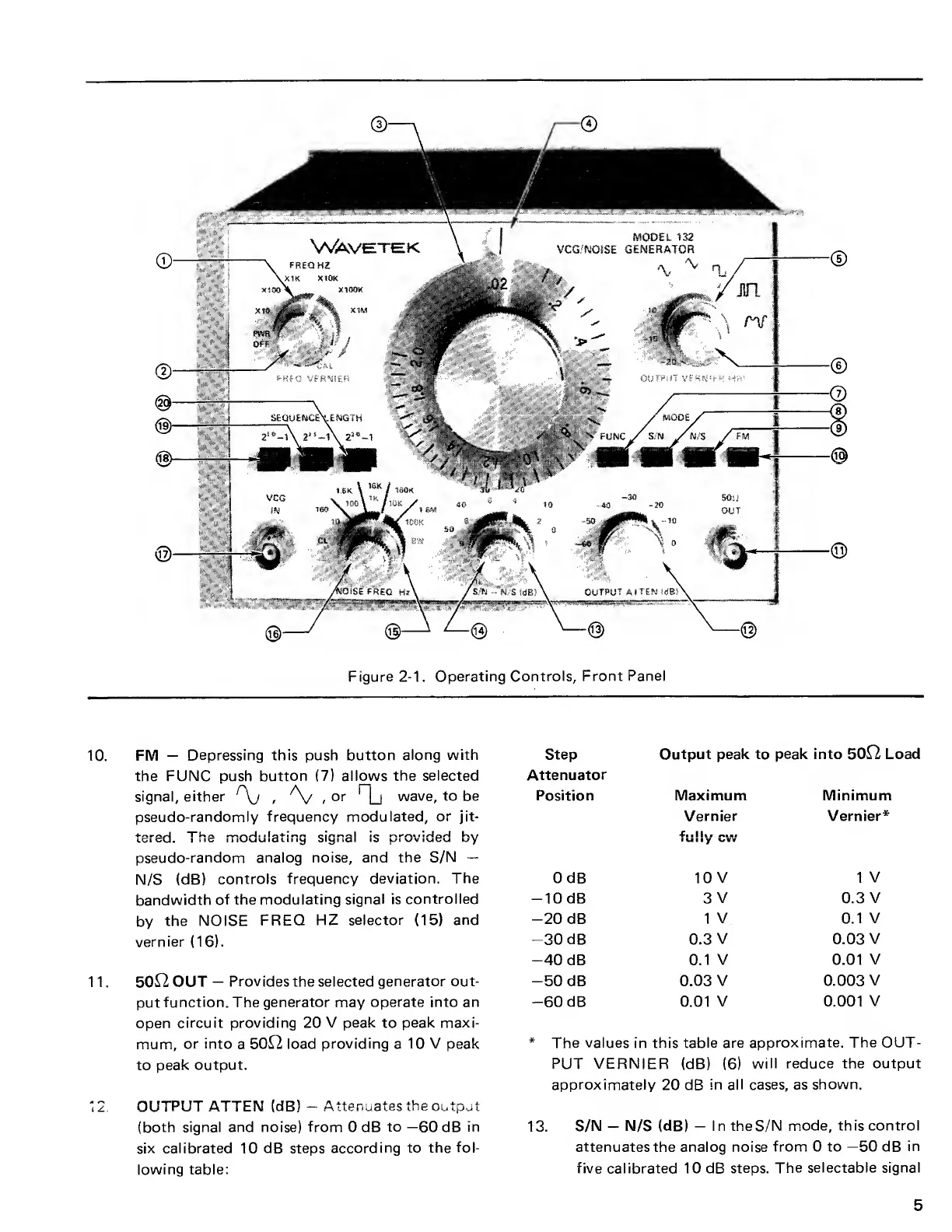
Figure
2-1
.
Operating
Controls, Front
Panel
10.
FM
Depressing this
push
button
along with
the FUNC
push button
(7)
allows
the selected
signal,
either
Ay
,
Ay
,
or
Oj
wave, to be
pseudo-randomly
frequency modulated, or jit-
tered.
"The modulating signal is provided by
pseudo-random analog noise, and
the S/N
N/S (dB)
controls
frequency deviation.
The
bandwidth
of the
modulating signal is
controlled
by
the
NOISE FREQ
FIZ selector
(15)
and
vernier
(16).
11. 5012
OUT
Provides
the
selected generator out-
put
function.
The generator
may
operate into an
open
circuit providing 20
V peak to peak maxi-
mum,
or into
a
5012 load
providing
a
10 V peak
to
peak output.
12.
OUTPUT ATTEN
(dB)
-
Attenuates the
output
(both signal and noise)
from
0 dB
to
—60
dB
in
six
calibrated 10 dB steps according
to the
fol-
lowing table:
Step
Output
peak to peak into
5012 Load
Attenuator
Position
Maximum
Vernier
fully
cvv
Minimum
Vernier*
0 dB
10 V 1
V
10 dB 3
V
0.3
V
-20
dB
1
V 0.1
V
-30
dB 0.3
V
0.03
V
-40
dB
0.1 V
0.01 V
-50
dB
0.03
V
0.003
V
-60
dB 0.01
V 0.001
V
*
The values
in
this table are
approximate. The OUT-
PUT VERNIER
(dB)
(6)
will reduce the output
approximately
20 dB
in all cases, as
shown.
13.
S/N
N/S (dB)
I n theS/N
mode, this
control
attenuates
the
analog
noise
from 0 to
—50
dB
in
five calibrated 10 dB
steps.
The selectable signal
5

Other manuals for Wavetek 132

Related product manuals