24
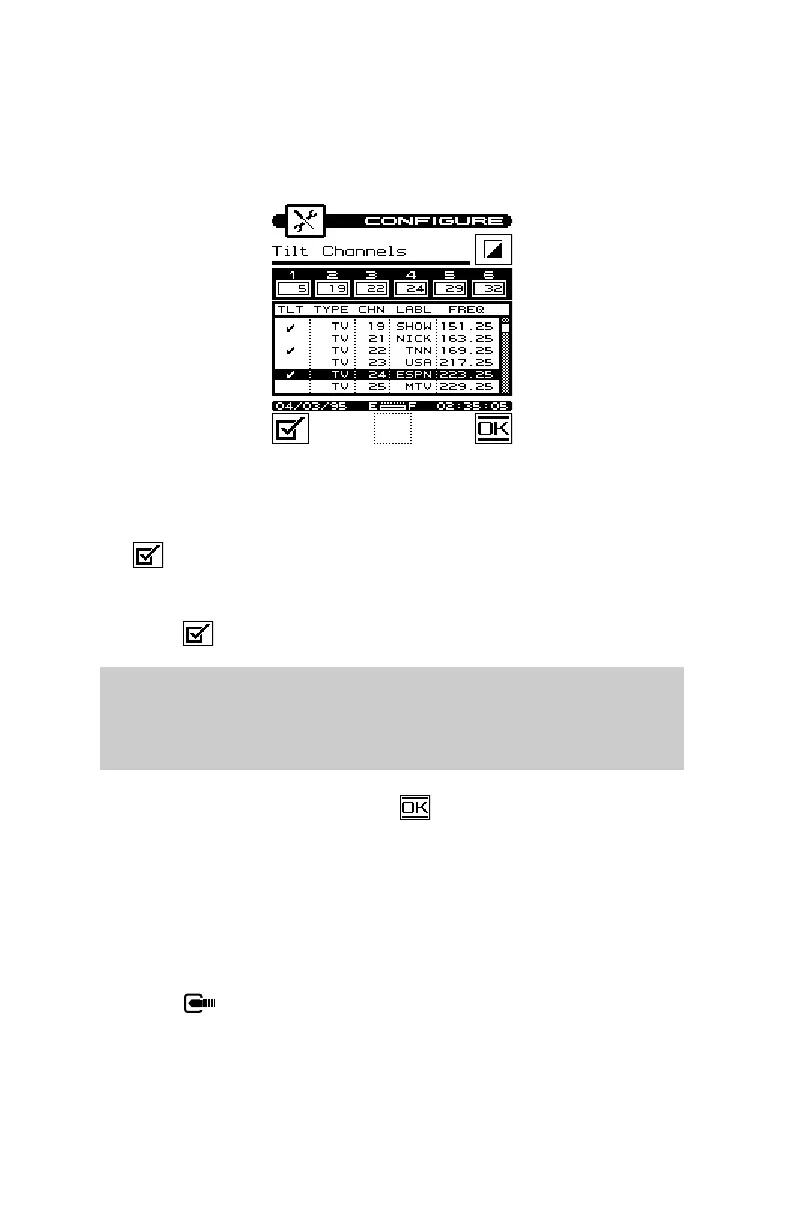
Up to six channels can be selected. To select a channel, use the up
or down arrow to highlight the desired channel in the list, then press
the softkey. A check mark appears in the left-hand column of
the list indicating that this is now a TILT channel. Also, the
channel number appears in one of the six boxes above the list.
Press the a second time to deselect the TILT channel.
Note
The TILT channel numbers are displayed above the list in order of
increasing frequency — not in the order in which they were se-
lected.
When you have finished, press the softkey.
CHANNEL PACKAGES
Channel packages allow you to organize channels into groups or
tiers. You can specify which channels you have installed for a
subscriber when checking an installation. Your microStealth can
then determine if the channels are installed properly.
Press the key to display a list of channel packages.


 To Next Page