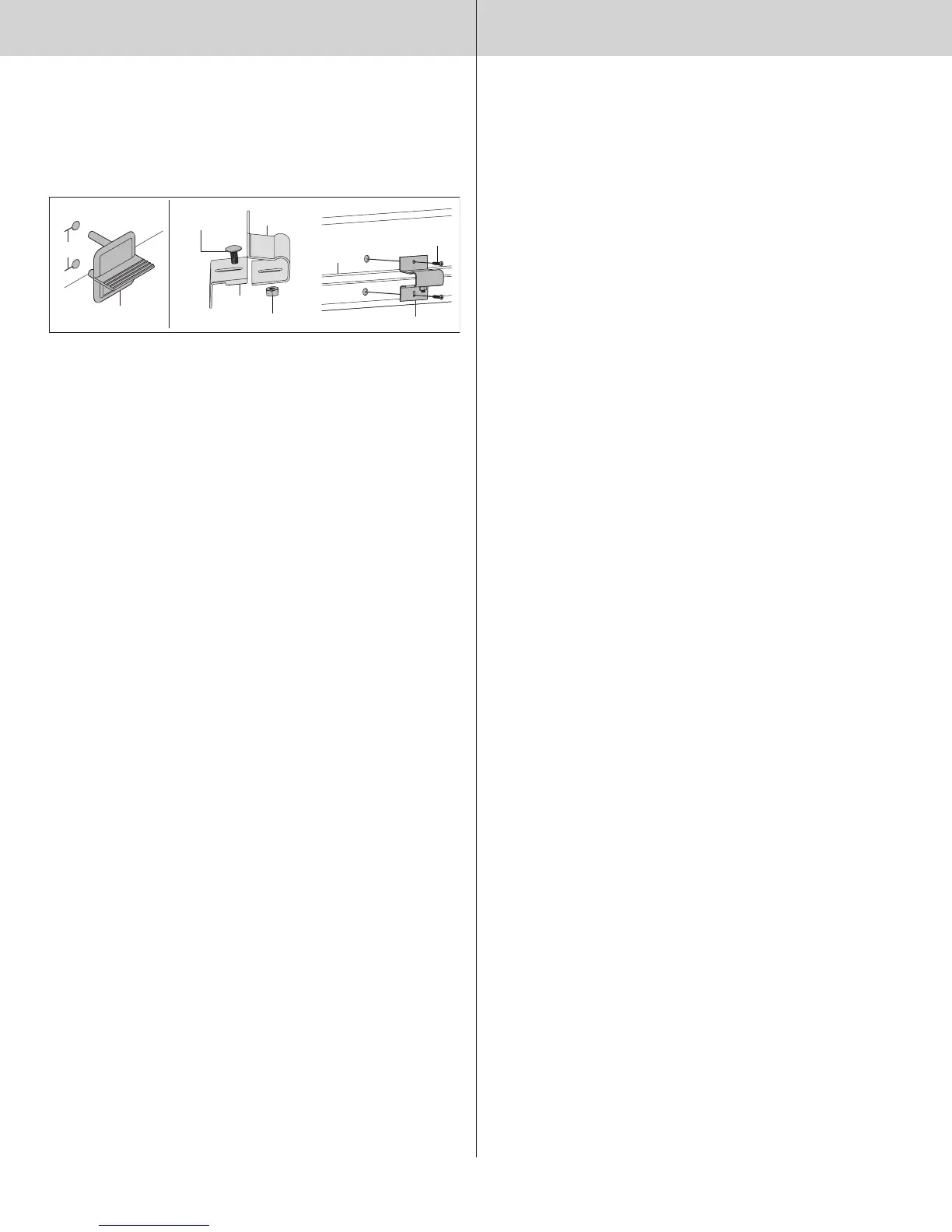
Loosely fasten step plate slide to base with (1) 1/4”-20 x 5/8” carriage bolt and nut. Align inside
step plate holes and fasten from inside using the #8 screws provided. Install one #8 x 3/4”
screw in the bottom step plate hole. The screw in the top hole varies with door models. Use the
screw size shown below for your model door.
a) #8 x 3/4” screw for model 9100
b) #8 x 1” screw model 9400/9600
Tighten 1/4”-20 carriage bolt and nut.
Outside step plate
2-3/16”
1”
Bottom
section
Hex nut
1/4” - 20 x 5/8”
Carriage bolt
Step plate
base
Step plate
slide
Assembled inside step plate
#8 screw
Bottom
Section
Strut
17
Please Do Not Return This Product To The Store. Contact your local Wayne-Dalton dealer. To find your local Wayne-Dalton dealer,
refer to your local yellow pages business listings or go to the Find a Dealer section online at www.Wayne-Dalton.com


 To Next Page
 Loading...