8602 Commerce Court
Burnaby, B.C., Canada V5A 4N6
Office: 604.502-9007
Fax: 604.502-9044
Web: www.webbelectronicsinc.com
Document Name: LS350 - Installation Guide_R02.docx 13 o f 15
CONFIDENTIAL, Copyright © 2023 This document is proprietary to Webb Electronics Inc. It may not be copied or otherwise
distributed without the express consent of Webb Electronics Inc.
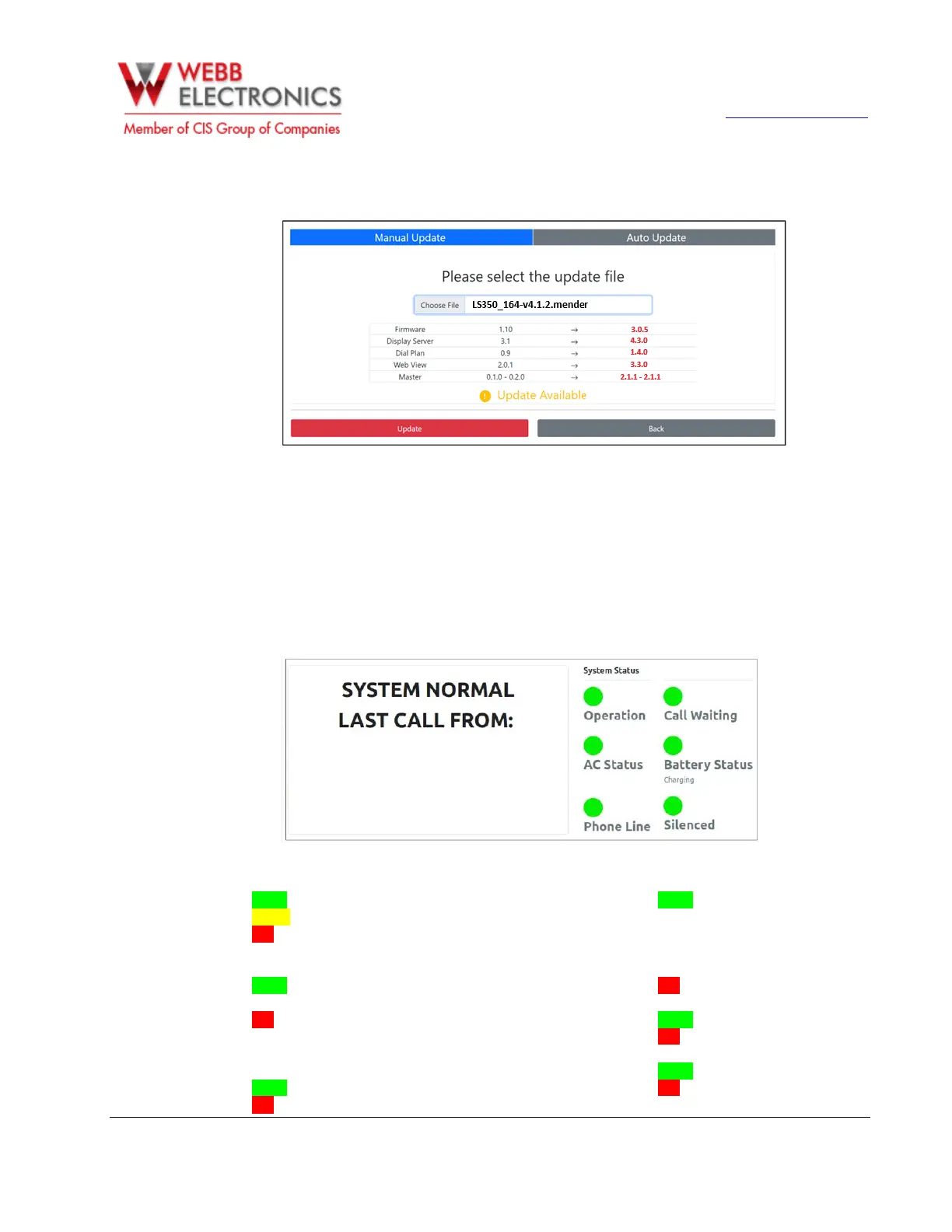
4. After selecting the update file, the system will scan it and display a summary of the updates to be
applied. Once the scan is complete, an Update Available message will appear on the screen.
5. Click on Update to start the process. You’ll be prompted to reboot the LS-350 once the update is
completed.
SYSTEM OPERATION
Status Page
The LS-350 screen displays various status of the system. See below:
o Operation
▪ Green – System Idle.
▪ Yellow – Line in use.
▪ Red – AC not connected / External
Line not connected.
o Call Waiting
▪ Green – No cab phone is queued to
place a call.
▪ Red – One or more Cab phones on a
queue to place a call using the
external line.
o AC Status
▪ Green – AC connected.
▪ Red – AC not connected.
o Battery Status
▪ Green – While AC is connected it
display the charging status of the
battery / If AC is not connected, it
displays the percentage of the charge
left on the battery.
▪ Red – Battery not connected.
o Phone Line
▪ Green – Phone line connected.
▪ Red – Phone line not connected.
o Silence
▪ Green – Alarm not silenced.
▪ Red – Alarm silenced.


 To Next Page