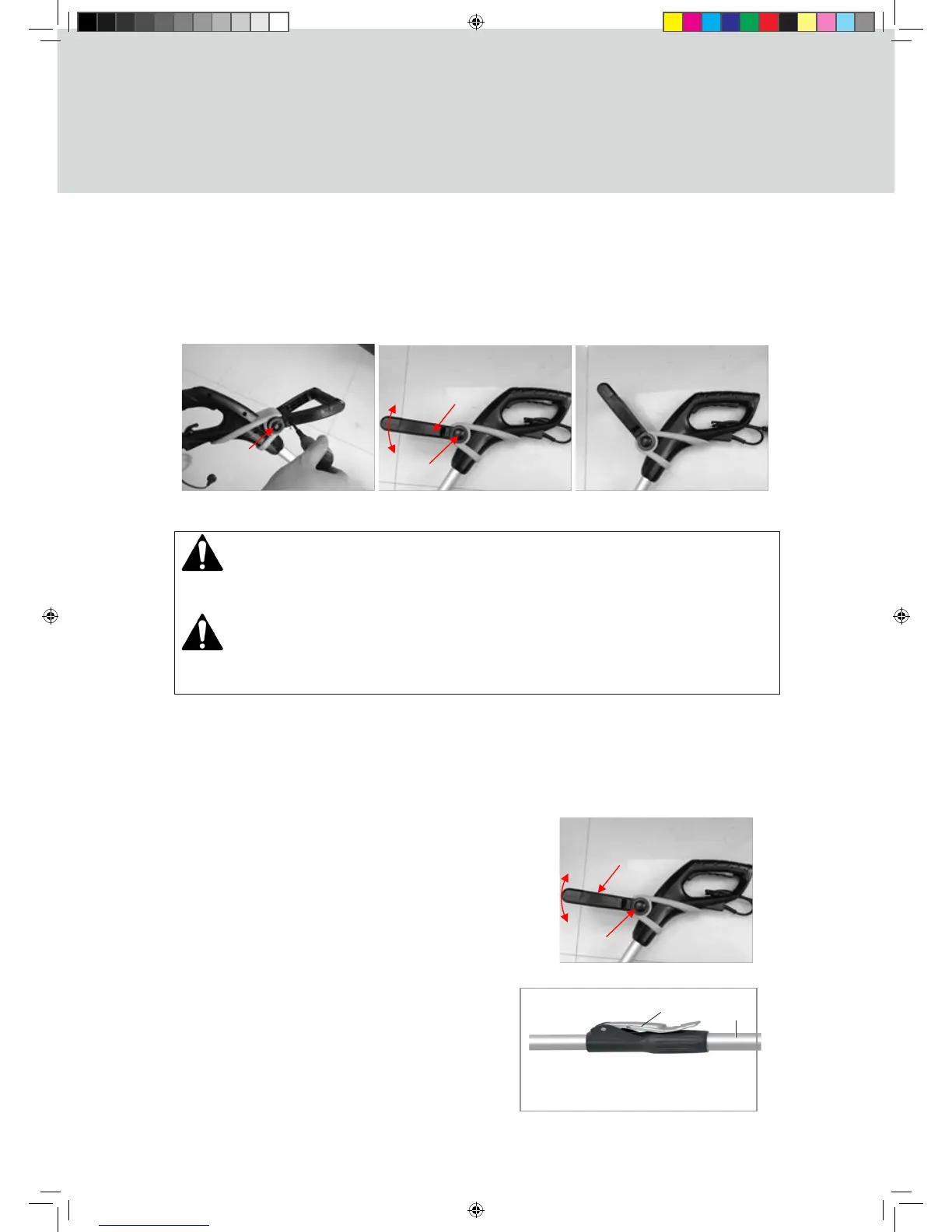
FRONT HANDLE
Press the locking button and hold, and then assemble the front handle; secure it with the one
screw supplied. If the operator wants to adjust the handle position, following the below step:
Press the locking button (4) and then rotate the front handle (3), until the button clicks securely
into the locked position to a comfortable working height, and then release it.
OPERATION
DANGER
Risk of injury! The device may only be put into operation if there are no defects. If a part is
defective it must be replaced before the device is used again.
WARNING
Risk of injury! Before starting work check the area and remove all objects which may be
kicked up by the unit.
Check to make sure there are no visible defects.
Check to make sure all device components are correctly mounted
CORRECT POSITION
Hold the unit with the left hand on the front handle, and the right hand at approximately hip
level on the operating handle, balanced in a comfortable way.
SETTING THE ANGLE OF THE FRONT HANDLE
handle (3), until the button clicks securely into the locked
position to a comfortable working height, and then
release it.
height of the operator. Pull the adjusting knob (9).
Adjust the telescopic shaft (14) up or down to the
appropriate height. Tighten the telescopic shaft
button once adjustment is complete.



 To Next Page