C-3
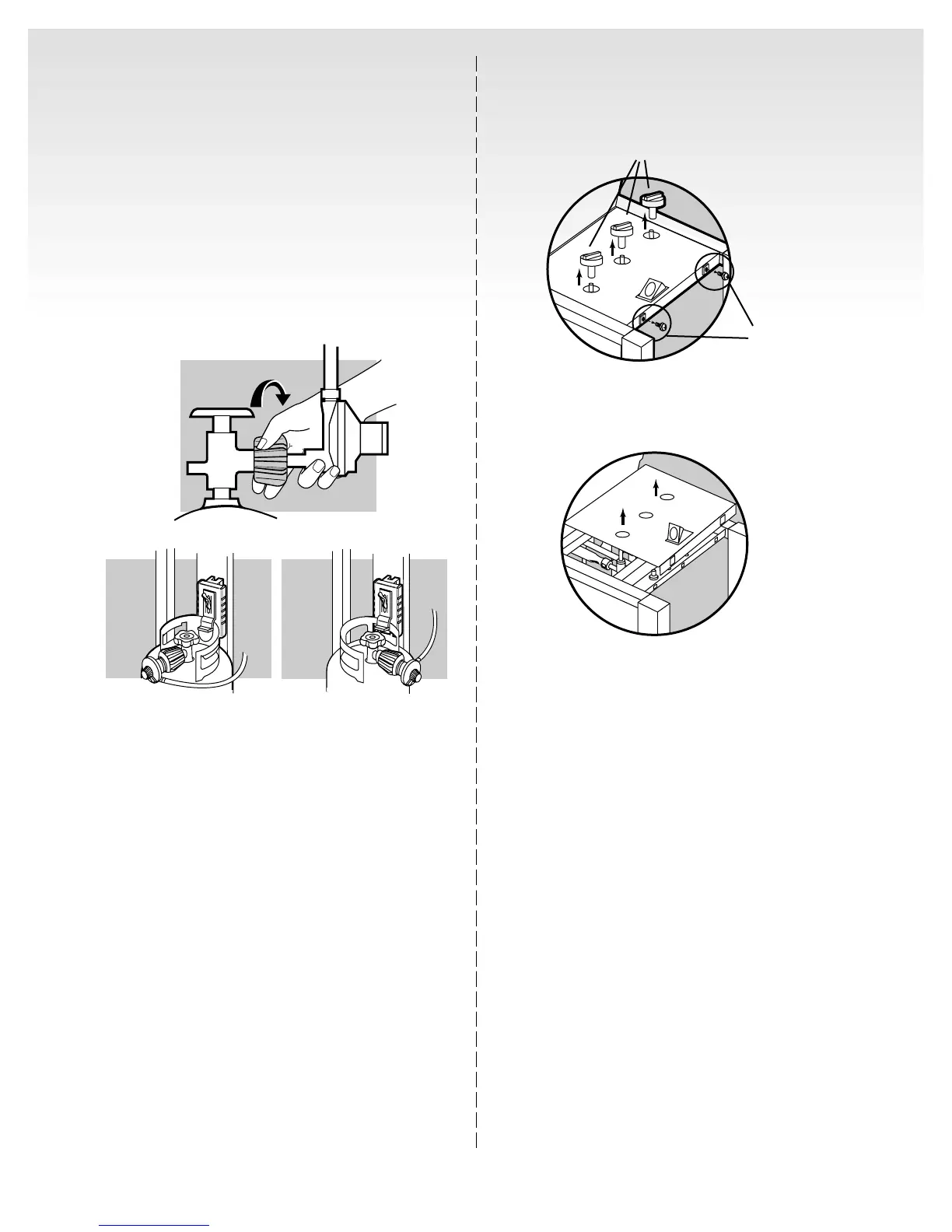
Remove the control panel
(1) Unscrew the two phillips screws, located on the
right edge of the control panel.
(2) Take off the burner control knobs.
(3) Lift off the control panel.
(1)
(2)
(1)
Connect filled liquid propane cylinder
WARNING: Make sure that the cylinder valve is
closed. Close by turning clockwise.
Remove plastic dust cover from the fuel cylinder valve.
Screw the regulator coupling onto the tank valve(1),
clockwise, or to the right. Hand tighten only.
Note: This is a new type of connection. It tightens
clockwise and will not allow gas to flow unless the
connection is tight. The connection requires tightening
by hand only.
WARNING: Do not use a wrench to tighten the
connection. Using a wrench could damage the
regulator coupling and could cause a gas leak.
Regulator vent hole should be at 3, 6, or 9 o’clock. It
should not be pointed up.(2)



 To Next Page
 Loading...