11
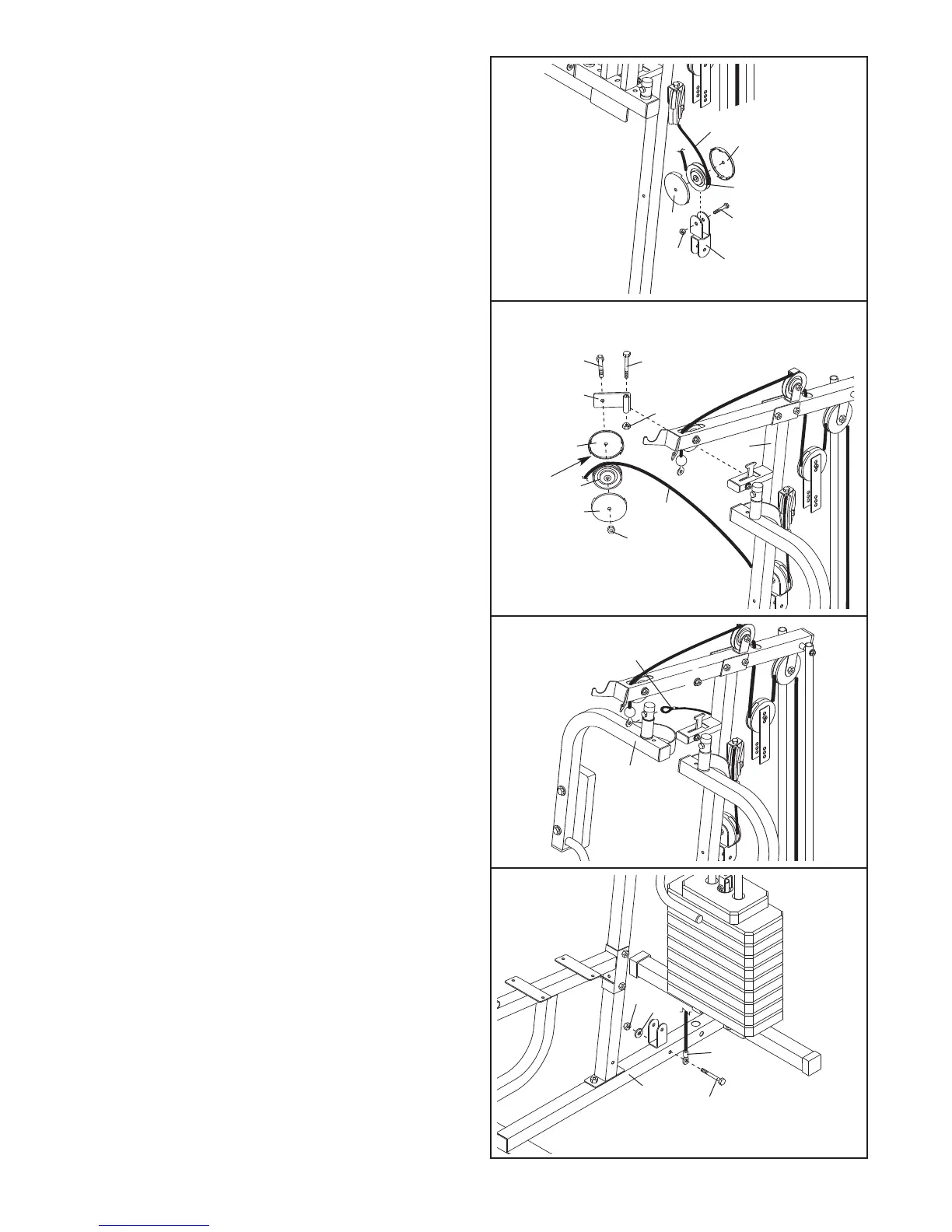
19. Attach the Pulley Arm (38) to the Upright (3) with
an M10 x 78mm Bolt (54) and an M10 Nylon
Locknut (68).
Do not overtighten the Locknut;
the Pulley Arm must be able to pivot easily.
Wrap the Press Cable (49) over a 90mm Pulley
(34). Attach the Pulley and a pair of Pulley Covers
(35) to the indicated side of a Pulley Arm (38) with
an M10 x 52mm Bolt (52) and an M10 Nylon
Locknut (68).
Make sure the large tabs on the
Pulley Covers are in the indicated position.
18. Wrap the Press Cable (49) under a 90mm Pulley
(34). Attach the Pulley and a pair of Pulley
C
overs (35) to the Offset Double “U”-bracket (42)
with an M10 x 52mm Bolt (52) and an M10 Nylon
L
ocknut (68). M
ake sure the small tabs on the
Pulley Covers are on top.
34
52
68
4
9
35
42
35
18
35
49
52
38
68
68
Large
Tab
3
54
34
35
19
20. Slide the end of the Press Cable (49) onto the
hook on the Right Arm (6).
49
6
20
21. Locate the Short Cable (47). Attach the eyelet
on the Cable to the Base (1) with an M10 x
70mm Bolt (57), an M10 Washer (70), and an
M10 Nylon Locknut (68). Do not overtighten the
Locknut.
57
70
68
47
1
21




 To Next Page