16
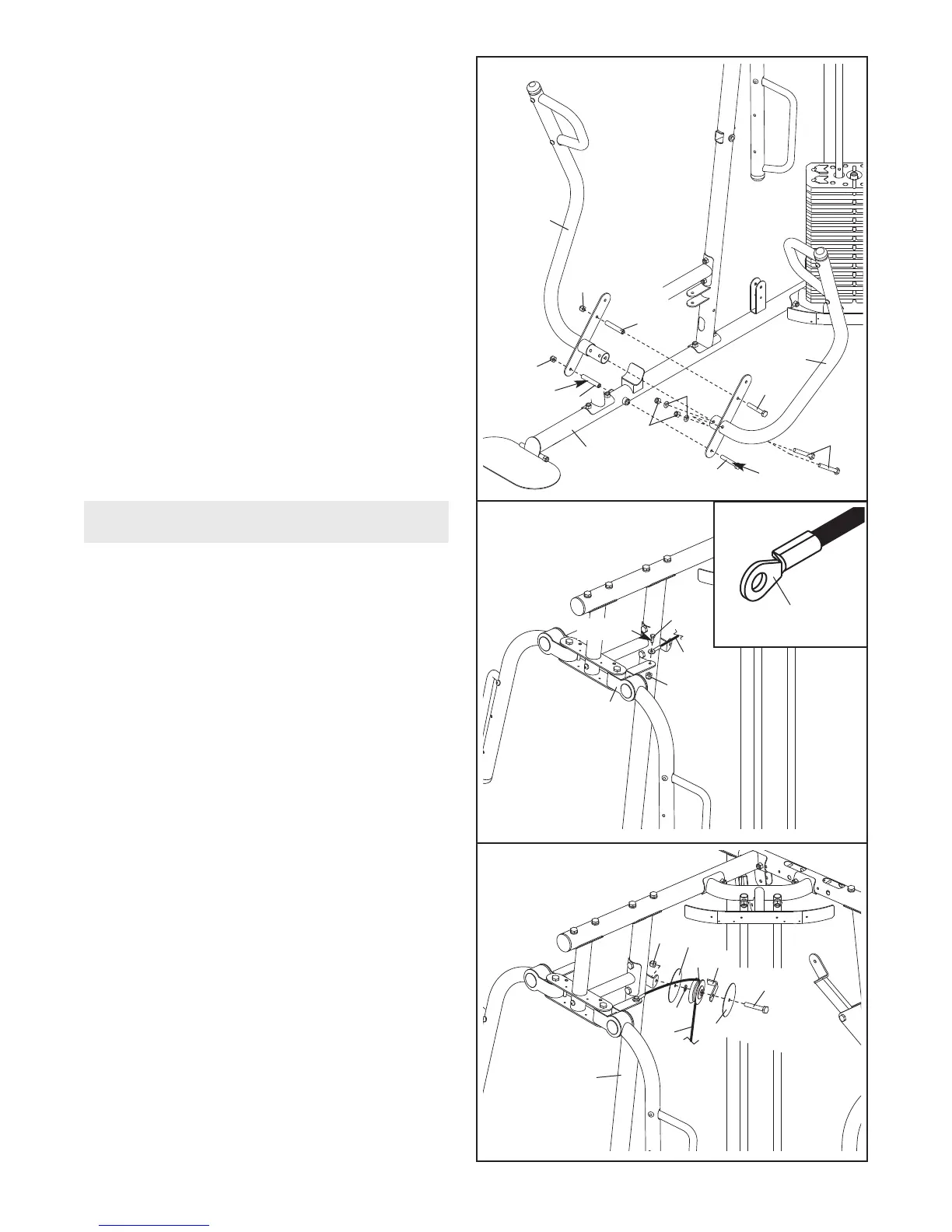
24. Apply grease to an M10 x 110mm Bolt (93).
A
ttach the Left Press Arm (15) to the Right
Press Arm (16) with the Bolt, the Spacer, and
an M10 Nylon Locknut (77).
Finish attaching the Press Arms (15, 16) with
two M10 x 63mm Bolts (79), two M10 Washers
(80), and two M10 Nylon Locknuts (77). Do not
tighten the Nylon Locknuts yet.
Apply grease to an M10 x 110mm Bolt (93) and
a 90mm Spacer (59). Attach the Left and Right
Press Arms (15, 16) to the Right Base (1) with
the Bolt, the Spacer, and an M10 Nylon Locknut
(77).
Do not overtighten the Nylon Locknut;
the Press Arms must pivot freely.
Tighten the Nylon Locknuts (77) used in
this step.
25. See the CABLE DIAGRAMS on page 32 and
33 to identify the cables as you assemble
them.
Identify the Butterfly Cable (50). Grease an
M8 x 22mm Shoulder Bolt (90). Attach the
Cable to the Left Butterfly Bracket (28) with the
Shoulder Bolt and an M8 Nylon Locknut (78).
Make sure the flat edge of the Cable is
against the Left Butterfly Bracket. Do not
overtighten the Shoulder Bolt; the Cable
must pivot freely
.
26.
W
rap the Butterfly Cable (50) over a “V”-pulley
(47). Attach the “V”-pulley, a Long Cable Trap
(57), an M10 Washer (80), and two Guards (54)
to the Right Upright (2) with an M10 x 63mm
Bolt (79) and an M10 Nylon Locknut (77).
2
4
25
28
59
Grease
Grease
59
1
77
80
93
15
93
79
77
77
1
6
78
90
50
26
50
2
77
54
54
79
47
57
80
Cable Assembly
Flat Edge
Grease











 To Next Page