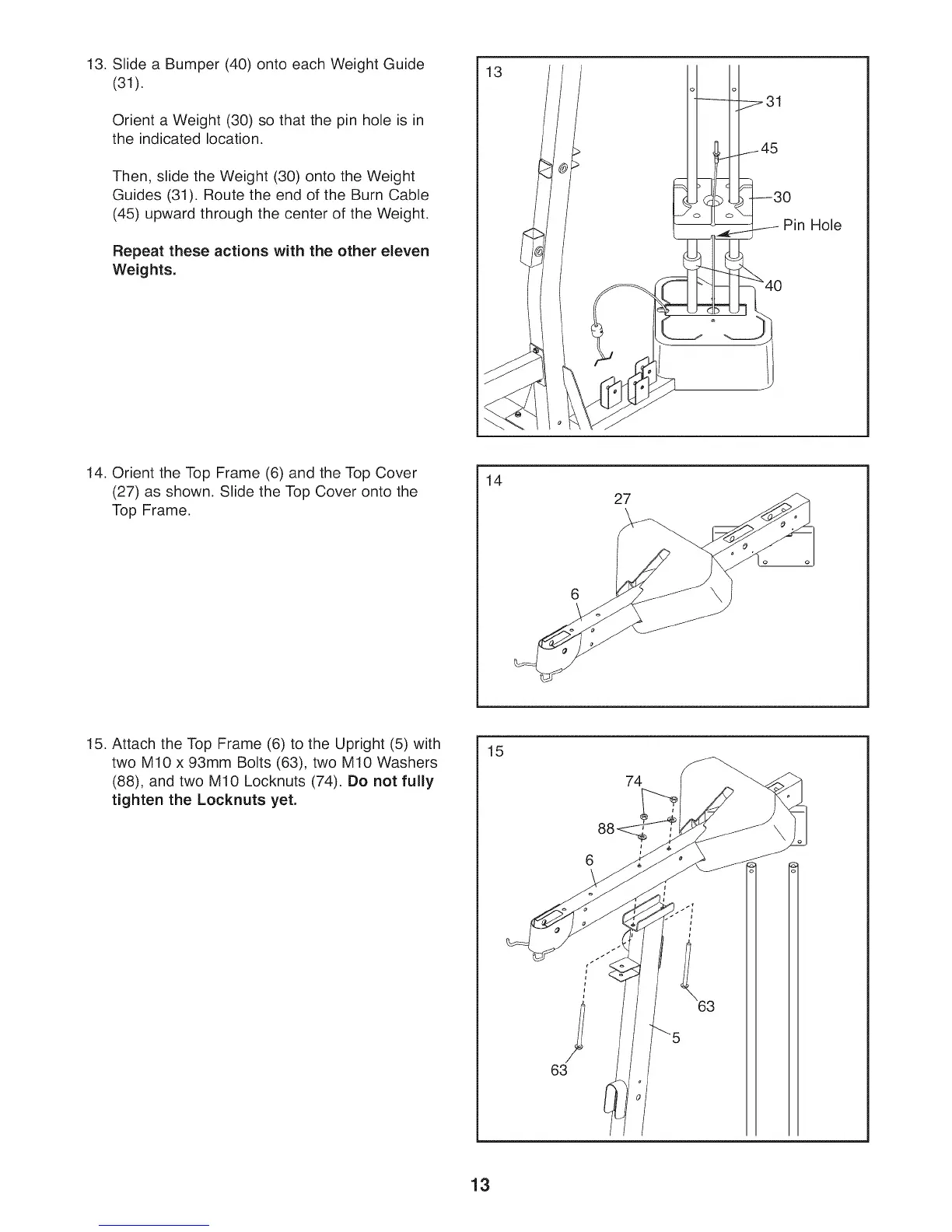
13. Slide a Bumper (40) onto each Weight Guide
(31).
Orient a Weight (30) so that the pin hole is in
the indicated location.
Then, slide the Weight (30) onto the Weight
Guides (31). Route the end of the Burn Cable
(45) upward through the center of the Weight.
Repeat these actions with the other eleven
Weights.
13
o o
31
45
0
Pin Hole
14. Orient the Top Frame (6) and the Top Cover
(27) as shown. Slide the Top Cover onto the
Top Frame.
14
27
15. Attach the Top Frame (6) to the Upright (5) with
two M10 x 93mm Bolts (63), two M10 Washers
(88), and two M10 Locknuts (74). Do not fully
tighten the Locknuts yet.
15
74
13



 To Next Page