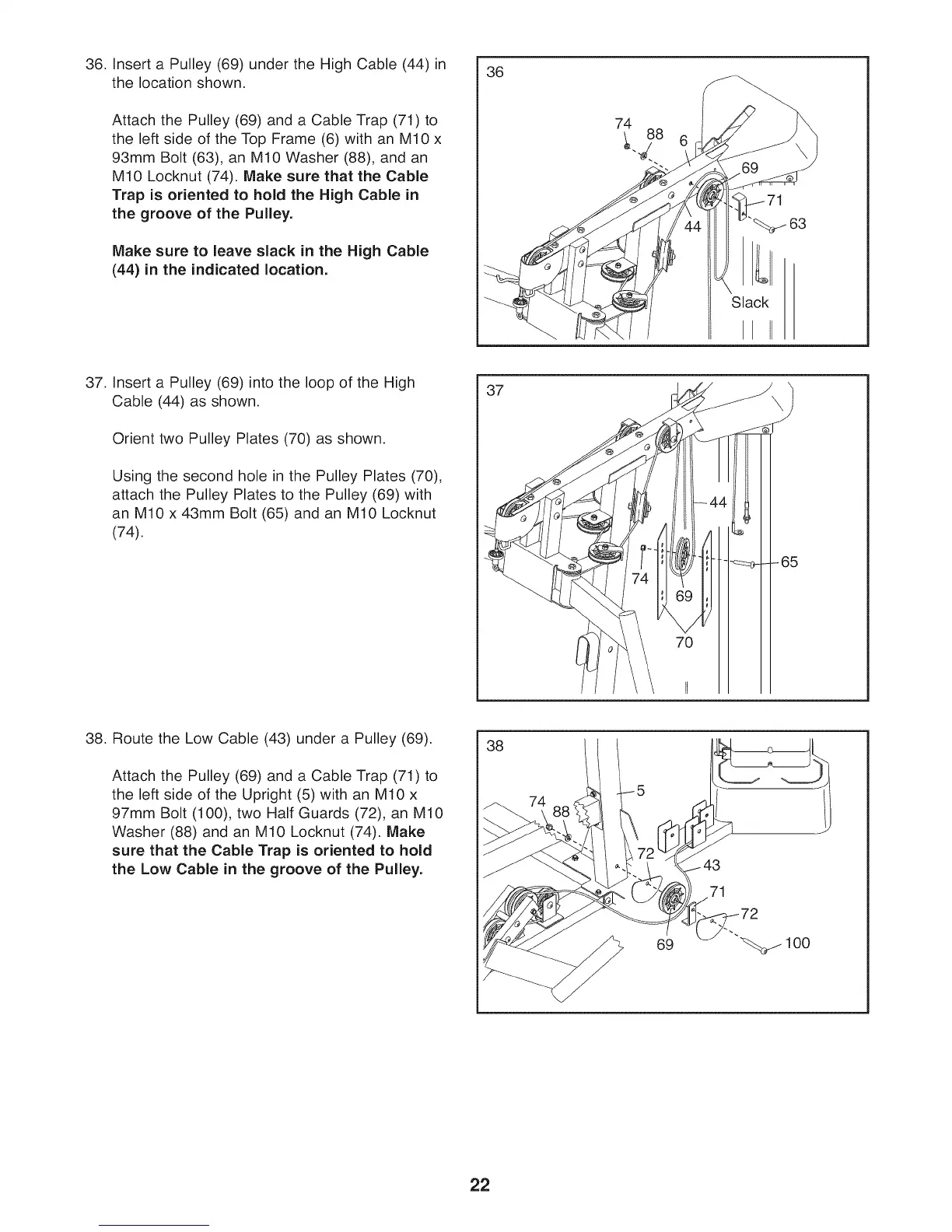
36. Insert a Pulley (69) under the High Cable (44) in
the location shown.
Attach the Pulley (69) and a Cable Trap (71) to
the left side of the Top Frame (6) with an M10 x
93mm Bolt (63), an M10 Washer (88), and an
M10 Locknut (74). Make sure that the Cable
Trap is oriented to hold the High Cable in
the groove of the Pulley.
Make sure to leave slack in the High Cable
(44) in the indicated location.
36
74
Slack
II II
63
37. Insert a Pulley (69) into the loop of the High
Cable (44) as shown.
Orient two Pulley Plates (70) as shown.
Using the second hole in the Pulley Plates (70),
attach the Pulley Plates to the Pulley (69) with
an M10 x 43mm Bolt (65) and an M10 Locknut
(74).
37
f
fJ
__ -65
70
38
38. Route the Low Cable (43) under a Pulley (69).
Attach the Pulley (69) and a Cable Trap (71) to
the left side of the Upright (5) with an M10 x
97mm Bolt (100), two Half Guards (72), an M10
Washer (88) and an M10 Locknut (74). Make
sure that the Cable Trap is oriented to hold
the Low Cable in the groove of the Pulley.
69
71
22



 To Next Page