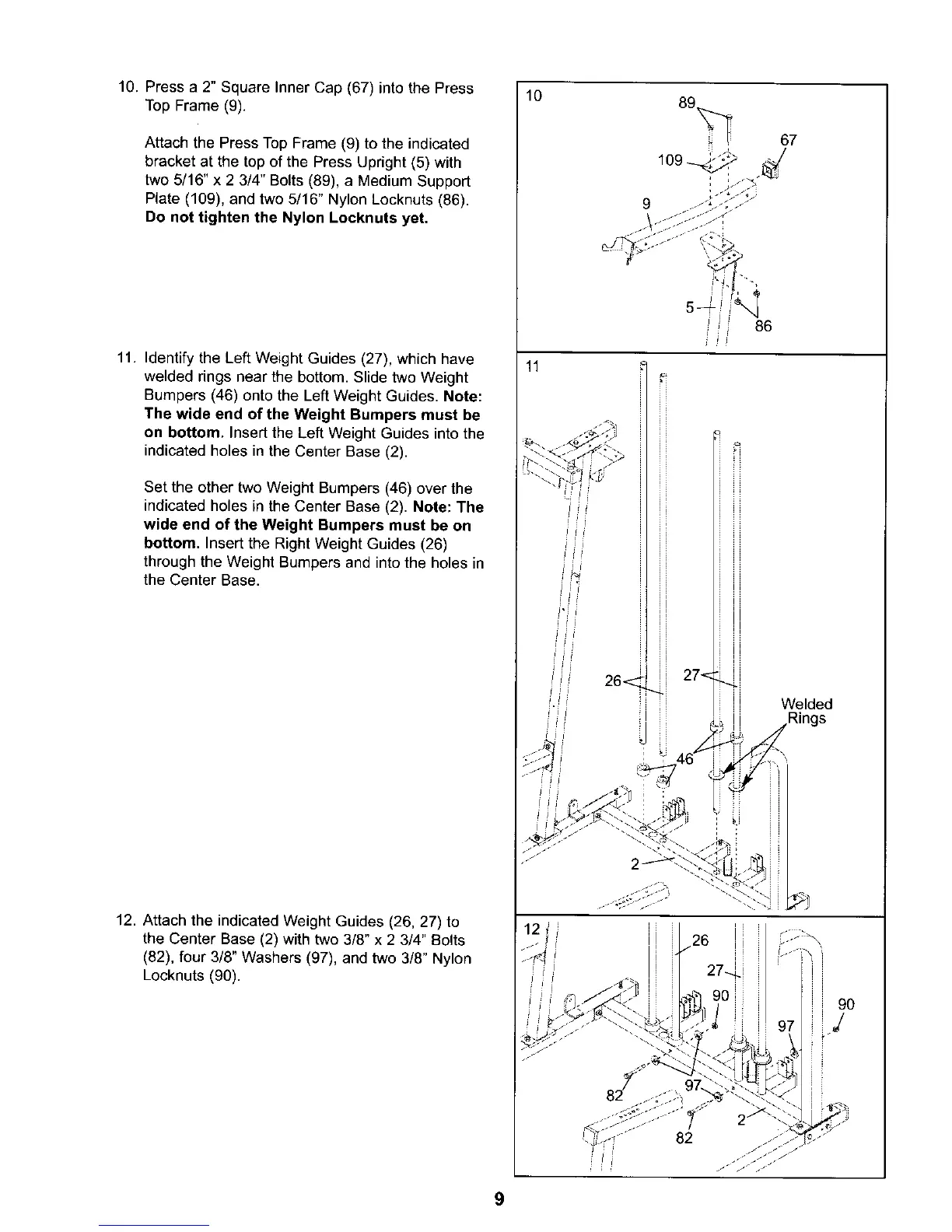
10.Pressa2"SquareInnerCap(67)intothePress
TopFrame(9).
AttachthePressTopFrame(9)totheindicated
bracketatthetopofthePressUpright(5)with
two5/16"x2 3/4"Bolts(89),aMediumSupport
Plate(109),andtwo5/16"NylonLocknuts(86).
Do not tighten the Nylon Locknuts yet.
11. Identify the Left Weight Guides (27), which have
welded rings near the bottom. Slide two Weight
Bumpers (46) onto the Left Weight Guides. Note:
The wide end of the Weight Bumpers must be
on bottom. Insert the Left Weight Guides into the
indicated holes in the Center Base (2).
Set the other two Weight Bumpers (46) over the
indicated holes in the Center Base (2). Note: The
wide end of the Weight Bumpers must be on
bottom. Insert the Right Weight Guides (26)
through the Weight Bumpers and into the holes in
the Center Base.
12. Attach the indicated Weight Guides (26, 27) to
the Center Base (2) with two 3/8" x 2 3/4" Bolts
(82), four 3/8" Washers (97), and two 3/8" Nylon
Locknuts (90).
10
11
i i 86
J_
26< 27"<
ii
i i Welded
ii Rings
,,_ j j
9O
J
9




 To Next Page