5 Detaildescriptionofcontrollers | UC20-WL2000-IOT
27Manual u-control2604080000/03/08.2020
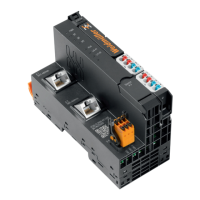
5.2 UC20-WL2000-IOT
Up to 64 active u-remote modules can be connected via the
u-remote system bus to the UC20-WL2000-IOT controller.
The controller has two Ethernet connections for integration
into the existing network architecture or HMI connections.
The integrated engineering tool u-create web can be
launched via the USB service interface or over Ethernet. In
u-create web, the u-control station can be congured and
parametrised and control applications can be programmed
(programming language: JavaScript by Node-RED).
The station's main power supply is integrated into the con-
troller. Power is supplied via two 4-pole connectors, separat-
ed into the input and output current paths.
Controller UC20-WL2000-IOT (Order no. 1334990000)
Status indicators
PWR
SF
BF
MT
IOT
1
2
3
4
1
2
3
4
RUN/STOP
L/A X1
L/A X2
3
4
X1
X2
LEDStatusindicatorsUC20-WL2000-IOT,forerrormessagesseeChapter12
PWR Power LED green: supply voltage present, rmware is
running
SF System failure red: serious system failure
BF Bus failure green: communication with modules OK
red: communication error with module or no
modules connected
MT Maintenance greenashingtwice: operating system is
running
RUN/
STOP
Controller status off: no application deployed
green: application is deployed and running
L/A X1 Connection/
activity
green: connection of controller connection 1
with an additional eld device
green/yellowashing: data being ex-
changed on connection1
L/A X2 Connection/
activity
green: connection of controller connection 2
with an additional eld device
green/yellowashing: data being ex-
changed on port2



 To Next Page
 Loading...